My Ride as a Tour de France Broadcast — a video maker where you drop in a GPX file and a director picks the shots
The 3D flyover videos that ride apps make are one camera following the course at the same angle, and they get boring fast. So I built ridecast, a “broadcast director” program: drop in GPX or FIT files and it picks helicopter, motorbike and side cameras for each stretch and cuts between them, stops time before a climb to show a gradient card, and ends with a photo finish and final standings. A four-rider, 2 h 19 min ride became a 197-second video. No AI is called at any point while the video is made. The first version was too fast, the camera got buried in the mountain, and the last rider never crossed the finish line. You can play it yourself inside the post.
Finish a ride, open the app, and a 3D video is waiting. Terrain rises out of satellite imagery, your line is drawn across it, and a camera follows. The first few times it's a thrill. But on the day I rode 115 km, I couldn't get to the end of the video. There's only one camera, and its angle never changes from start to finish. Thirty kilometres of flat and three kilometres of climbing that cost me buckets of sweat go by at exactly the same speed.
A Tour de France broadcast doesn't work like that. A helicopter shows the whole mountain, then a motorbike camera pulls up right in front of a rider's face. A gradient chart appears before the climb starts, and when someone attacks, the frame holds both riders at once. With one kilometre to the summit, the red triangular flag — the flamme rouge — comes up. The same race can be three dull hours or three nail-biting hours depending on who picks which camera, and when.
My ride data has all the ingredients. Position and altitude every second, plus the tracks of the people I rode with. The only thing missing is a director. This time I built one.
What I wanted to do
- Drop in ride files (GPX, FIT, TCX) and get a video directed like a Grand Tour broadcast.
- Not one camera but several. Pick a shot to suit each stretch (long straight, twisty road, climb, top speed, overtake, finish) and cut between them.
- If others rode along, turn it into a race. Positions, time gaps, the lead group and the chasers, a photo finish at the line, and final standings.
- Call no AI while making the video. Use AI only to write the program, and once it's written, running it any number of times should cost nothing.
78 years of putting a race on screen
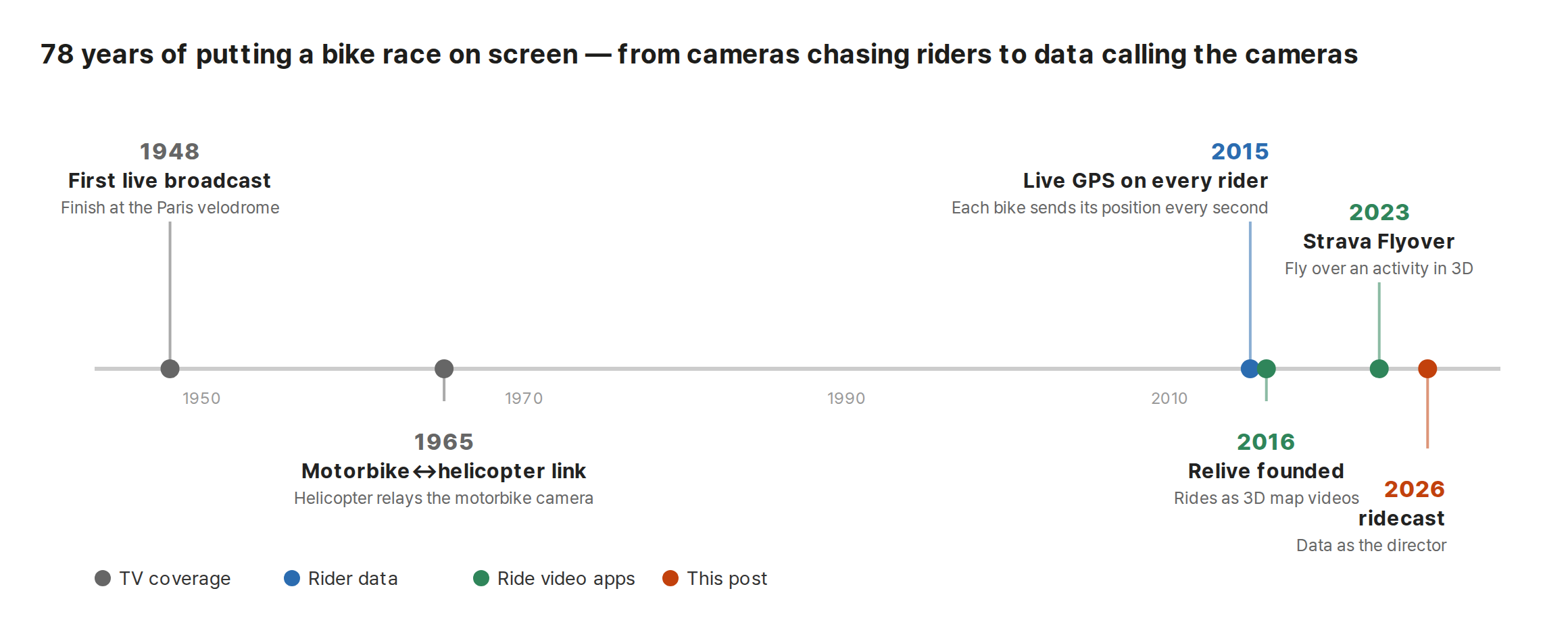
The Tour de France was first broadcast live in 1948: the riders arriving at the Parc des Princes velodrome in Paris. Coverage that follows the race along the road came later. A 1965 clip in the French national audiovisual archive shows a motorbike fitted with an antenna, with the commentary saying French television was the first to try relaying a motorbike camera's pictures through a helicopter. The skeleton is the same today: cameras on motorbikes and helicopters shoot, and relay aircraft flying higher pass the signal on.
In 2015 a different branch appeared. Every one of the 198 riders' bikes carried a GPS transmitter sending position and speed every second. Riders no camera was showing could now at least be located as numbers. From then on, the on-screen “seconds behind the leader” became a measurement rather than an estimate.
For ordinary riders, Relive was founded in the Netherlands in 2016 and started turning your ride data into 3D map videos. Strava launched Flyover in late 2023. Both are good products. But both are videos that fly along your track, not videos that broadcast from your data. In pro coverage, the pictures and the data arrive separately. My ride has no cameras, only data. So what I need to imitate is the part that looks at the data and decides where to put the camera — the director.
So I built ridecast
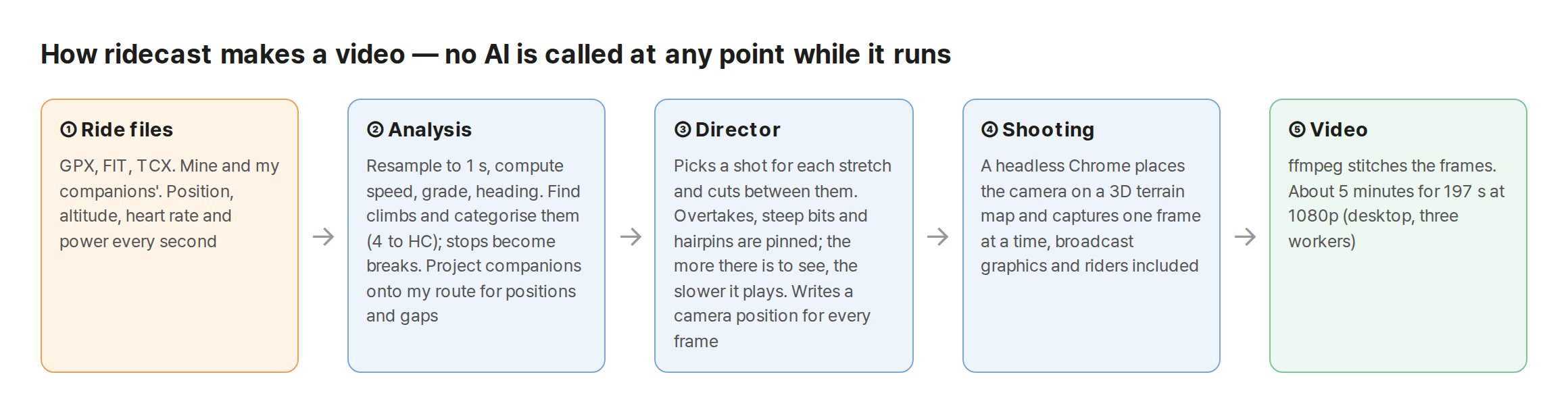
The name joins ride and broadcast: ridecast. It works in five steps.
Analysis. Read the ride files and resample them to one-second intervals, since every device records at a different rate. From there it computes speed, grade, heading and stops. Climbs get their own pass. Average grade and length give a Strava-style category (4 up to 1, and HC above that), and the summit coordinates are looked up for a place name, giving labels like “Sanseong-ri climb”. Companions' tracks are projected onto my route. That's what makes it possible to count “who is how many metres ahead”.
Director. This is the heart of the program. It walks the course and picks a shot to suit each stretch.
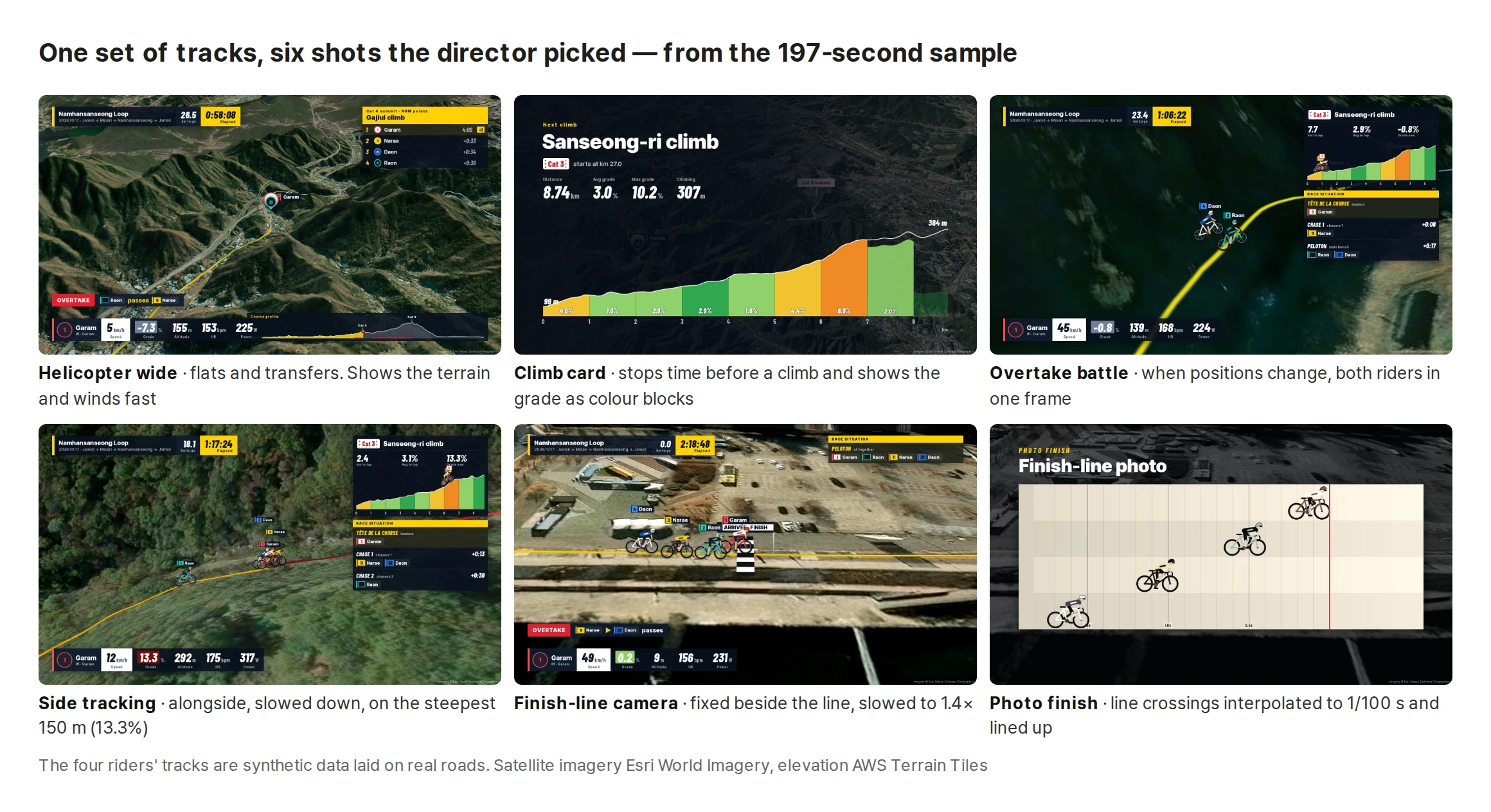
- A straight running more than 1.4 km gets a pull-back: start close on the rider, then pull out wide enough to show the whole straight.
- A twisty road gets a helicopter overhead: you have to look almost straight down to see the bends.
- The stretch where the top speed happened gets a crash zoom: rush in from far away and show “Top speed” in slow motion.
- Before a climb, time stops. A profile card draws the gradient as colour blocks, the course is flown once as a preview, and only then does the climb begin.
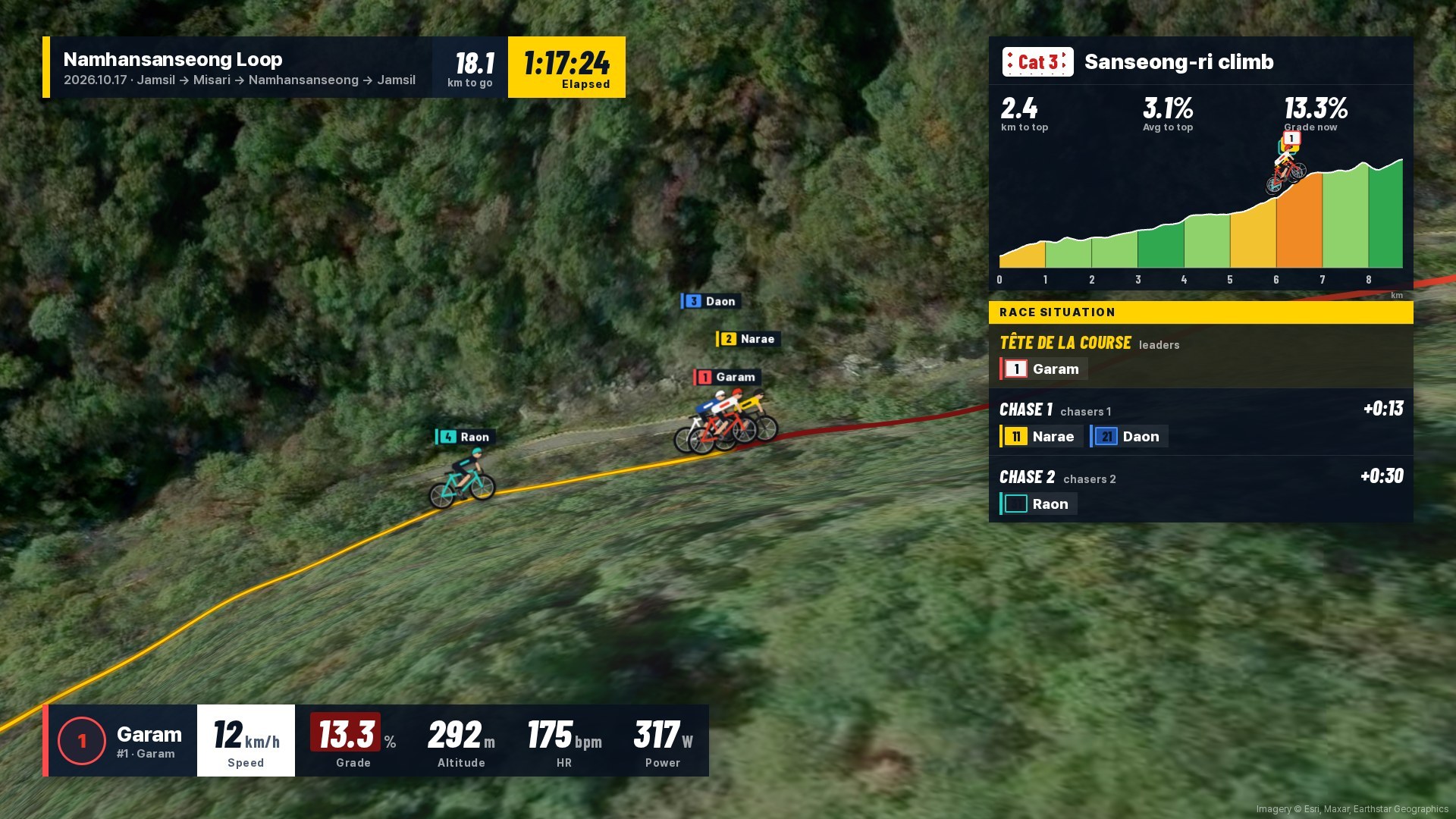
- On a climb it mixes motorbike chase, front and side shots, with the distance to the summit, a gradient chart and a little rider figure crawling up it on the right.
Some moments are pinned as “always show this”: the moment positions change (an overtake battle shot), the steepest 150 m (slow side shot), and hairpins (a helicopter overhead that holds still). The finish runs in a fixed order: last kilometre, sprint from the front, a fixed camera beside the line, photo finish, final standings, ride summary.
Shooting. Once the director has written down, for every frame, “where the camera is, which way it faces, and how steeply it looks down”, a Chrome running with no screen sets the 3D map to that spot and captures one frame at a time. The map is MapLibre with Esri satellite imagery and AWS elevation tiles on top. The broadcast graphics and the pedalling riders are drawn into the same frame. At the end, ffmpeg stitches it all together.
There's no AI anywhere in that chain. Analysis and directing are rules and arithmetic; shooting is a browser. AI went into agreeing on those rules and writing the code, and nothing else. Once it was built, all you change is the ride files. A 197-second 1080p video takes about five minutes on a desktop.
Example: a loop of Namhansanseong
I made the test data myself. Using BRouter, which plans routes along real roads, I drew a 51.7 km loop from Jamsil through Misari and Gwangjiwon up to Namhansanseong and back to Jamsil, and sent four virtual riders around it. On the flat they ride together as a bunch; on climbs each rider gets a different power output, and a simple physics model sets their speed from the grade. Each rider's power wobbles a little every few hundred metres, and on every climb each one attacks once at a different point and then fades. It's a device to get scenes where someone goes clear and someone else claws back. Their names are Garam, Narae, Daon and Raon.
The four riders in this post and their tracks are synthetic data, not real people. Only the roads, the terrain and the satellite imagery are real.
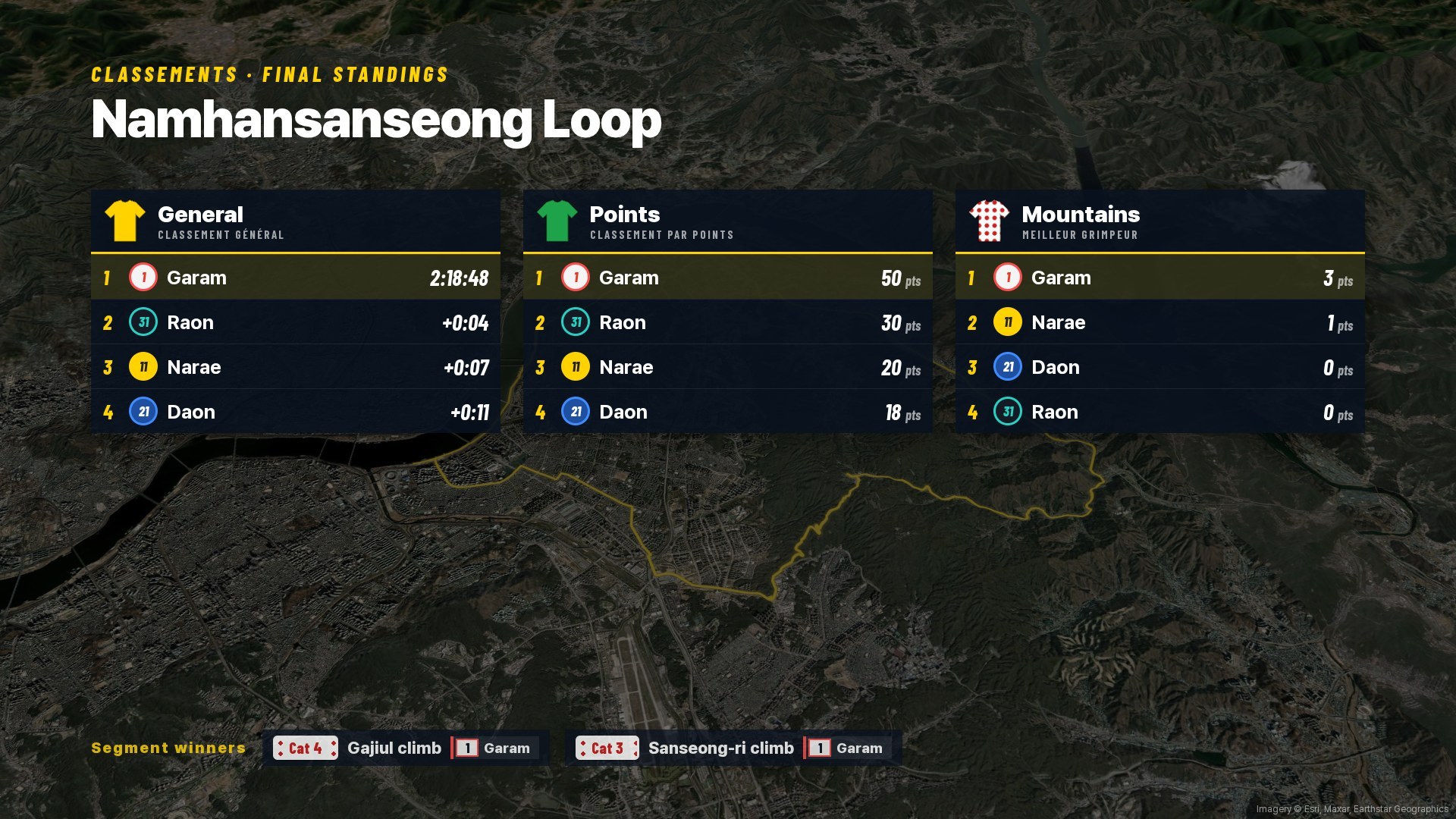
Feed in those four tracks and this happens:
- A ride of 2 h 19 min (2 h 9 min moving) with 662 m of climbing becomes a 197-second video.
- It found both climbs on its own: the Cat 4 “Gajiul climb” and the Cat 3 “Sanseong-ri climb” (8.74 km, avg 3.0%, max 10.2%). The names come from places near the summit coordinates.
- 45 shots in all. There were nine overtakes where positions changed, and the director picked two of them for a battle shot that holds both riders in one frame. Each climb has a fixed budget of video time, so only a few pinned scenes fit; the director takes the non-overlapping ones in priority order: new leader, overtake, steep section, hairpin. Overtakes that don't make the cut go by as a caption at the bottom, like “OVERTAKE Raon passes Narae”.
- At the finish all four came in almost together. The photo finish separated them by 0.40 s, 0.94 s and 1.49 s. The general classification then subtracts the finish bonuses (10, 6 and 4 seconds).
How the director spends time
The most important number in this video is playback speed. Squeezing 2 h 19 min into 197 seconds averages out at 42×. But wind through it evenly at the average and you're back to the app's flyover.
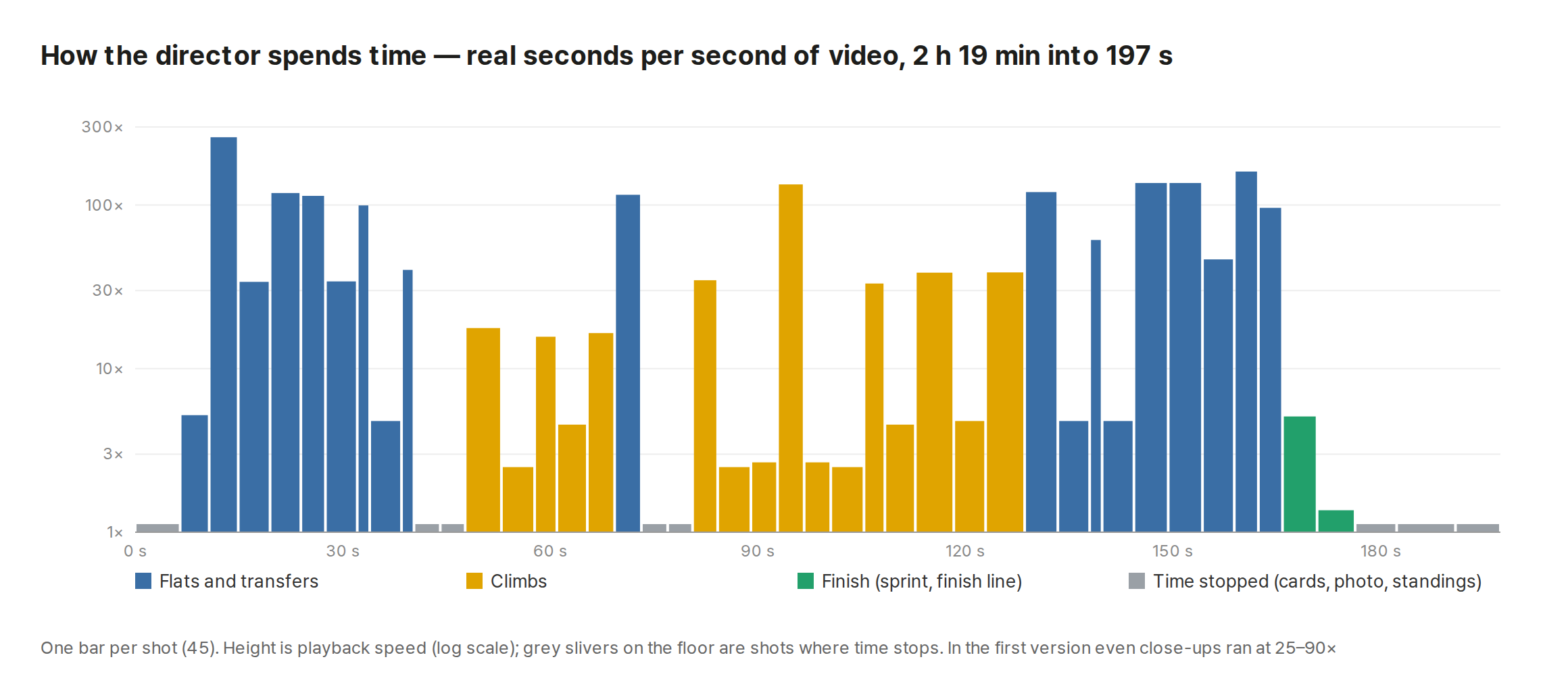
The chart shows what the director did. The flats go by at 100× and 200×. On the climbs, helicopter shots stay fast, but shots that get close to a rider drop to 2.5–5×. The finish-line camera runs at 1.4×, close to real time. The grey slivers are scenes where time stops altogether.
Speed isn't constant within a shot either. As the grade steepens, a hairpin comes round, two riders sit side by side, or the finish gets closer, a “something to watch” score goes up, and the director spends more time where the score is high. Each shot gets a fixed amount of real time, and within it, video time is shared out in proportion to the score.
Play it yourself
The player in this post isn't a video file. The same code that draws the frames for the video is drawing the map in your browser. Drag the strip into the middle of a climb and the positions and gaps on the race board change to the values for that moment. The actual video waits for every frame to finish drawing before capturing it, so it has no half-loaded tiles.
Where it went wrong
The first version was too fast. It was 87 seconds long. Even close-ups went by at 25–90×, so while the motorbike camera sat beside a rider, the rider teleported. Think of a pro broadcast and it's obvious: the camera gets close to a rider to show that rider, and to show them it has to be near real speed. I capped close-ups at 6× and added the mechanism that slows down by the “something to watch” score. The video grew to 197 seconds.
Rider markers jumped to the corner of the screen. On every cut where the camera leapt a long way, a rider pin appeared somewhere odd for a single frame. The map tiles the globe side by side, so every point is copied every 360° of longitude. The map library places a marker on “the copy nearest its previous position”, and because the camera had teleported, it picked the copy at −232° instead of 127° east. One line that clears the remembered previous position before moving the marker fixed it.
Riders were underground. When 3D terrain tiles arrive late, rider markers are left at the 0 m baseline. A rider halfway up a mountain gets drawn at its foot. When shooting, the fix is to wait until the map has finished drawing and place them once more. The player in this post hit the same problem and uses the same fix.
The camera got buried in the mountain. A motorbike camera sits low behind the rider. When the road bends on a climb, a hillside gets between camera and rider and the frame fills with brown. A real motorbike is on the road, so this never happens, but a camera placed by arithmetic can end up inside a slope. It now checks the terrain height at five points along the line of sight between camera and rider, and if anything blocks the view, it tilts to look down 5° more steeply each time.
The last rider never crossed the line. When I added the photo finish, only the winner was judged; nobody else was. Time in the video runs off the main rider (the first track), and the main rider's track ended exactly at the finish line, so everyone who arrived afterwards was outside the timeline. I now take the finish-line coordinates separately and require the tracks to run at least a little past the line. In real use, too, you need to keep recording for a few seconds after you cross the finish.
It couldn't find a climb. I was finding climbs as “stretches averaging over 3%”, but a climb made of a long gentle approach followed by a short steep pitch averaged under 3% overall and was dropped entirely. Namhansanseong is exactly that kind of road. It now finds the earliest start point from which the average is over 3% and trims off the gentle approach.
The test route was a hiking trail. The first test route I drew had a 25% grade, a number you can't ride up. I'd asked the route planner for a walking/trekking route, and it had gone up the Namhansanseong hiking trail. I switched to the road-bike profile and redrew it to climb by road via Gwangjiwon. Even synthetic data needs suspicion from the start.
The map wouldn't show inside the post. This happened today, while preparing the post. oosioo isolates the screens embedded in posts and opens only a narrow set of permissions inside them. The map library spins up a background worker for the heavy lifting, and the way to create that worker was blocked. None of the existing embeds used a 3D map like this, so it had never come up. I opened just that one path.
Why one click works here
Broadcasting has a grammar. Lay down the profile before a climb, hold both riders when someone attacks, raise the flag a kilometre from the summit. It's a grammar refined over decades, so it can be written down as rules. And “what's worth watching” is already in the data as numbers: the grade, the speed, the moments positions changed.
So the AI's job wasn't to make the video, but to move that grammar into a program. Once it's moved, all you do after that is feed in ride files. If I'd asked an AI “make this video look great” every time, it would cost money and the result would differ every time. ridecast gives the same video every time you give it the same tracks.
If you want to try this
- Name the exact screen you're imitating. Not “a cool video” but “a Tour de France broadcast”, and concrete parts come with it: helicopter and motorbike shots, a race situation board, the flamme rouge. The more a field has a named grammar, the better.
- Say what you dislike compared with what you have now. The starting point this time was “one camera, so it's boring”. That one sentence set the design: a director module.
- Look at the first version and write down specific fixes. Everything in version two (slower, pedalling riders, emphasis on overtakes, steep bits and hairpins, photo finish, climb categories, standings, race situation board) was an order placed after watching version one. You don't need to say it all up front.
- Make your own test data. One of your own rides can't test overtakes or a photo finish. Build a fake race with plenty of back-and-forth and you see all the cases at once.
What it can't do
- It hasn't been run on real rides yet. Every example in this post is synthetic. Real GPS tracks drop out in tunnels and jump around, and companions' device clocks can be a few seconds apart. I don't know how well the position calculations hold up then.
- Strava integration is unverified. The code to pull activities and segments exists, but it has never fetched from a real account.
- No vertical video. There's no 9:16 layout for Shorts or Reels yet.
- The files are big. 197 seconds at 1080p is 546 MB. Quality is set high, and there's no option to bring it down yet.
- The satellite imagery is free, with conditions. Attribution is required, and large-scale commercial distribution needs a separate look at the terms. Satellite pictures show the day they were taken, so a construction site may show up as it was.
- Companions' tracks must be from the same time. A “ghost race” between rides of the same course on different days doesn't work yet.
- It isn't as perceptive as a human director. A great view, or the spot where a friend waved, doesn't show up in the numbers. All the director knows is grade, speed and position.
If an app's flyover shows “where I rode”, a broadcast shows “what happened that day”. The difference came less from how many cameras you have than from when you cut to which one. Next time I ride up Namhansanseong with friends, I plan to keep recording for a few seconds past the finish.
If you enjoyed this, please leave a comment.
Sources
- First live broadcast in 1948: 1948 Tour de France (secondary), Van Reeth, TV Broadcasting of the Tour de France: From Local Experiment to Global Media Product, 1948-2021, Essays in Economic & Business History (2022)
- 1965 motorbike–helicopter link: French national audiovisual institute INA, Technical resources for the Tour de France (broadcast 1965-09-18, per its commentary)
- Live GPS on every rider in 2015: BikeRadar, Big data comes to the Tour de France, ARN, Dimension Data equips Tour de France
- Ride video apps: Relive TechCrunch 2017-05-02, Strava Flyover DC Rainmaker 2023-11
- Climb categories follow Strava's scheme (4 to HC); mountain and points scoring and the finish bonuses (10, 6, 4 seconds) imitate the way Tour de France rules award them
- Map: MapLibre GL JS, satellite imagery Esri World Imagery (Imagery © Esri, Maxar, Earthstar Geographics), elevation AWS Terrain Tiles, place names OpenStreetMap Nominatim (© OpenStreetMap contributors), routing BRouter
- The program, synthetic tracks, video and charts were all made for this post's experiment. The English translation was done by an AI agent