Putting an AR HUD on a Table Tennis Broadcast — Computing Speed, Landing Spots and Forehands from Public Match Footage
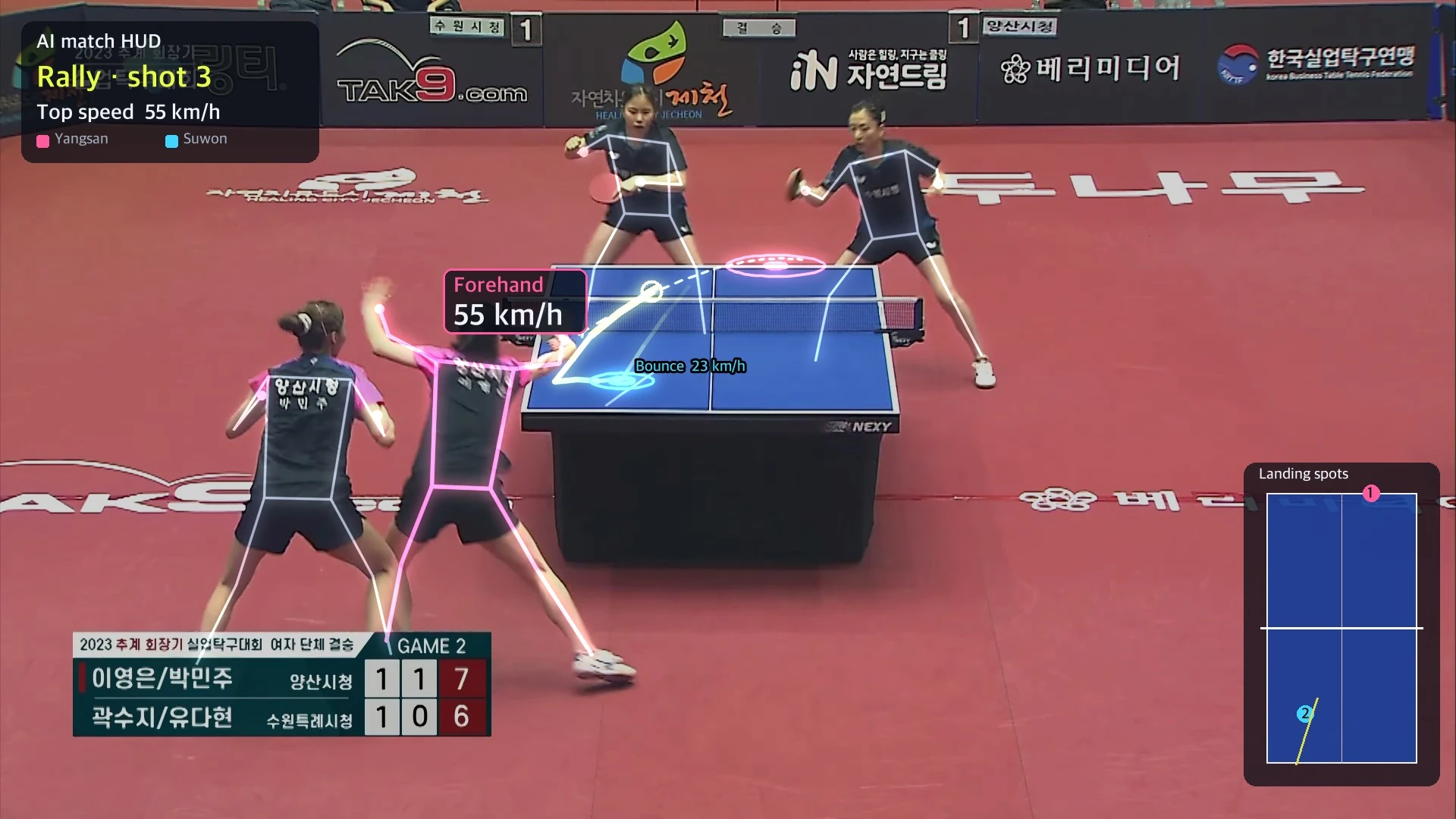
Table tennis and badminton clips on social media now carry a ball trail, speed, landing spot and stroke type drawn over the match. I built the same overlay on a freely licensed (CC BY) broadcast of a Korean corporate league women's team final, played in doubles. Six points, the table corners and the net-post tops, gave the camera position (17 m behind the end line, 4.4 m up). Ball candidates came from background difference, YOLO and a small neural network, and a ballistic model with air drag plus player pose gave 3D paths and speed. In the reviewed rally, the four shots left the racket at 33–55 km/h and bounced at 23–35 km/h. Without drag, the same ball came out inflated to 77 km/h. Fully automatic tracking, though, found the ball only 36% of the time, because the two near players cover the table in doubles and at 30 fps the ball smears into a streak.
Table tennis and badminton clips on social media now come with information drawn over the match: a trail behind the ball, how fast it flew, where it landed on the other side, whether that was a forehand or a backhand. It looks like a video game broadcast.
A little while ago I made something similar from table tennis footage I shot myself at the office. The camera sat beside the table, only a little above the playing surface, and it could not tell how deep the ball went. This time I tried again with an official match broadcast. A broadcast camera sits high and far away, so the whole table shows up square. Does that make it work better?
What I set out to do
- Find official match footage I am free to reuse.
- Solve the camera from a single frame, linking screen coordinates to table coordinates.
- Find the ball in every frame, rebuild its path in 3D, and get speed and landing spots.
- Use player pose to tell who hit and whether it was a forehand or a backhand.
- Draw all of it back onto the match as a HUD.
AI agents wrote and ran everything on a MacBook, from finding the footage to calibration, detection, training and rendering. What went wrong is listed separately under "Where it went wrong" below.
Finding footage I can use
I did not use YouTube or broadcaster clips, because I could not confirm the rights. I searched Wikimedia Commons for match footage under free licenses.
| Candidate | License | Footage | Decision |
|---|---|---|---|
| 2023 Autumn President's Cup Corporate Table Tennis, women's team final, doubles (KTTL Korea Professional Table Tennis League) | CC BY 3.0 | 1080p 30 fps, fixed broadcast camera behind one end, 47 min | Used |
| Slovenian women's league final (TV Uršlja) | CC BY 3.0 | 1080p 25 fps, frequent crowd and interview cuts | Dropped |
| Slovenian badminton championship, final point (Badminton Club Ljubljana) | CC BY 3.0 | 1080p 30 fps, handheld and panning, 32 s | Dropped (the opponent is often off screen) |
| China Open badminton final | Marked CC BY 3.0 | A broadcast re-uploaded by another channel | Dropped (original rights holder unclear) |
I used minutes 10 to 14 (four minutes) of the KTTL video.
1. Solving the camera from one frame
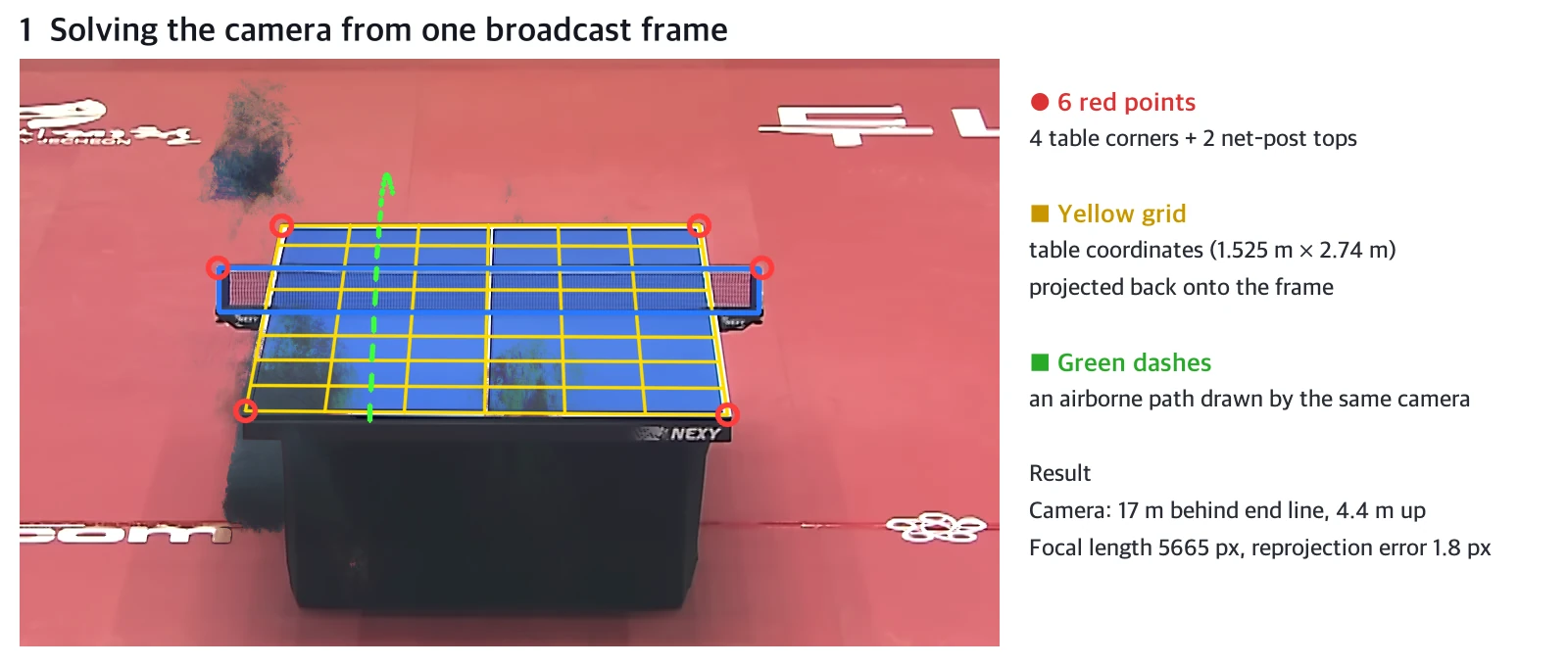
A table tennis table has fixed dimensions. The top is 1.525 m wide and 2.74 m long, and the net is 15.25 cm high. So marking just the four table corners and the tops of the two net posts in the frame is enough to compute where the camera is and which way it points. It is the camera calibration used in photogrammetry.
I marked the corners roughly by hand, then refined them by fitting straight lines along the white edges and taking their intersections. Players cover the table in many frames, so I first built an empty background from the median of dozens of main-camera frames.
The camera turned out to be about 17 m behind the end line and 4.4 m above the table. That one result does two things.
- A point on the table maps straight from screen to table coordinates (a homography). Bounce points are like this.
- A point in the air cannot be fixed from screen coordinates alone. It lies somewhere along a ray from the camera. Pinning down the depth takes physics (section 4).
2. Main camera only
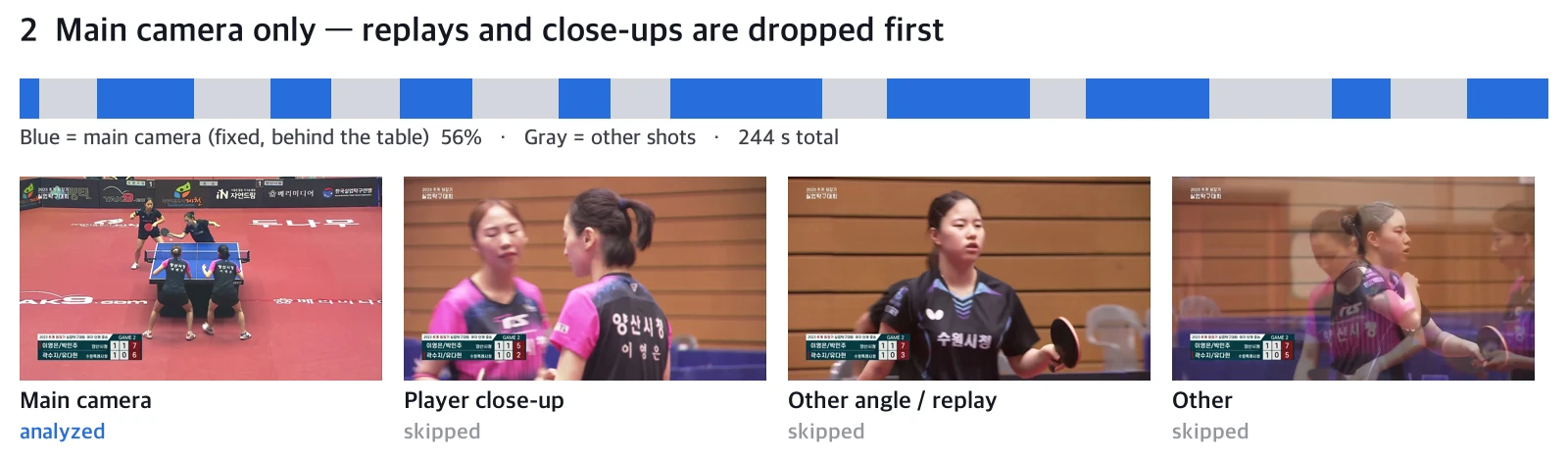
After every point the broadcast cuts to players' faces, other angles and replays. If the blue of the table sat in the same place with the same shape as in the reference frame, I treated the frame as main camera; otherwise I skipped it. 56% of the four minutes was main camera.
I also checked whether the main camera panned or zoomed during play. I matched features to the reference frame in every frame and computed a homography. The frame corners moved less than 1 px in most frames and 10 px at most. The main camera in this match was fixed, so the one calibration from section 1 held all the way through.
3. Finding the ball
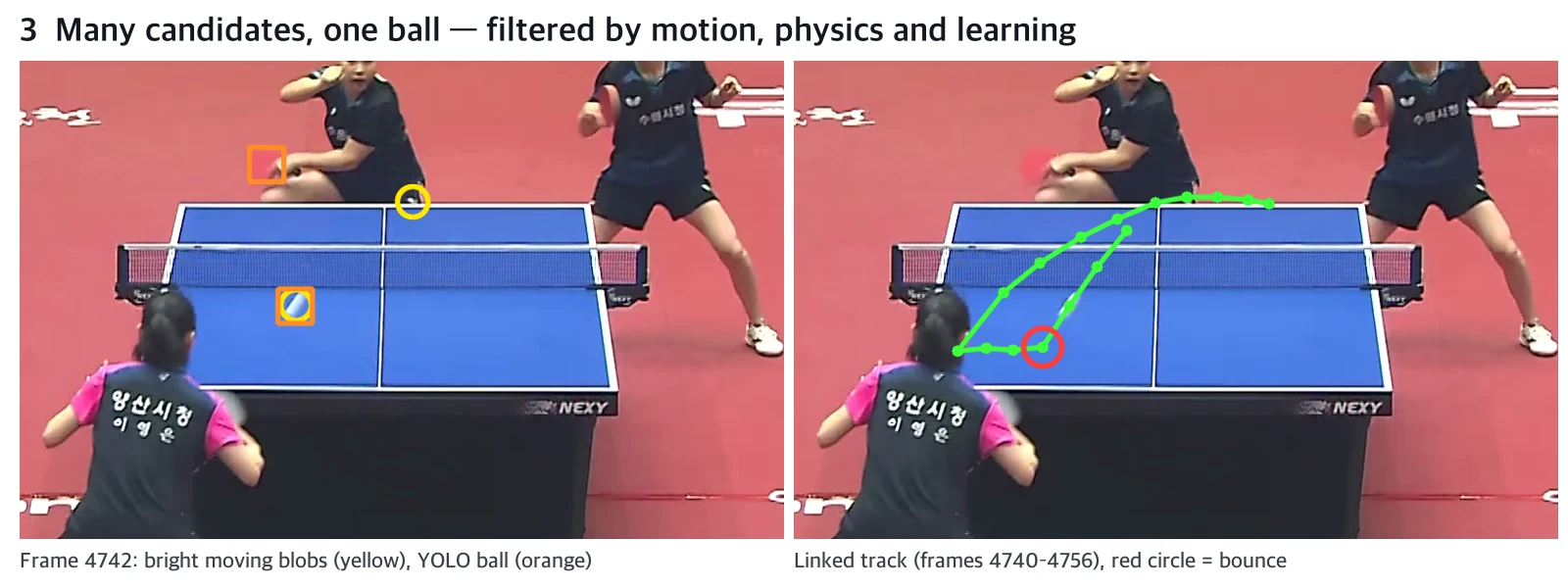
The ball is 4 cm across. In this broadcast it shows up 10–12 px wide. The problem is 30 fps. During one frame's exposure a fast ball moves tens of pixels and smears into a white streak.
I gathered candidates two ways.
- Background difference: small blobs that are suddenly brighter than the empty background and also differ from the frames before and after, so they are moving. I masked only the area around the joints from pose estimation (YOLO11-pose). Masking the whole person box also erases a ball passing close to the body.
- YOLO11x: the "sports ball" class of a general object detector. It catches a sharp ball well but often misses one smeared into a streak.
That gave 5–6 candidates per frame on average. There is only one ball. I filtered with three things.
- Physics: link only candidates whose acceleration stays constant (a parabola) across three consecutive frames. Hands and rackets change direction often, so they do not form long chains.
- Overlap cleanup: among chains that overlap in time, keep only the one that is long, fast and scores most ball-like.
- A small neural network: the figure below.
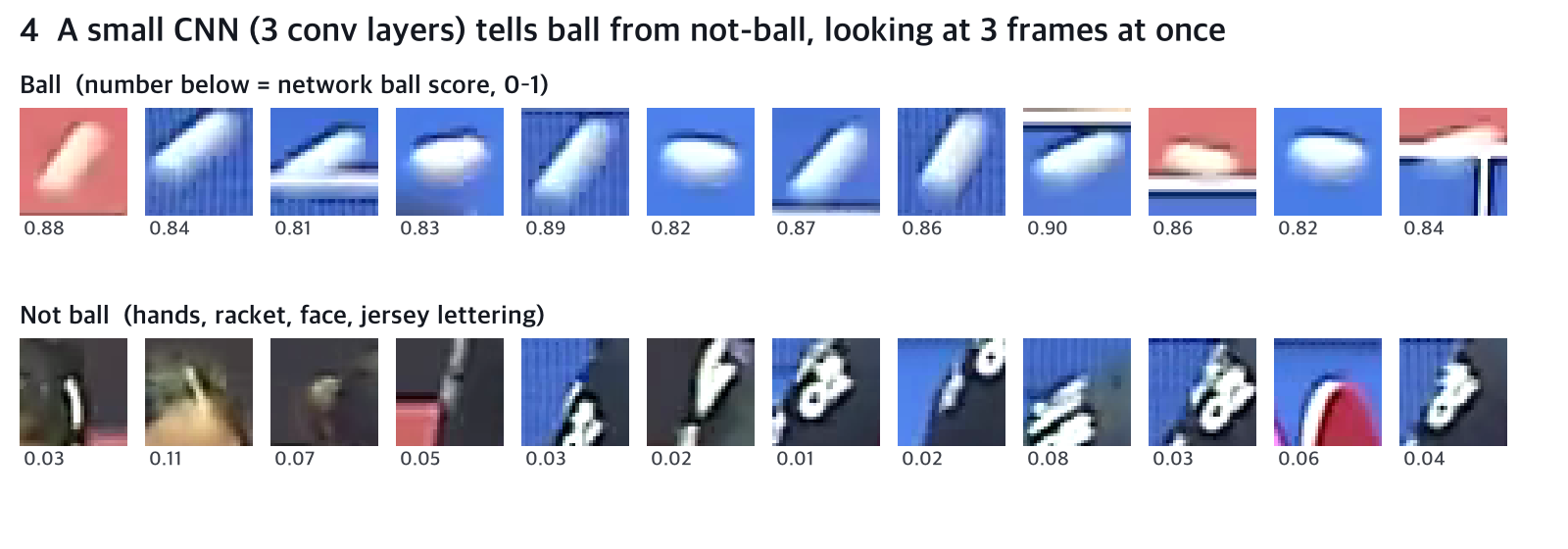
I cut a 32×32 px patch around each candidate, stacked the previous, current and next frames into a 9-channel image, and fed it to a 3-layer convolutional classifier. No person labeled the training examples. I sorted them automatically: 3,684 points that were in long, fast chains or that YOLO caught with confidence became "ball", and 2,482 points in the middle of a person's body or in slow chains became "not ball". Validation accuracy on a split by time was 79%. All 49 balls later confirmed by eye scored above 0.5. But quite a few non-balls scored above 0.5 too. It does not miss the ball; it gets confused.
4. Fixing depth with physics — 3D paths and speed
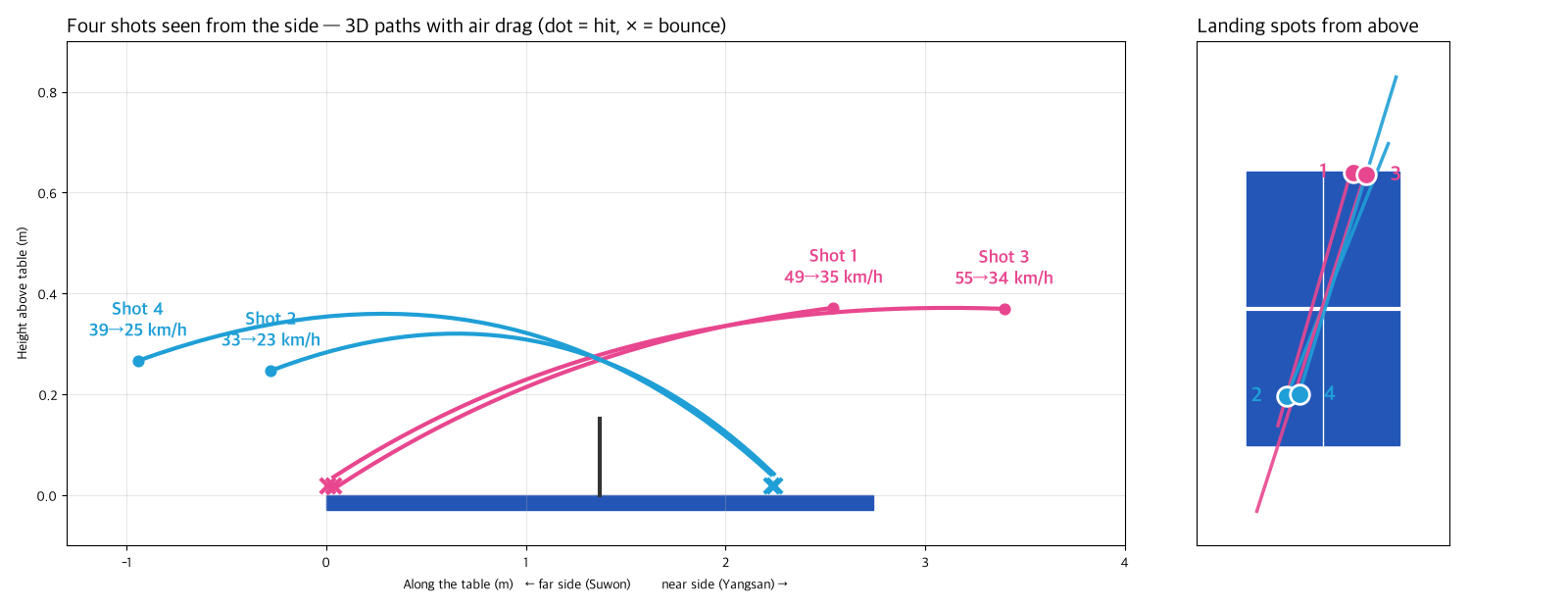
For a ball in the air, you do not know where along the camera ray it is. But a ball does not fly any old way. It follows a ballistic path under gravity and air drag. Fix the position (3 numbers) and velocity (3 numbers) at the moment of the hit, and the whole path after it is determined. I search for the 6 numbers whose path, projected onto the frame, best matches where the ball was actually seen.
To pin those 6 numbers down, I fixed two things.
- The bounce point: it is on the table, so the homography from section 1 gives its X and Y directly. Its height is the ball's radius, 2 cm.
- The hit point: drop the hitter's ankles onto the floor plane (76 cm below the table) to place the player. The hit point is where the ray through the racket wrist meets a vertical plane 30 cm in front of the player, toward the table. For far players whose feet are hidden behind the table, I assumed they stand 60 cm behind the end line. This went in only as a soft condition that can shift by about ±30 cm.
All four shots came out with a reprojection error of 6–8 px, close to the width of the streak the ball leaves.
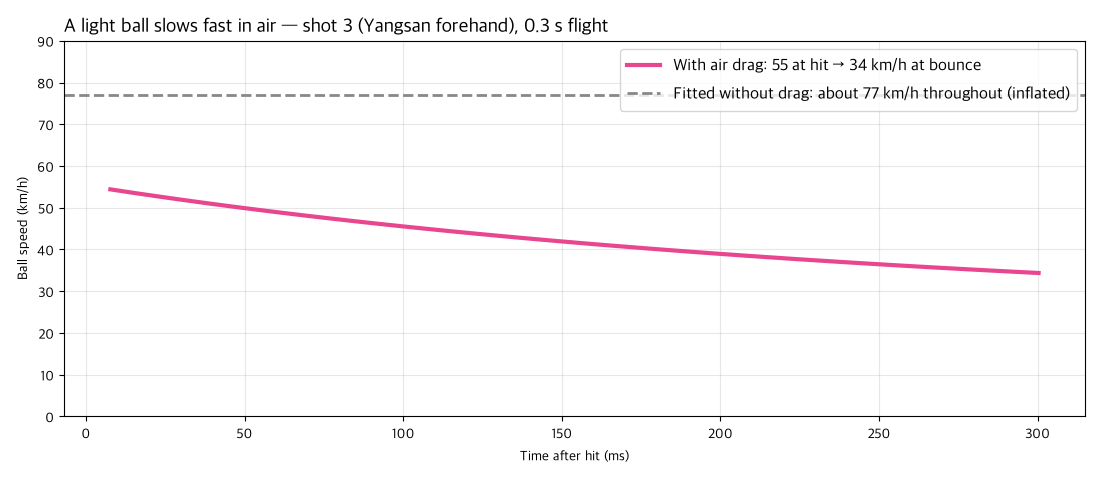
What happens without air drag? A table tennis ball weighs only 2.7 g. At 55 km/h (15 m/s), the deceleration from drag is more than three times gravity (about 32 m/s²). Fit the same points without it and the depth comes out wrong: shot 3 becomes 77 km/h. With drag, it leaves the racket at 55 km/h and bounces past the net at 34 km/h. It loses nearly 40% of its speed in 0.3 seconds. The HUD shows both numbers: the hit speed above the player's head, the landing speed next to the landing ring.
5. Telling forehand from backhand with pose
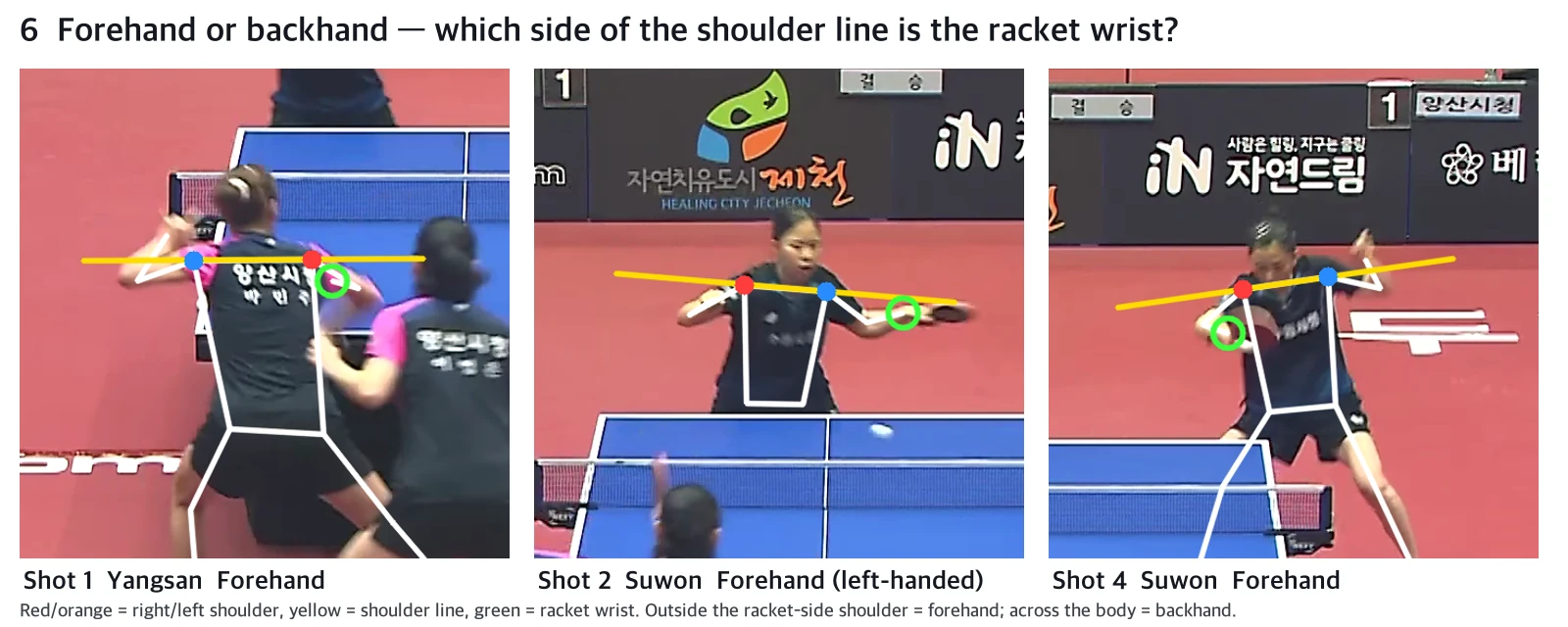
The racket hand is the wrist closest to the ball at contact. Forehand and backhand are split by the shoulder line. In the frame where the wrist moved fastest just before contact, if the wrist is outside the shoulder on the racket-arm side, it is a forehand; if it has crossed to the other side of the body, a backhand. Joints are named relative to the body (left and right), so the same rule works for players facing the camera and players with their backs to it.
All four shots in the reviewed rally came out as forehands, and the player who hit shot 2 was picked up as left-handed. Watching the scenes again, that is right. Still, it is one rule, so a short block in front of the body or a swing with a big torso turn could fool it. No backhand came up, so I could not check that case.
6. Drawing the HUD back on
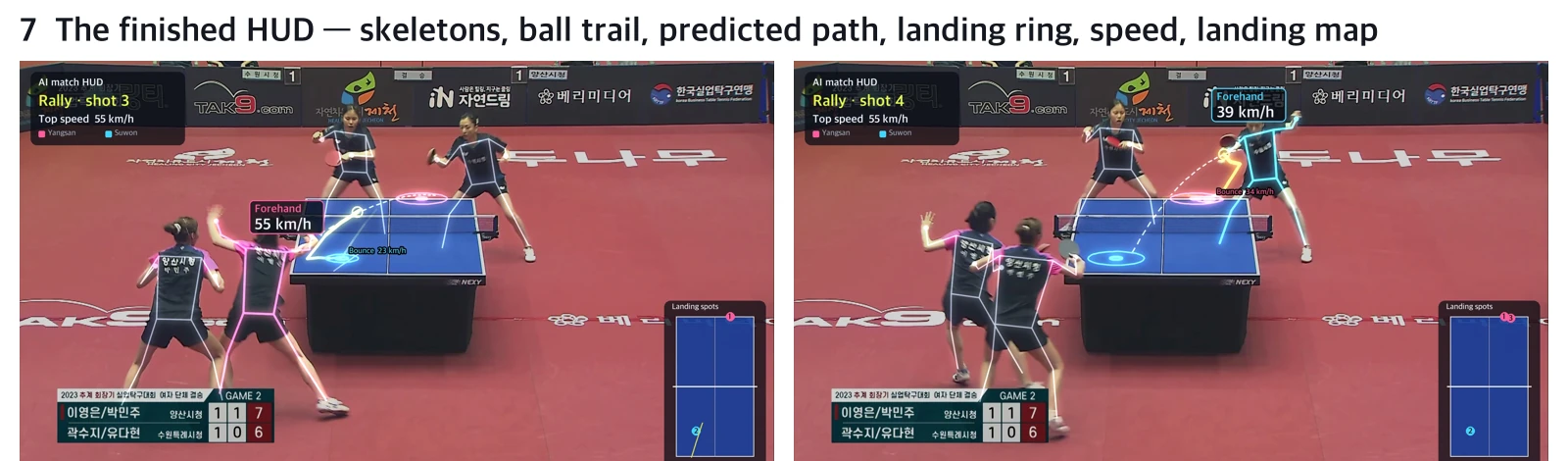
Here is what goes on the frame.
- Skeletons: faint for all four players. Only the player who just hit is drawn bold in team color (Yangsan pink, Suwon light blue).
- Ball trail: ball positions over the last 10 frames, fainter the older they are.
- Predicted path: the 3D path from section 4 projected onto the frame as a gray dashed line, with its shadow on the table.
- Landing ring: a ring spreading from the bounce point, with "Bounce ○○ km/h".
- Hit box: "Forehand 55 km/h" above the hitter's head.
- Landing map: bottom right, a top-down table where the landing spots appear in order.
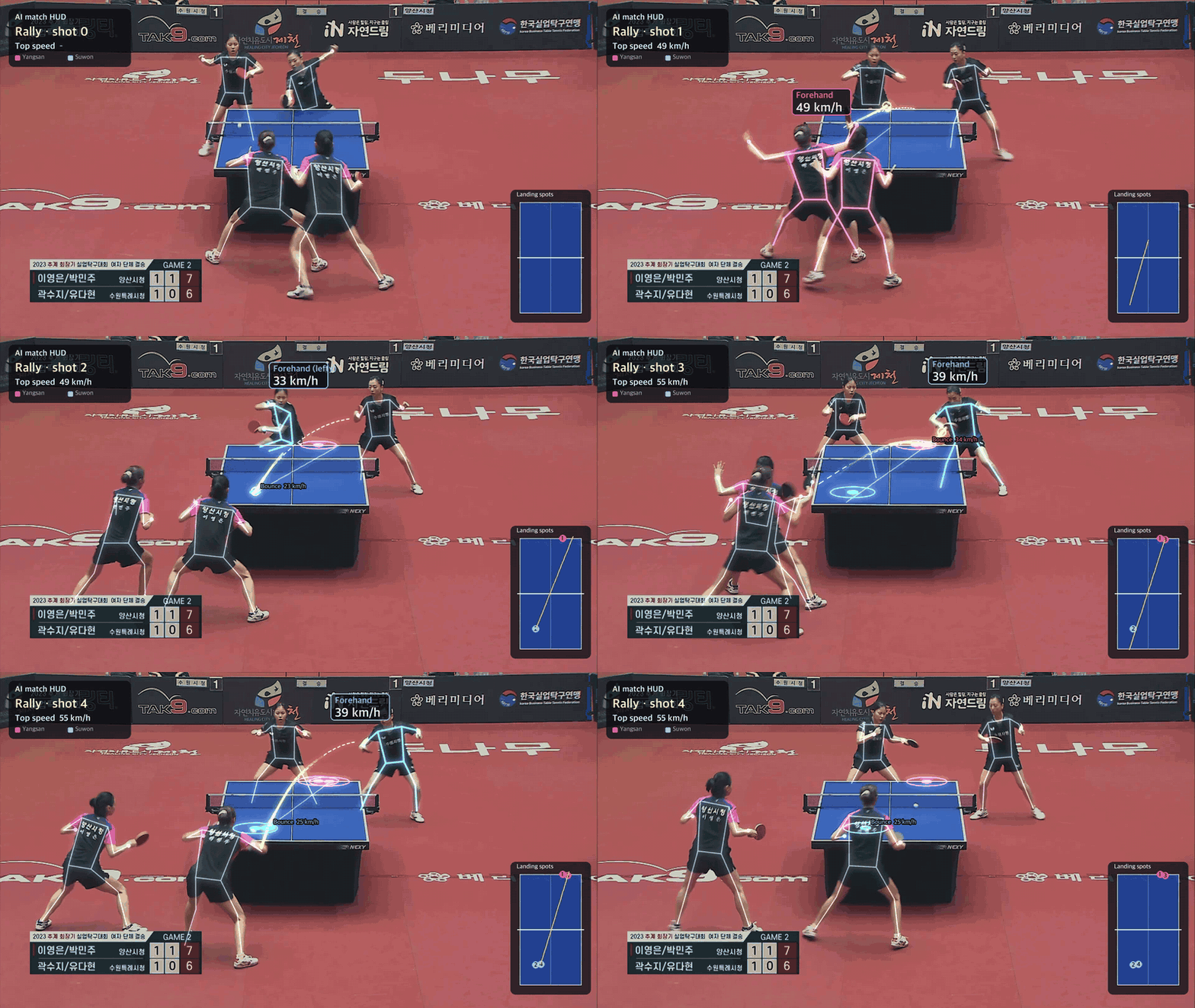
The animation above runs at one-third of real speed. In real time these four shots are over in 1.7 seconds.
Where it went wrong
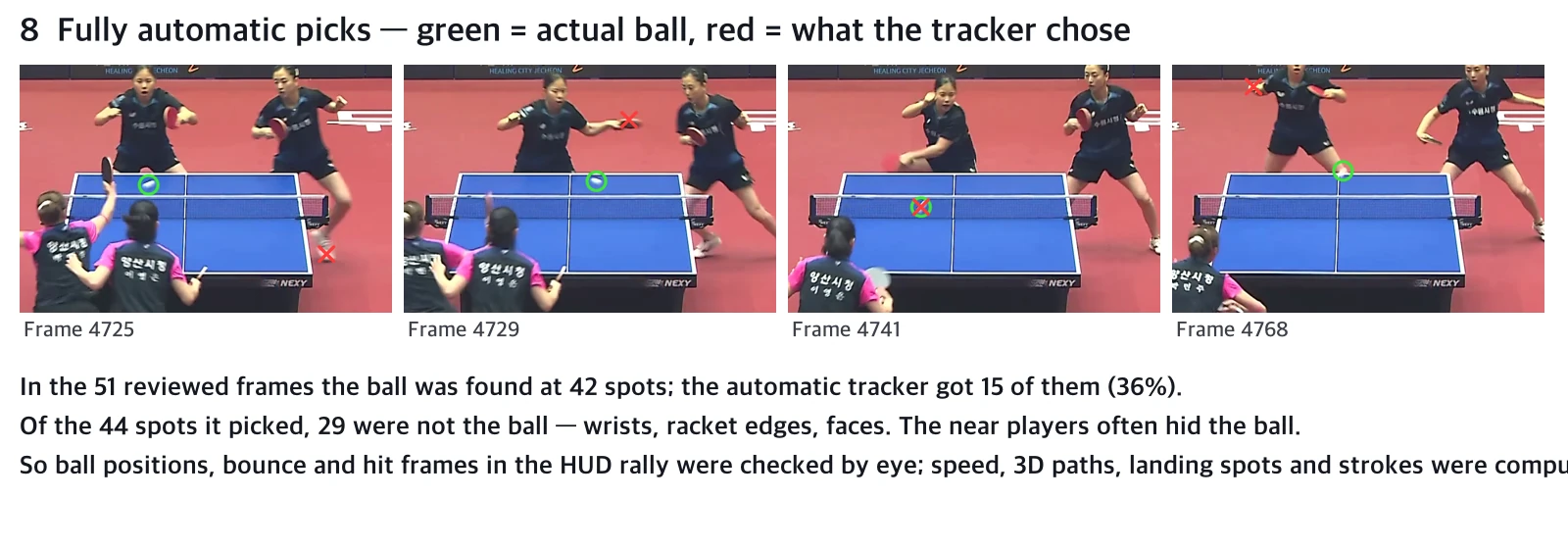
- Automatic tracking alone cannot make this HUD. In the 51 reviewed frames, where ball positions, bounces and hit moments were checked by eye, the ball was visible at 42 spots. The automatic tracker got only 15 of them (36%). Of the 44 spots it picked in the same frames, 29 were wrists, racket edges and faces. So the ball positions, bounce frames and hit frames in this HUD rally were checked by eye. Speed, 3D paths, landing coordinates, who hit, and the forehand calls were computed.
- In doubles, the near half of the table is hidden. The two near players stand in front of the end line and often cover the front half of the table. Bounces on that side were often not visible.
- 30 fps is slow for table tennis. With a fast ball, the bounce falls between frames and the kink does not show. So the rule "a kink is a bounce" often missed. The bounce of shot 4 is an estimate too: near the near end line the kink was not clear, so I took the last point just short of the line as the bounce.
- Speeds are model values. The drag coefficient is a typical value from the literature. Curving from spin (the Magnus effect) is not included. Moving the pose-based hit point 30 cm forward or back and 15 cm up or down and refitting changes each shot's speed by ±9–13%.
- At first I wrongly thought the camera moved. The table seemed to sit in different places in the cropped review sheets, so I added a per-frame alignment step. Measuring showed the main camera was fixed. The alignment step did not change the results.
- No badminton. The only usable freely licensed footage was handheld and kept panning, and the opponent was often off screen.
So, to make it one click
- Calibration, picking main-camera frames, pose estimation, 3D paths and HUD rendering ran almost automatically on this footage. The one thing that got stuck was finding the ball.
- Finding the ball automatically needs a ball detector tuned to this kind of broadcast: mark ball positions in a few hundred frames and train a heatmap model that looks at several consecutive frames at once. The 42 spots checked by eye this time are the first labels for it.
- If you shoot it yourself: 60 fps or more, high up behind one end of the table, singles. That avoids the three things that got in the way here (frame rate, occlusion, doubles). Last time, in the office video, the camera was low beside the table and could not resolve depth. This time the camera was high, and depth and landing spots came out.
Sources
- Video: full-match recording of the Yangsan City Hall vs Suwon Special City Hall doubles (title in Korean), KTTL Korea Professional Table Tennis League (Korea Business Table Tennis Federation), Wikimedia Commons, CC BY 3.0. Minutes 10–14 were cut and overlaid with the HUD.
- Table and ball specifications: ITTF rules (table 2.74 m × 1.525 m, net 15.25 cm, ball 40 mm, 2.7 g).
- Pose estimation and object detection: Ultralytics YOLO11.