One Photo to 3D, Now on a MacBook — Scoring Idol on the Same Test as Episode 39's TRELLIS
I took the problem from episode 39, where TRELLIS ran on a laptop GPU, and solved it with Idol on a MacBook (M4 Max) with no NVIDIA GPU. Idol, released in April, is a 660-million-parameter model that turns one photo into a bundle of 3D Gaussians, and it has a port to Apple's MLX. I rendered episode 39's five ground-truth objects at the same angle and scored them with the same code. On the three public models it stayed within 1 mm like TRELLIS (0.77–0.95 mm). On my custom little house it was 1.79 mm, better than TRELLIS (2.98 mm): where TRELLIS copied the front door onto the back wall, Idol left the wall blank. It still did not invent the mug handle missing from the photo. Each object took 227–289 seconds, more than ten times slower than the episode 39 laptop, and MLX memory peaked around 8.6 GB. Increasing the Gaussian count 16-fold barely changed the time. The output is splats, so I extracted meshes with Poisson reconstruction and ran them through episode 39's print conversion; all seven became single watertight STL files. Re-scoring as meshes did not change the order.
In episode 39 I ran TRELLIS, which turns a single photo into a 3D model, on a laptop GPU (RTX 3070, 8 GB). Each object took 12–22 seconds, and on objects with a known ground truth, the public models came within 1 mm on average when printed at 6 cm.
Then in April this year, Speridlabs released a model called Idol. It turns one photo into a bundle of 3D Gaussians (small translucent ellipsoids). It has 660 million parameters, fewer than TRELLIS, and the weights are released under Apache-2.0. It was built for NVIDIA GPUs, but a port to MLX, Apple's machine learning library for its own chips, has appeared. That means it runs on a MacBook with no NVIDIA GPU at all.
So I solved the same problem with the same scoresheet as episode 39.
What I set out to do
- See how Idol differs from TRELLIS.
- Run the MLX port of Idol on a MacBook (M4 Max, 48 GB of memory) and measure time and memory.
- Render episode 39's five ground-truth objects (the public cow, duck and fish models, plus my custom mug and little house) at the same angle, feed them in, and score them with episode 39's code. Put the results next to TRELLIS, TripoSR and TripoSG.
- Also feed in the two real photos from episode 39 (a garden gnome and a toy car), and try different Gaussian counts and modes.
An AI agent wrote and ran the setup, experiments, scoring and charts on the MacBook. The mistakes are listed separately under "Where it went wrong".
How Idol differs
TRELLIS and Idol both do "one photo → 3D", but what comes out is different.
- TRELLIS switches on the cells of a 64³ grid that the surface passes through, fills each with eight numbers, and then decodes that into a mesh or Gaussians (episode 39). You can get a mesh out directly.
- Idol produces a bundle of Gaussians from the start. Each Gaussian is a small translucent ellipsoid with a position, size, orientation, colour and opacity. Layer hundreds of thousands of them and you get a photo-like object. It is the same representation as 3D Gaussian Splatting (2023). There is no mesh.
The public repositories and the MLX port describe these parts. The photo is read by Meta's DINOv3 and the FLUX.2 VAE encoder from Black Forest Labs. The background is removed with BiRefNet. A diffusion denoiser (the MLX port's notes thank the Wan and Hugging Face teams for the original denoiser) builds a latent over 50 steps, and an octree decoder and a Gaussian decoder turn it into Gaussians. You can choose anywhere from 32,768 to 1,048,576 Gaussians. There is a real mode for photos and a synthetic mode for renders and generated images.
In Speridlabs' own comparison table, Idol takes 6.8 seconds on one H100, slightly faster than TRELLIS (7.1 seconds), and leads on six metrics. Its per-GPU table lists 19.1 seconds on an RTX 4090 and 46.2 seconds on an RTX 3080. Both are the company's own measurements.
Running it on a MacBook
The MLX port is Neywa Labs' addition to mlx-vlm, a vision–language model library for Apple chips. Installing it was one line: clone the repository and run pip install -e .. Idol's four weight files (about 3.1 GB) download on the first run.
One thing got in the way. The two encoders that read the photo are gated models on Hugging Face. You have to accept the terms on the DINOv3 and FLUX.2-dev pages and be approved before you can download them. When I checked, FLUX.2-dev was already open, while DINOv3 had to wait for Meta to review the request. On the first run, downloading DINOv3 alone took 3 minutes 22 seconds.
The MacBook has an M4 Max and 48 GB of memory. I loaded the model once and generated episode 39's five ground-truth objects with three seeds each, 15 runs in all.
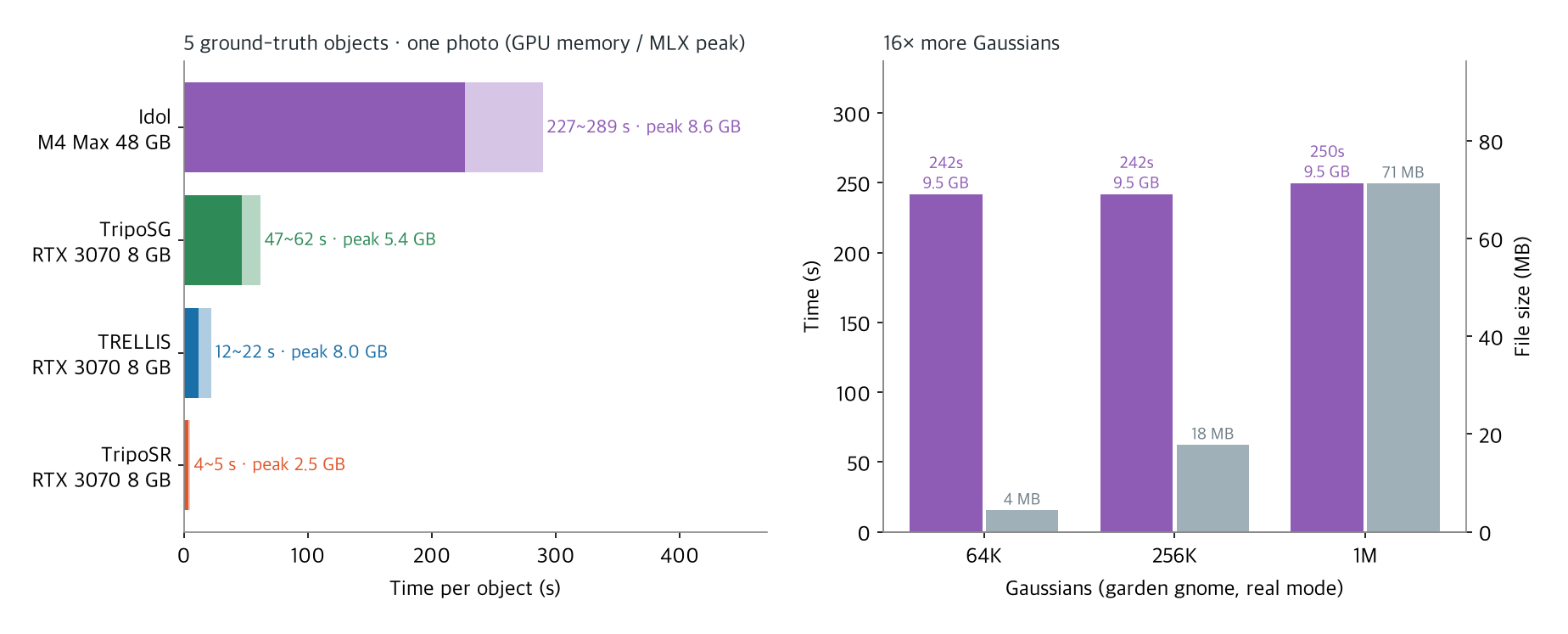
- 227–289 seconds per object, median 239. That is more than ten times slower than TRELLIS on the episode 39 laptop (RTX 3070, 12–22 seconds), and about five times slower than the RTX 3080 in Speridlabs' table (46.2 seconds). Apple's GPUs still can't keep up with NVIDIA desktop GPUs at this kind of work.
- Memory peaked at 8.6 GB as allocated by MLX. A photo with a background also runs the background remover (BiRefNet), which brings it to 9.5 GB. The ground-truth objects are rendered on a transparent background, so they skip that step. That is a little more than Speridlabs' "under 8 GB of GPU memory". On the first run, though, the operating system's figure for the whole process reached 38 GB. The weight files are mapped straight into memory, so the number looks large. It runs on a 48 GB MacBook, but it is better not to run anything else heavy at the same time.
- The Gaussian count barely affects time. Going 16-fold from 65K to a million Gaussians took 242 seconds → 250 seconds. Most of the time goes to the 50 denoiser steps, and the final decode into Gaussians is short. Only the file grows, from 4.5 MB to 71.3 MB.
How accurate: the same objects as episode 39
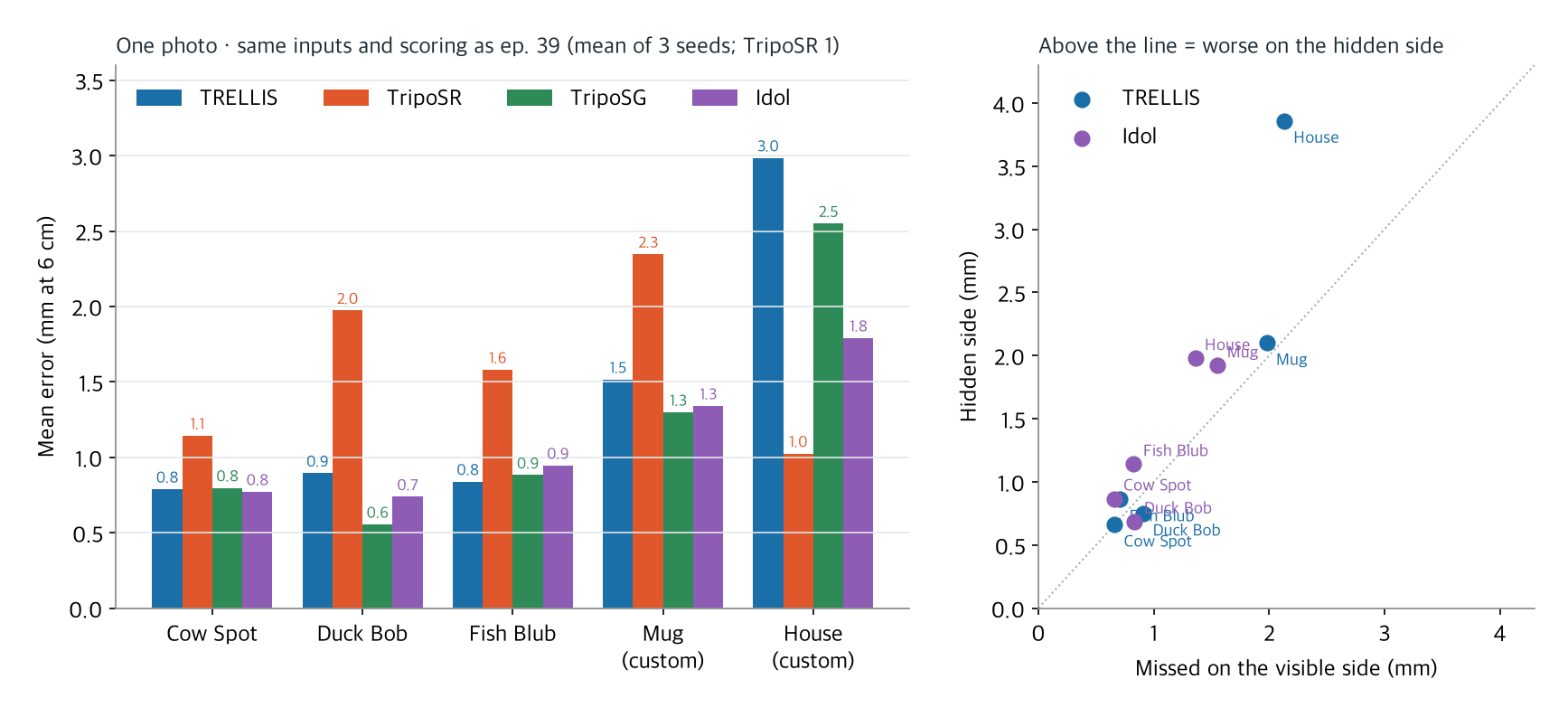
I did exactly what episode 39 did. The ground-truth models (Keenan Crane's cow Spot, duck Bob and fish Blub, plus my custom mug and little house) were rendered at 768 pixels, 15° from above, from a front three-quarter angle, and fed in as a single photo. Scoring used episode 39's code unchanged. The result is scaled and rotated onto the ground truth, and the distance between the two surfaces (symmetric chamfer distance) is reported in millimetres for a 6 cm print.
Idol has no mesh, so I measured it two ways. First, I used the centres of opaque Gaussians (opacity above 0.5) as surface points, 240,000–250,000 per result. Then I extracted a mesh from the Gaussians (see "Can you 3D print it?" below) and re-scored it with points sampled evenly from the mesh surface, as for TRELLIS and Tripo. The two methods differed by 0.01–0.11 mm in mean error per object. The table and chart below use the Gaussian-centre values.
| Object | TRELLIS | TripoSR | TripoSG | Idol |
|---|---|---|---|---|
| Cow Spot | 0.79 mm | 1.14 | 0.80 | 0.77 |
| Duck Bob | 0.89 | 1.97 | 0.56 | 0.74 |
| Fish Blub | 0.84 | 1.58 | 0.88 | 0.95 |
| Mug (custom) | 1.52 | 2.35 | 1.30 | 1.34 |
| Little house (custom) | 2.98 | 1.02 | 2.55 | 1.79 |
| Time per object | 12–22 s | 4–5 s | 47–62 s | 227–289 s |
| Hardware | RTX 3070 laptop | same | same | M4 Max MacBook |
- On the three public models, everything except TripoSR is within 1 mm. Idol scored 0.77 mm on the cow, 0.74 on the duck and 0.95 on the fish, close to TRELLIS. On the duck, only TripoSG (0.56) did better than Idol.
- The custom objects showed a difference. The mug came in at 1.34 mm, close to TripoSG. The little house was 1.79 mm, more than 1 mm better than TRELLIS (2.98). TripoSR (1.02) still got the depth of the house best.
| Object | From Gaussian centres | Re-scored as a mesh |
|---|---|---|
| Cow Spot | 0.77 mm | 0.78 |
| Duck Bob | 0.74 | 0.73 |
| Fish Blub | 0.95 | 0.97 |
| Mug (custom) | 1.34 | 1.45 |
| Little house (custom) | 1.79 | 1.82 |
- Re-scoring as a mesh did not change the order. No object changed rank among the four models. The mug moved most, from 1.34 to 1.45 mm, and still sits between TripoSG (1.30) and TRELLIS (1.52). The little house, at 1.82 mm, was still more than 1 mm better than TRELLIS (2.98).
- The hidden side drifted less. TRELLIS missed the hidden side of the house by 3.86 mm (visible side 2.13). Idol missed it by 1.98 mm (visible side 1.36). On the share of points within 2% distance (F-score), Idol was ahead on four of the five objects. Only on the fish did TRELLIS (0.81) beat Idol (0.76).
How the hidden side got filled
A picture is quicker than numbers. I drew the same three views as episode 39 (duck from behind, mug from the side, house from behind) at the same angles. The ground-truth and TRELLIS columns are taken directly from episode 39's figure.
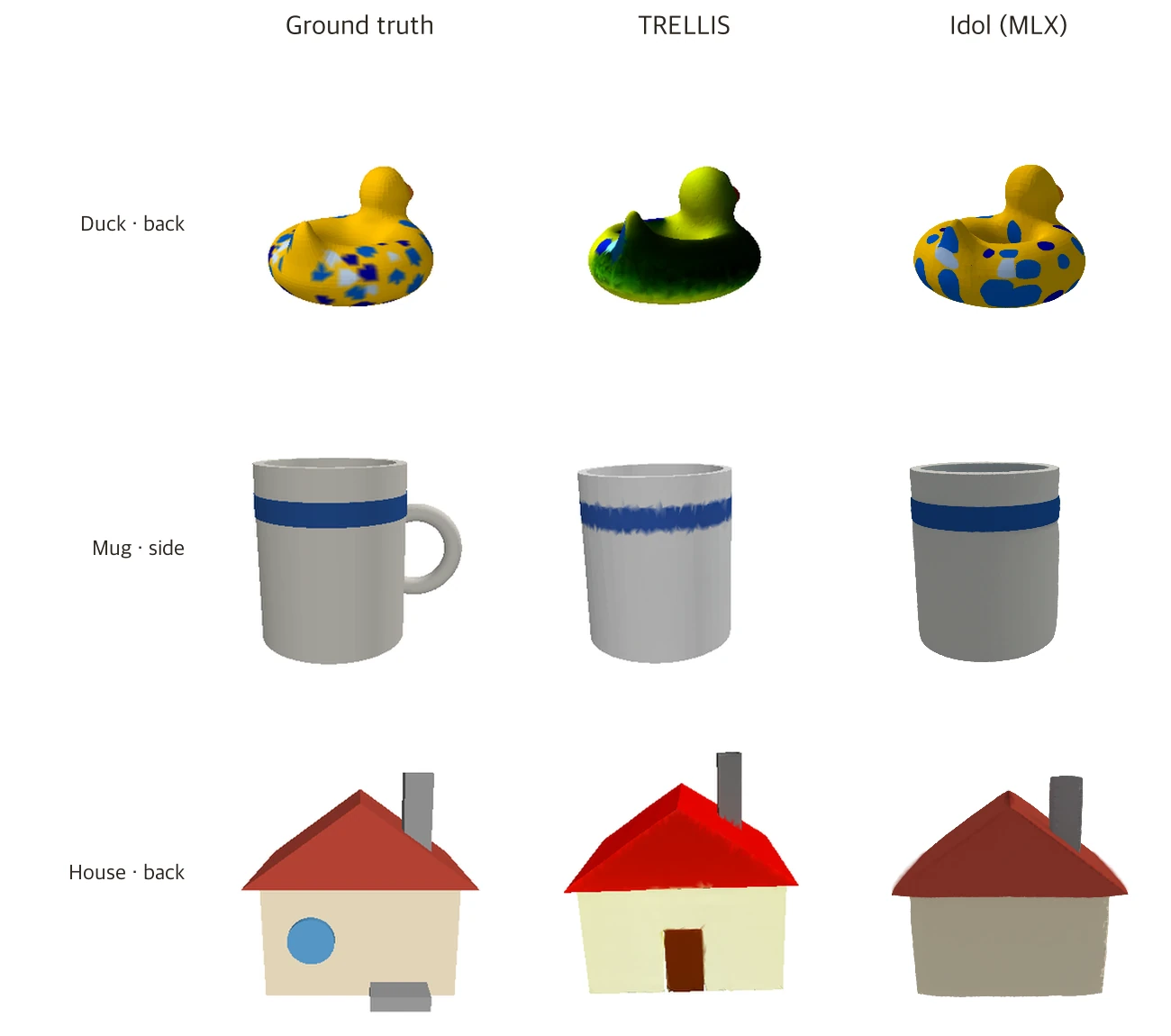
- The duck's back continues the front pattern. Where TRELLIS painted dark green, Idol filled in a yellow body with blue spots. The pattern does not match the ground truth, but the colours do. All three seeds did this.
- Still no handle. All three seeds gave a cylinder without a handle, the same as all three models in episode 39. If the front photo shows no handle, there is no evidence one exists, whichever model you use.
- The back wall of the house was left blank. TRELLIS copied the front door onto the back wall. Idol left a wall with no door or window in all three seeds. It did not copy the front door, but it did not find the round window and steps either. It is closer to "leave the unknown side empty". Not adding a wrong door seems to account for part of its lower error than TRELLIS.
Real photos and changed settings
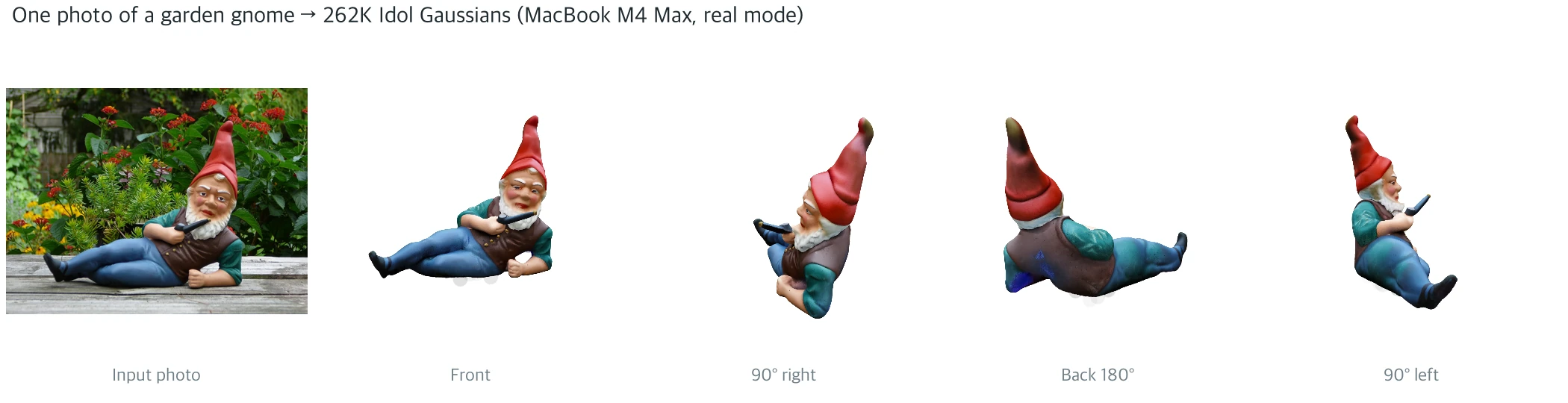
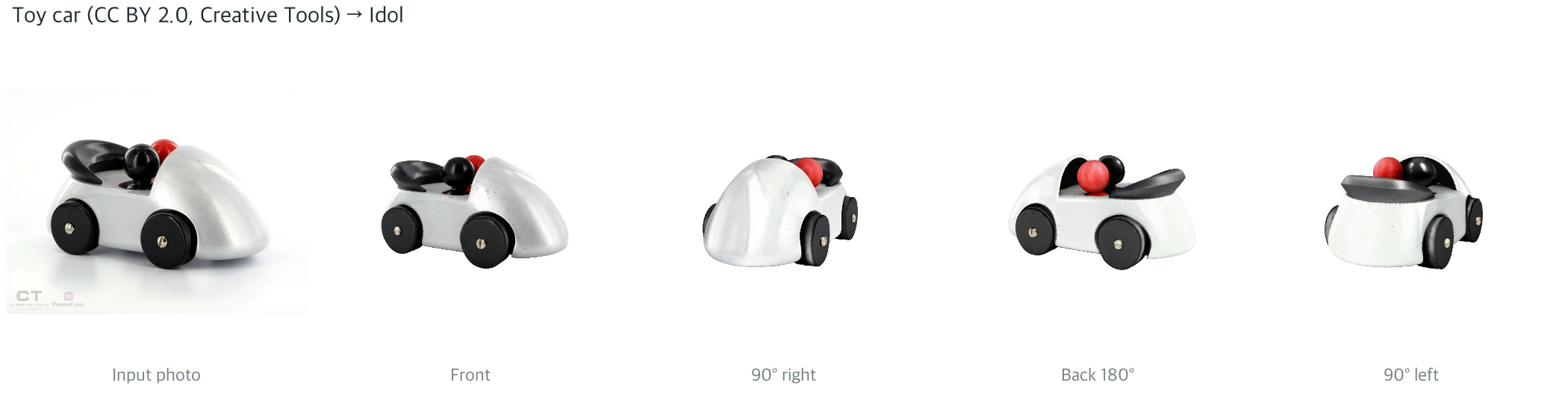
I also fed in the two real photos from episode 39, using real mode for photos. The garden gnome is the figure at the top. The back of the vest and the hat, which the photo never showed, were filled in convincingly. The texture is closer to the photo than episode 39's TRELLIS mesh, because the Gaussians carry the colours directly and there is no texture-baking step.
I also compared the garden gnome from behind under different settings.
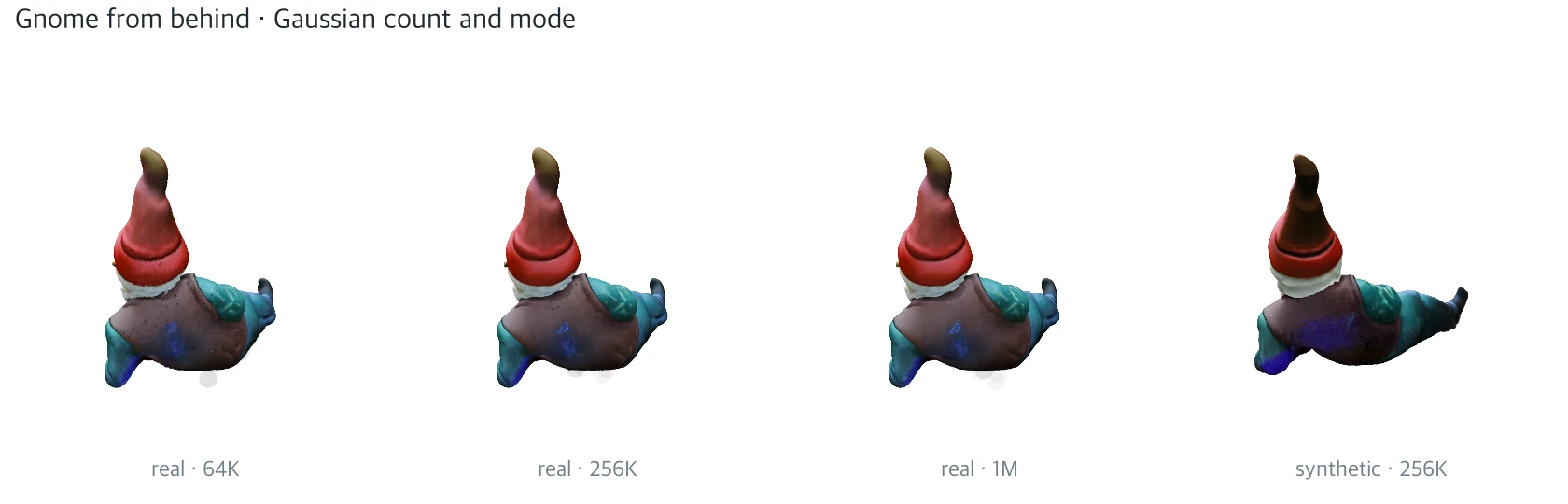
- At this size the Gaussian count hardly shows. At the size of one panel, 65K, 262K and a million Gaussians were indistinguishable by eye, and took the same time. Only the files grew: 4.5 MB, 17.8 MB, 71.3 MB. If nobody will zoom in, fewer is fine; for a close-up product preview, the default (262K) is a safe choice.
- Use
realmode for photos. Feeding the same photo insyntheticmode (meant for renders and generated images) made the colours darker and the smear on the back larger. Time and memory were the same. - Floating specks remained under the base. The garden gnome result had a few hazy grey blobs floating where the table was, under the figure. A blue smear that is not in the photo also appeared along the bottom of the back. If you use the splats as they are, you need a clean-up step to remove such debris.
Can you 3D print it?
The part of episode 39 that took the most effort was making a file for a 3D printer. Idol's output is splats, so it doesn't work as is. Hundreds of thousands of translucent ellipsoids have no boundary between inside and outside. So I added a step that extracts a surface from the Gaussians.
I tried two methods.
- Density field + marching cubes: stack the Gaussians onto a grid, blur it, and extract the boundary at a set density as a surface.
- Poisson surface reconstruction: take each Gaussian's shortest axis as its normal, and solve for a smooth closed surface from the points and normals (open3d).
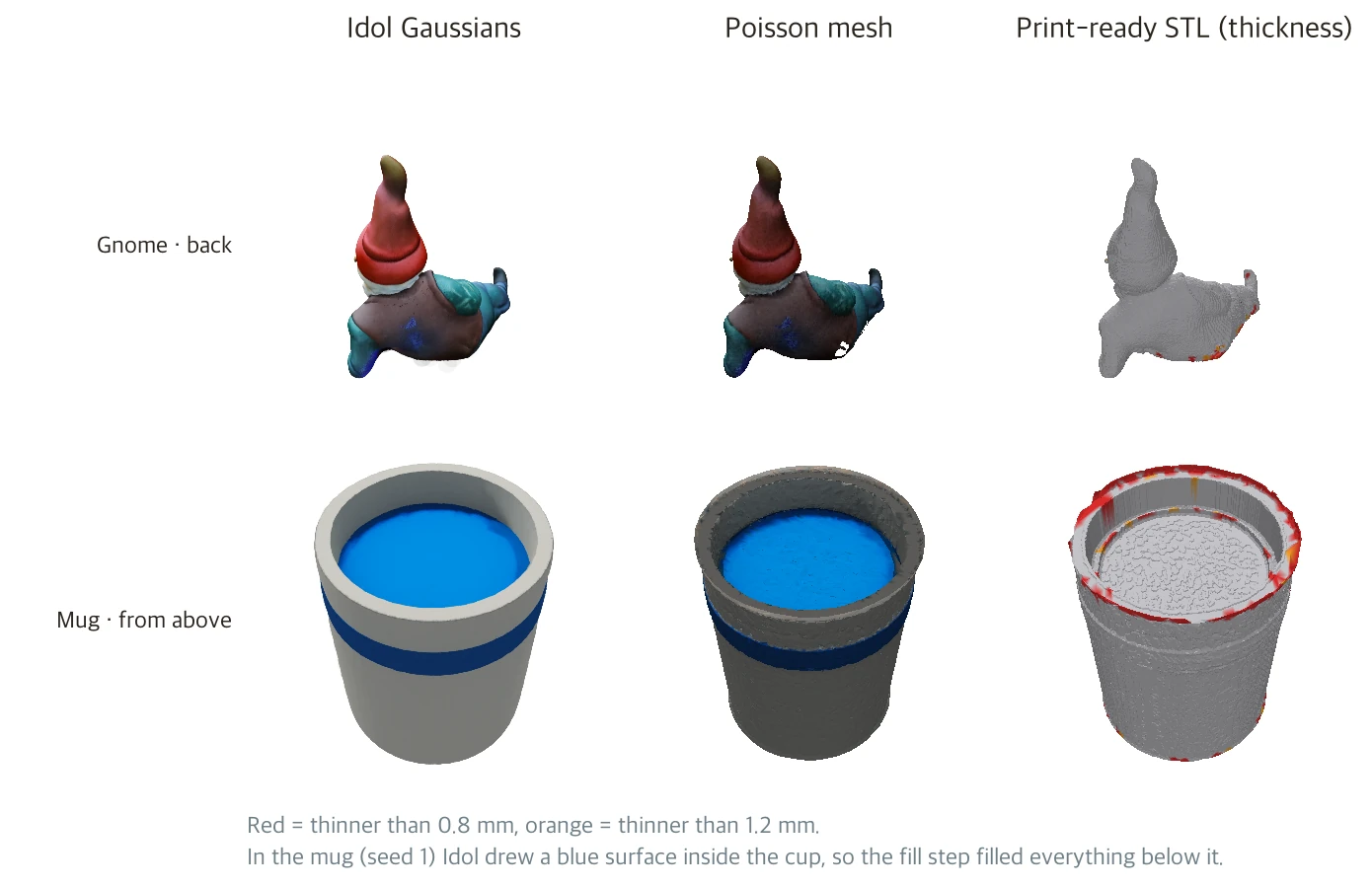
On the cow, Poisson scored 0.68 mm and the density field 0.81 mm. Across all 15 results for the five objects, Poisson was better on three. After that I reused episode 39's print conversion code as is (remove debris → 6 cm tall → fill the inside → reduce to 120,000 faces → cut the base flat → check thickness and overhangs).
| Example | Size (mm) | Volume after filling | Thinner than 0.8 mm | Overhang beyond 45° |
|---|---|---|---|---|
| Garden gnome (real photo) | 38×71×59 | 18.2 cm³ | 6.6% | 16.0% |
| Toy car (real photo) | 78×128×59 | 253.3 cm³ | 2.0% | 23.7% |
| Cow | 60×37×59 | 34.5 cm³ | 1.6% | 16.8% |
| Duck | 108×92×59 | 148.0 cm³ | 2.8% | 16.6% |
| Fish | 91×45×59 | 30.4 cm³ | 5.8% | 15.8% |
| Mug (seed 1 / seed 2) | 49×49×59 | 89.2 / 30.6 cm³ | 3.7% | 0.3% |
| Little house | 59×63×59 | 114.8 cm³ | 3.2% | 7.1% |
- All seven became files a printer can take. Each is a single watertight piece and passed the manifold check with no tangled faces. They have 100,000–120,000 faces.
- There were slightly more thin spots than with episode 39's TRELLIS. Even after filling, 1.6%–6.6% was thinner than 0.8 mm (TRELLIS in episode 39: 0–2.9%). These are genuinely thin parts such as the beard tip, the fin tips and the mug's rim.
- Mug seed 1 became a shallow cup. Already at the Gaussian stage, Idol drew a blue surface about a third of the way down inside the cup. It looks like a drink. The fill step treated everything below it as solid, so the volume came to 89.2 cm³, nearly three times seed 2 (30.6 cm³; TRELLIS in episode 39, 32.5 cm³). Seeds 2 and 3 were hollow.
- Small contact areas, as in episode 39. The toy car touches only at its wheel tips, 3.0 mm², and the fish at 1.3 mm². They can't be printed without supports.
So the uses sort out like this.
- For viewing on screen (web product previews, video, AR), using Idol's splats as they are wins on texture.
- For things you hold in your hand, add one Poisson step. But any stray surface in the splats (the mug's blue disc) becomes part of the mesh too. TripoSG, which outputs a solid mesh from the start, is still less work.
Where it went wrong
- Idol lost badly in the first scoring. The cow came out at 4.44 mm. The MLX port's notes say the output uses y-up coordinates, but the actual files had up/down and front/back flipped. Rotating 180° about the x axis brought it to 0.69 mm. The alignment only searches rotations around the vertical axis, so it cannot fix an upside-down result. I fixed this transform once using cow seed 1 and applied it to every object the same way, rather than picking whichever way suited each object.
- My first drawing showed the garden gnome upside down. Same cause. I flipped the axis in the drawing code too.
- I nearly reported memory as 38 GB. On the first run, the operating system's statistic (peak memory footprint) was 38 GB. The peak MLX actually allocated for computation was 8.6 GB. The OS also counts weight files mapped into memory. I report the two separately.
- I waited for encoder approval. DINOv3 and FLUX.2-dev are gated models that need you to accept their terms. At first both were blocked. FLUX.2-dev opened first; DINOv3 needed approval. Meanwhile I downloaded the other weights in advance and set things up to run as soon as approval came through.
- Poisson crashed at first. Fed all 262K Gaussians, open3d's Poisson printed "Failed to close loop" and took the whole program down. Thinning the points on a grid of 0.3% of the longest side (0.18 mm at 6 cm) and dropping to one thread made it run.
- I blamed Poisson for the blue surface in the mug. Seeing a blue disc closing off the inside of the cup in the mesh, I put down Poisson's habit of closing open holes as the cause, even in the figure caption. Drawing the Gaussians from the same angle showed that the blue surface was already in Idol's result, and only in seed 1. I fixed the caption.
- The comparison figure was misaligned once. I cut the ground-truth and TRELLIS panels out of episode 39's figure, but that figure had been saved at 0.87 times its original size, so the panels were offset. The camera distance was also 2.2 in episode 39 but 2.0 in my code, so only Idol was drawn larger. I matched both to episode 39.
Why it works in one click
For the same reason as in episode 39, generation itself is one click. Put in a photo and four minutes later you have 3D. This time no NVIDIA GPU was needed, only a MacBook with plenty of memory. It is slower, but neither the photo nor the result goes to someone else's server.
The places where one click is not enough are also the same as in episode 39. The hidden side is imagination. Idol did not copy the front door onto the back wall the way TRELLIS did, but it did not discover the window and steps either. It just left them out. What changed this time is the form of the output. You get splats that look good on screen, and turning them into something you can hold takes one more Poisson step. That step doesn't question what the splats drew.
If you want to try it
- On a MacBook, 32 GB of memory or more is advisable. MLX allocates around 9 GB, but the OS counts far more. 48 GB was no problem.
- Get Hugging Face approval first. Accept the terms on both the DINOv3 and FLUX.2-dev pages. DINOv3 takes time to approve.
- Use
realfor photos andsyntheticfor renders and generated images. The default issynthetic. - 262K Gaussians (the default) is enough. Using fewer does not make it faster.
- If you make several, load the model once. Running the command line one at a time reloads everything each time. In Python, call
load_3d_modelonce andgenerate_3dmany times. - Check the output axes. This build came out with the y and z axes flipped. If it looks upside down in another program, rotate it 180° about the x axis.
- Check the licences. Idol's weights are Apache-2.0. DINOv3 is under Meta's DINOv3 License and FLUX.2-dev under the FLUX Non-Commercial License. The FLUX.2-dev model card says generated outputs can be used commercially, but points self-hosted commercial use to separate terms. Whether commercial use is allowed when it serves only as an encoder, as here, needs to be checked.
What it can't do
- The mesh used for scoring is not Idol's own. The mesh-based numbers include the Poisson reconstruction added in this article. A different reconstruction method would give different numbers. Differences of around 0.1 mm should not be used to rank them.
- The hardware differs. TRELLIS and Tripo ran on an RTX 3070 laptop, Idol on an M4 Max MacBook. The time comparison holds only for these machines. For Idol on an NVIDIA GPU there are only the company's numbers (46.2 seconds on an RTX 3080).
- Only five objects have ground truth. Three of them may have been in the training data. The two real photos have no ground truth, so I only judged them by eye.
- I did not actually print anything. I made and checked the STL files, but did not measure slicer time, support material or print success, the same as episode 39.
- I did not compare against the original PyTorch version. The MLX port uses a different random number generator, so the same seed gives a different result. The MLX port's own checks confirm that it runs to completion with finite values; its notes say reconstruction quality was not scored.
- I did not compare against TRELLIS.2 or TripoSplat.
Still, one thing is clear. What episode 39 showed "works on one laptop" now also works on a MacBook with no NVIDIA GPU. It takes four minutes, gets within 1 mm on objects like the public models, and the texture is closer to the photo. If you need something to hold in your hand, one Poisson step gets you to an STL. But that step sets in stone whatever the splats imagined.
If you enjoyed this, please leave a comment.
Sources
- Idol: Speridlabs, project page (v0.1, April 2026, comparison table and per-GPU times), weights speridlabs/idol (Apache-2.0), idol-sdk
- MLX port: Neywa-Labs/mlx-vlm, mlx_vlm/models/idol
- Encoders: facebook/dinov3-vith16plus-pretrain-lvd1689m (DINOv3 License), black-forest-labs/FLUX.2-dev (FLUX Non-Commercial License), checked 2026-11-10
- Mesh reconstruction: Open3D Poisson surface reconstruction (Kazhdan and Hoppe, Screened Poisson Surface Reconstruction, 2013)
- Baseline: this series' episode 39, "Can One Photo Get You to a 3D Print?", its experiment code (ground-truth rendering, alignment and chamfer scoring) and numbers (TRELLIS, TripoSR, TripoSG)
- Ground-truth models: Keenan Crane, 3D Model Repository (Spot, Bob, Blub, public domain)
- All runs, scoring and charts were produced for this article
Image credits
- Garden gnome photo: German garden gnome.jpg, Colibri1968, public domain (Wikimedia Commons)
- Toy car photo: CreativeTools.se - PackshotCreator - Toy car, Creative Tools, CC BY 2.0 (Wikimedia Commons)
- The ground-truth and TRELLIS panels in the comparison figure are taken directly from episode 39's figure

