How Does AI Read a Sheet of Paper? 112 Years of OCR, and a Toy That Takes a Scanned Document All the Way to Conclusions
OCR, reading text from photographed or scanned documents, began in 1914 with a machine that turned letters into sound. Today models of about 1B parameters convert tables and formulas to Markdown and plug into tools like Claude Code through MCP. I traced those 112 years and built a single-file Document Reading Dissector that binarises scanned receipts, bills and statements, finds the text, decides the blocks and reading order, recognises the letters, turns tables and key-values into data, and checks the sums.
Hand Claude Code a PDF and you get Markdown back, tables included. Give it a photo of a receipt and it pulls out the total. These days the job is often split off into an MCP server and plugged in: names like PaddleOCR, MinerU and Docling turn up one line at a time in developer tool configs.
The job is older than it looks. Attempts to make machines read printed letters began 112 years ago. Since then the method has changed three times, and each time people had to spell out less of it. That matters. Most of what humanity has put on paper still exists only as images. In 2010 Google counted roughly 130 million books in the world, and by 2019 it said it had scanned more than 40 million. Only once those pages become text, and then tables and numbers, can we search them, compute with them and let AI read them.
This episode follows those 112 years and builds a toy that imitates the last stage. It does not stop at reading letters. It recognises how the document is laid out, pulls the numbers out as data, and checks whether the document adds up.
This is the English edition. The toy below reads English versions of the same three documents, so its numbers differ slightly from the Korean edition. Where that matters, both are given.
What I set out to do
- Lay out, era by era, what has done the recognising, from the first OCR to the newest models of autumn 2026. Only figures from primary sources.
- Make each stage visible: split a scanned document into black and white → find the text → decide the blocks and reading order → recognise the letters → turn tables and key-values into data → draw conclusions from that data.
- Make it run inside this article with nothing to install, and let readers deliberately damage the scan.
The research went to an AI agent. It was told to use only patent texts, papers, official repositories and blogs, and to mark any year it could not confirm as unconfirmed.
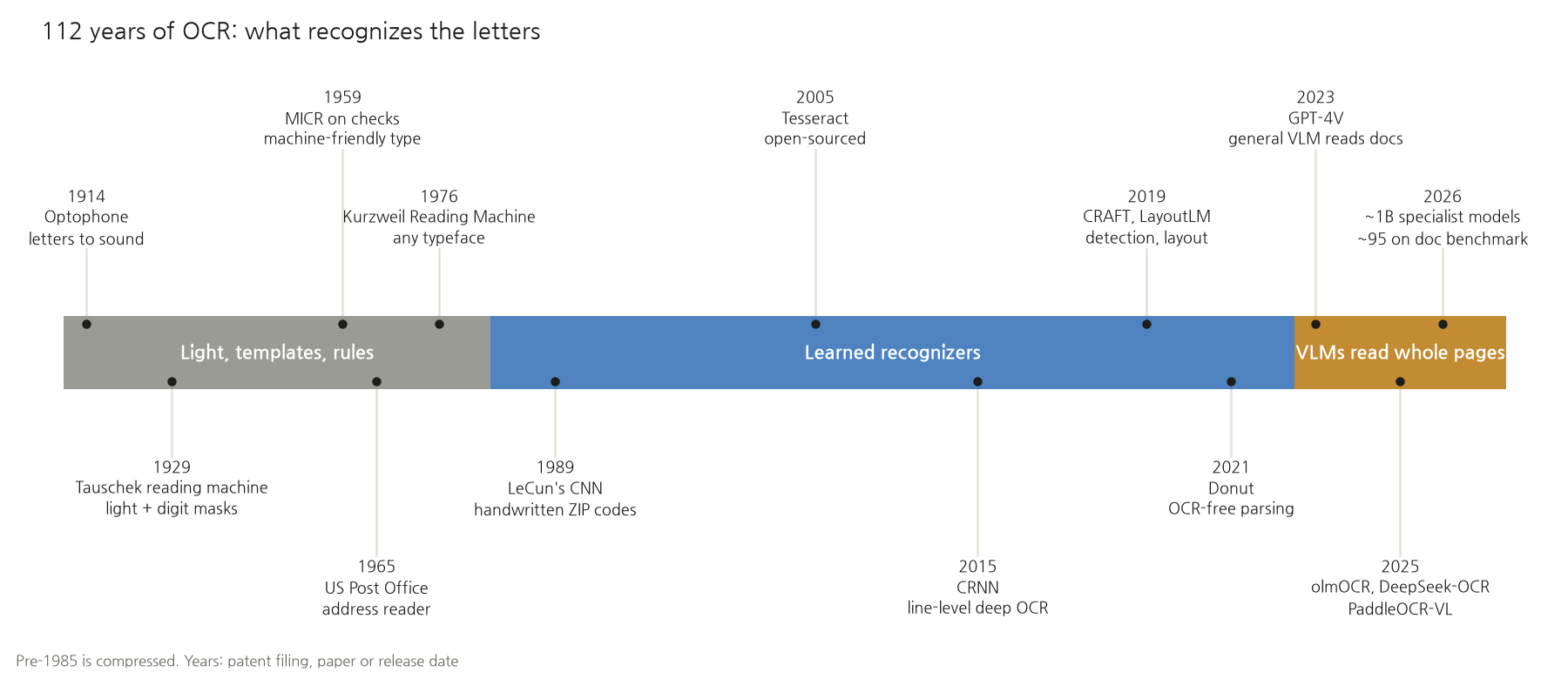
112 years on one page
The age of light and templates (1914 to the 1980s)
At first the machine did not decide anything. The optophone, which Irish physicist Edmund Fournier d'Albe described in the Proceedings of the Royal Society in 1914, swept a selenium photocell across a line of print and turned the changing amount of light into tones of different pitch. The one who recognised the letters was the person wearing the headphones. It was a sensory-substitution device for blind readers.
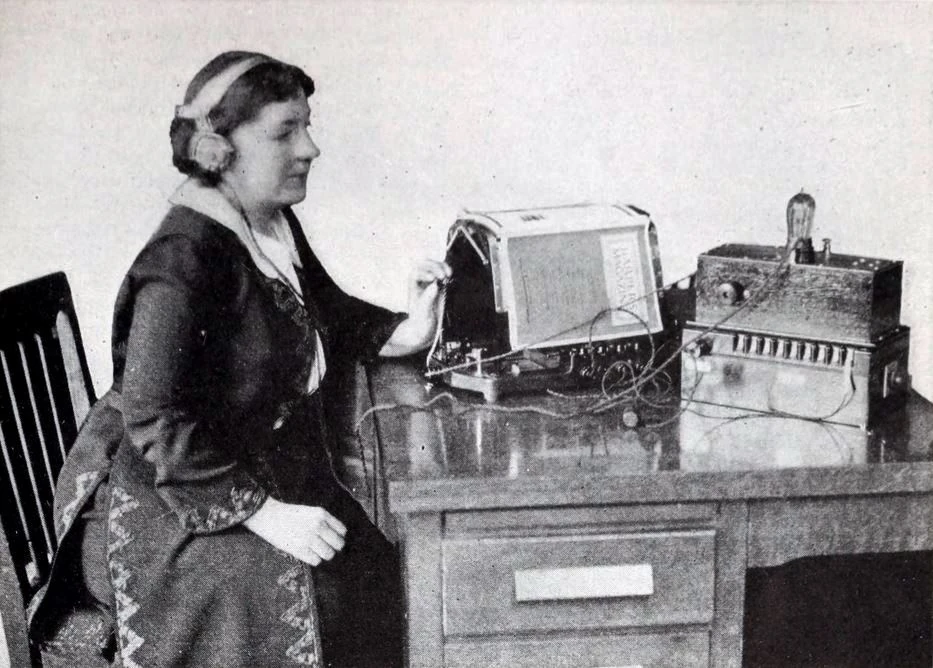
Margaret Hogan reading a magazine with an optophone. Harper's Magazine, July 1922, public domain (Wikimedia Commons)
Machines began to decide for themselves at the end of the 1920s. The "Reading Machine" patent that Gustav Tauschek of Vienna filed in the United States in 1929 (US 2,026,329, granted 1935, with Austrian priority from 1928) shows the principle well. A disc with holes cut in the shape of digits spins in front of a photoelectric cell. At the instant the shadow of a printed digit lines up with a hole, the light reaching the cell changes, and a relay records that digit. It overlays a prepared template and picks the one that fits best. Step 5 of the toy in this article does exactly the same, with pixels instead of light.
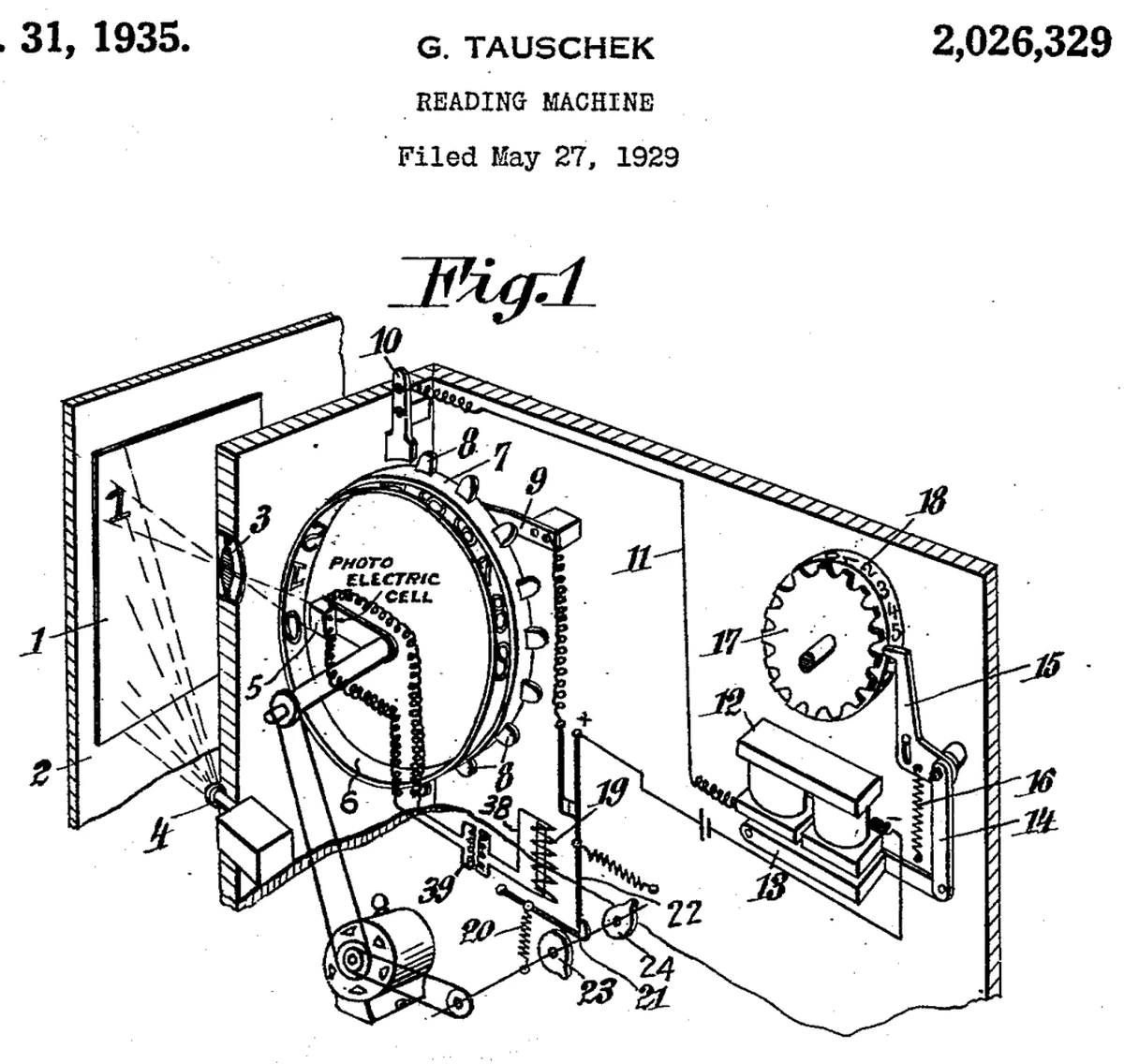
Drawing from Tauschek's US "Reading Machine" patent (1935). US patent document
For the next thirty years the trend was to fit the letters to the machine. ERMA, the check-processing system Bank of America and SRI delivered in 1959, read MICR characters printed in magnetic ink along the bottom of checks at ten checks a second. In November 1965 the US Post Office Department put a high-speed address reader into service in Detroit, and nine post offices were using them by 1970. Typefaces designed for machines, such as OCR-A and OCR-B, appeared around the same time. Print a fixed form in a fixed font, and template matching was enough.
A machine that would read any typeface arrived in 1976. The Kurzweil Reading Machine, which Ray Kurzweil unveiled on 13 January 1976, photographed a book on a flatbed scanner, read it with omni-font OCR and spoke it aloud with a speech synthesiser. What the optophone's user had done half a century earlier, the machine now did on its own.
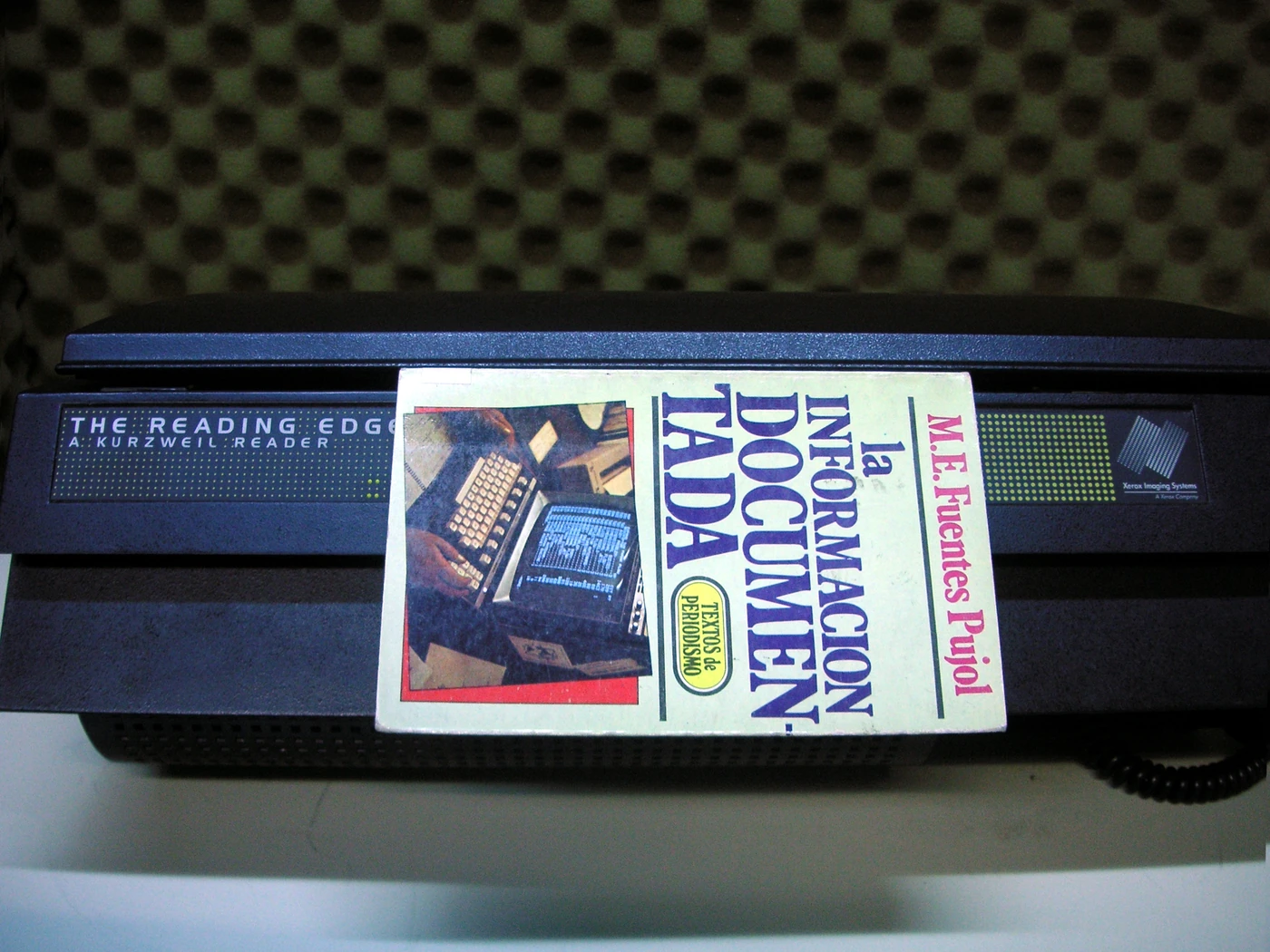
A later Kurzweil reader, "The Reading Edge". Photo by Beatrice Murch, CC BY-SA 2.0 (Wikimedia Commons). Not the original 1976 model
The age of learned recognisers (1989–2022)
In 1989 Yann LeCun at Bell Labs read handwritten ZIP codes with a convolutional neural network (CNN). Instead of people building templates, the machine was shown many examples and learned the features itself. According to his official biography, the check-reading technology he developed was reading 10 to 20% of all checks in the US in the early 2000s.
For printed text, Tesseract, built at HP between 1985 and 1994, was open-sourced in 2005 and developed further at Google until 2017. Version 4.0 in 2018 added an LSTM engine that reads a whole line instead of cutting it into characters first. It is still the default free OCR.
From 2015 onwards a neural network took over each stage.
- Line recognition: CRNN (2015) extracts features from a line image with a CNN, reads context in both directions with an LSTM, and uses CTC (2006) so it can learn without knowing where each letter sits. It sidestepped the old problem of having to cut out characters first.
- Finding text: EAST (2017) and Naver Clova's CRAFT (2019) located text in photos as heat maps.
- Document structure: Microsoft's LayoutLM (released late 2019) learned words together with their coordinates. It knows from position that "Total" and the number to its right belong together. Table structure went to models such as IBM's TableFormer (2022).
- Straight to structure, no OCR: Naver Clova's Donut (2021) skipped reading letters and wrote out structured results directly from the image. Meta's Nougat (2023) converted research-paper PDFs into markup, formulas and all.
OCR in this era was a pipeline of models chained together. Each stage got smarter, but errors piled up at the joints between them.
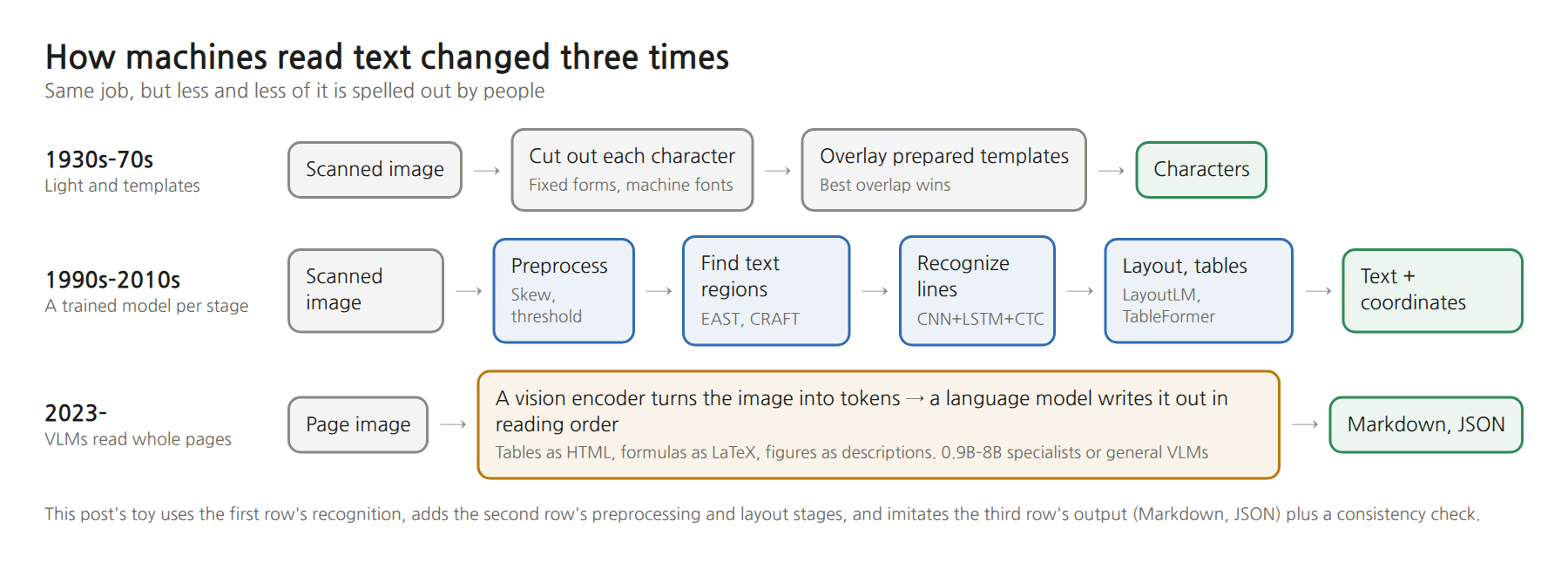
The age of VLMs that read whole pages (2023–)
When GPT-4V arrived in September 2023, general-purpose vision-language models (VLMs) started reading documents. But an evaluation paper that October found that while it read Latin script well, it could not beat dedicated OCR models on non-Latin scripts, handwritten formulas or table structure.
From 2025 came a flood of small VLMs built only for document parsing. What they share: feed in a page image and they write Markdown in reading order, tables as HTML and formulas as LaTeX.
- olmOCR (Allen Institute for AI, February 2025, 7B): built to turn PDFs into language-model training data. Its paper puts processing a million pages at more than $6,240 with GPT-4o against $176 with olmOCR. Version 2 in October was trained with reinforcement learning, using unit tests such as "this number must be in this cell of this table" as the reward.
- DeepSeek-OCR (October 2025, about 3B): the idea is unusual. Instead of feeding long text in as text tokens, render it as a page image and it takes far fewer tokens. According to the paper, when the text tokens are within ten times the image tokens (10× compression) it recovers 97% correctly, and at 20× it still gets about 60%. Beyond OCR, it became a question of whether an AI's long memory could be compressed into pictures.
- PaddleOCR-VL (Baidu, October 2025, 0.9B): 109 languages. Versions 1.5 and 1.6 followed in 2026.
- MinerU 2.5 (Shanghai AI Laboratory, September 2025, 1.2B): looks at the layout at low resolution first, then crops each region at full resolution to read it. The 2026 Pro version kept the architecture and grew the training data from 10 million to 65.5 million samples.
- Plus dots.ocr (3B), Chandra (Datalab), GLM-OCR (0.9B), and in summer 2026 OvisOCR2 (0.8B) and TeleOCR (1.2B).
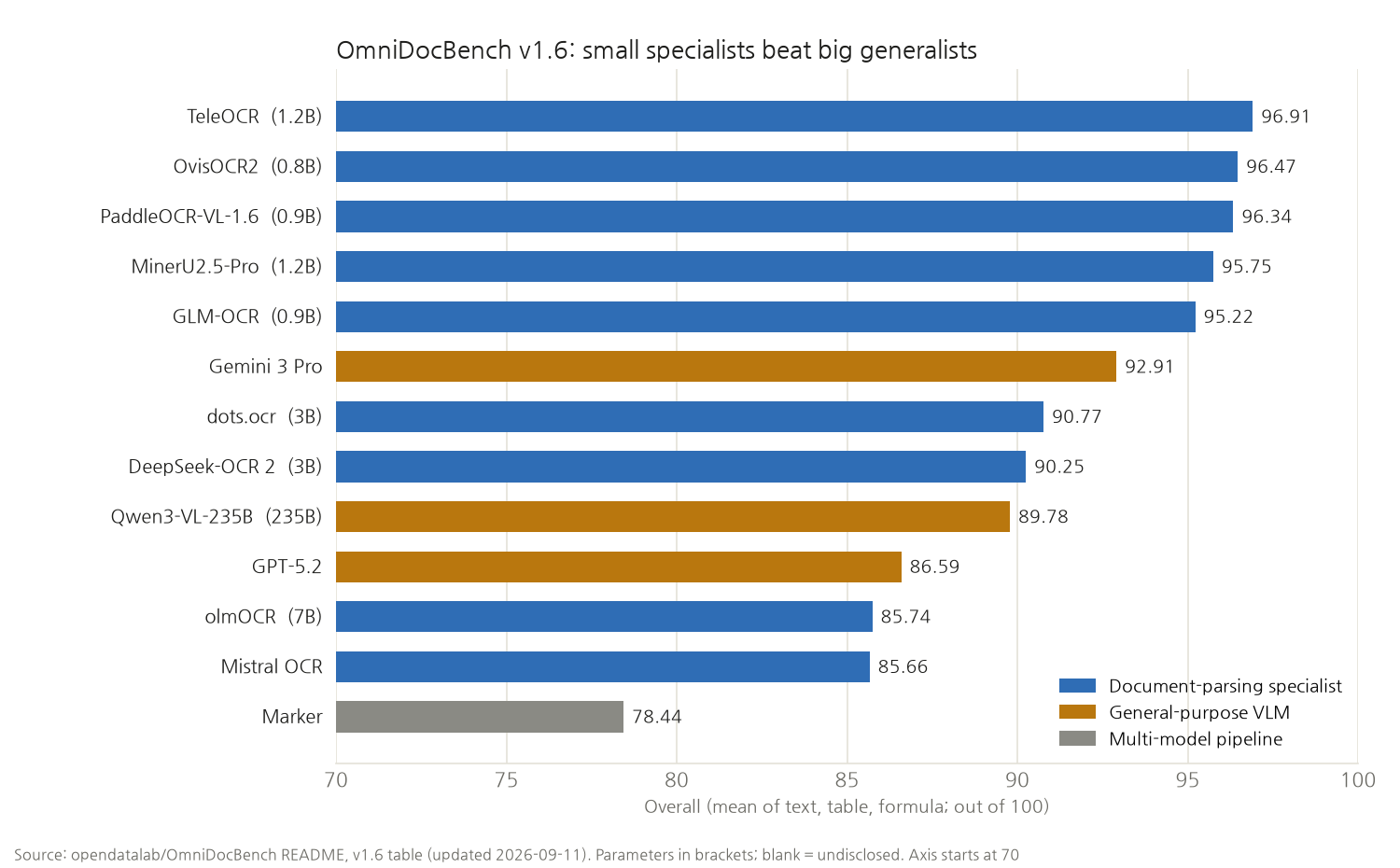
What stands out is size. In the September 2026 table of OmniDocBench, a document-parsing benchmark, places one to five all go to specialist models of 0.8B to 1.2B parameters. They score higher than general-purpose models such as the 235-billion-parameter Qwen3-VL, GPT-5.2 and Gemini 3 Pro, and they are small enough to run on a laptop GPU. In the previous version of the benchmark (v1.5), GPT-4o scored 75.02.
And they plug in through MCP
The way these models reach developers is through MCP (Model Context Protocol) servers. They hand agents such as Claude Code or Codex a tool along the lines of "turn this scanned PDF into Markdown".
| MCP server | What it does |
|---|---|
| PaddleOCR MCP (official) | Text detection and recognition (ocr), layout-preserving Markdown (pp_structurev3), VLM parsing (paddleocr_vl). Runs locally or via API |
| MinerU Open MCP (official) | PDF, Word, PowerPoint and images to Markdown. Has a free mode that needs no key |
| Docling MCP (IBM lineage) | Converts documents with a layout model and TableFormer |
| MarkItDown MCP (Microsoft) | A single tool, convert_to_markdown. More a converter from many formats to Markdown than an OCR engine |
| Upstage MCP (Upstage) | Document parsing and schema-based extraction. Needs an API key |
One gap remains for Korean users: none of these tools list Hangul word-processor files (HWP) among their supported formats. Public-sector notices in Korea are still often attached as .hwp, so in practice they get converted to PDF first.
So here is what I built: the Document Reading Dissector
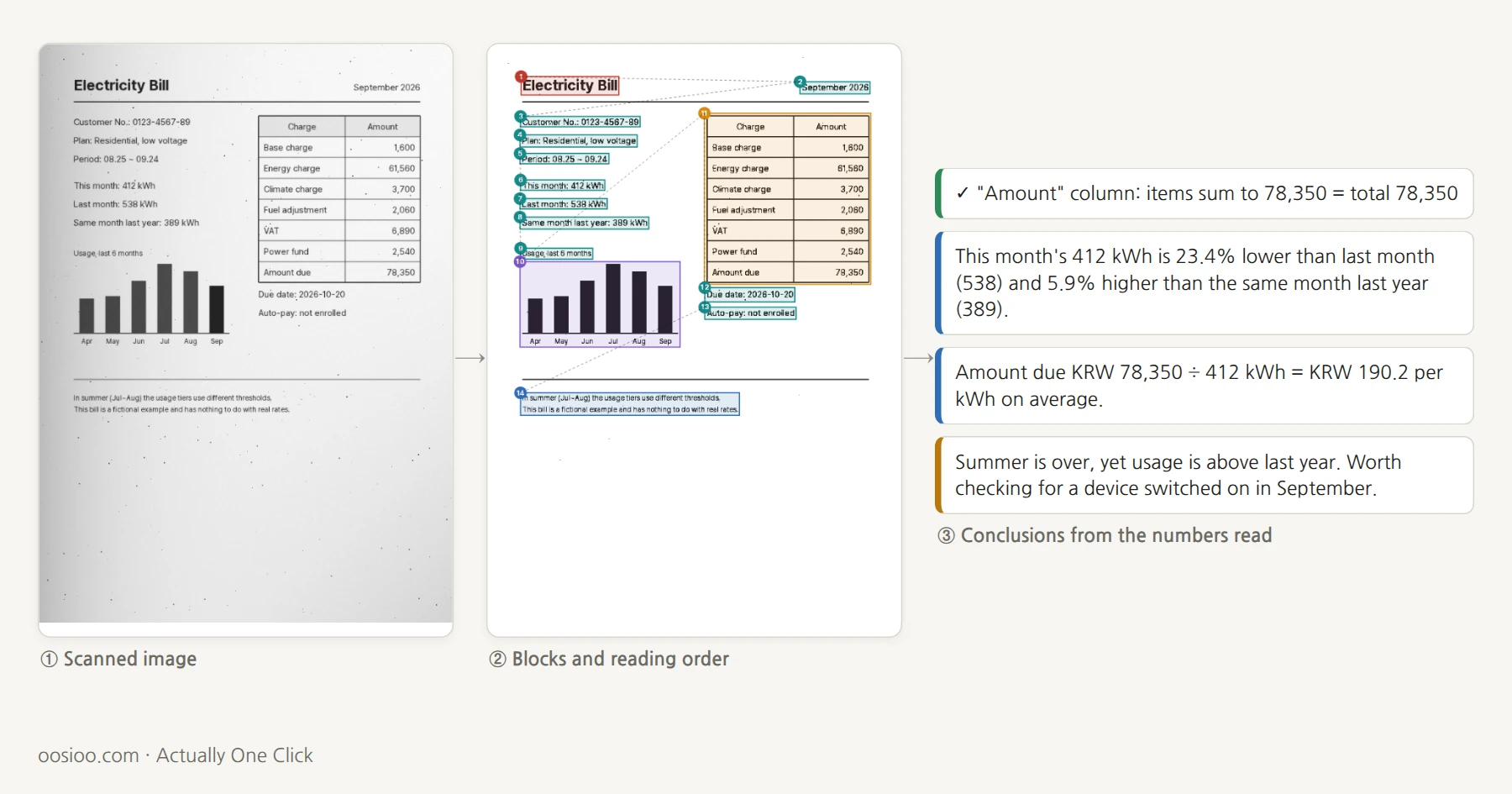
Below is the toy. It draws a fictional medical receipt, electricity bill and delivery statement in the browser, imitates a scanner by mixing in shadow, noise and blur, then reads the image in seven steps. Use the buttons at the top to move between steps; the image on the left and the explanation on the right change with them.
Everything is computed inside the article. The only outside dependency is one font.
① Scan. What the computer receives is 720×1000 gray dots. The three English documents hold 512, 456 and 324 characters.
② Preprocess. Decide, dot by dot, whether it is ink or paper. Both Otsu's method (1979), one threshold for the whole image, and Sauvola's method (2000), which sets the threshold from the brightness and contrast of the surrounding 25×25 dots, are included. Then the ink dots are rotated by trial angles and counted row by row. At the right angle the gaps between lines go empty and the profile is spikiest. On a document skewed 2.5°, it found 2.50°.
③ Find text. Touching ink dots are grouped into blobs. The dot of an i is a separate blob, and in Korean a single syllable such as 시 splits into two. Blobs whose heights overlap and that sit close together are joined into lines. Long, thin ink becomes table rules; oversized blobs become figures or stamps.
④ Layout. Lines, tables and figures become boxes for an XY cut: cut horizontally where an empty band runs across, vertically where one runs down, and repeat. The order of the cuts is the reading order. That is why, on the two-column electricity bill, the whole left column is read before the table on the right. Before a single letter is read, blocks are typed as title, key-value, paragraph, table or figure from size, shape and position alone.
⑤ Recognize. This part is deliberately old-fashioned. The 67 characters that appear in the English documents (166 in the Korean edition) are drawn in advance in the same font as templates, and each piece of the image is matched against them. It is the same idea as Tauschek's disc. But letter boundaries are not fixed first: the line is cut into small pieces, then glued back together by choosing on scores whether a shape is "rn" or "m" (dynamic programming). This is the over-segmentation approach of the 1990s. Words that are mostly digits are read once more with digit templates only.
⑥ Structure. Letters alone are not data yet. Table text goes into the cells drawn by the rules, giving rows and columns. Elsewhere, a line split by ":" or a line with a number to its right at the same height becomes a key-value pair. It is the idea LayoutLM learned from coordinates, imitated with rules. The output is Markdown and JSON, the same shape VLM document parsers produce.
⑦ Insight. The extracted numbers are used to check whether the document adds up, and to compute what a person would ask. On the receipt, it checks that each column's items sum to its total, and reports that of KRW 116,560 in total charges the patient paid KRW 52,470 (45.0%), and how much was not covered. On the bill, it reports the change in usage and the average price per kWh (KRW 190.2).
The delivery statement has a deliberately wrong row. Five boxes of A4 paper at 24,500 make 122,500, but 112,500 is written, and the subtotal, VAT and total were filled in to match the wrong figure. Because the totals agree with each other, a quick glance lets it slip. The dissector recomputes qty × unit price on every row, points to that row, and concludes the total should be 202,730.
How it did
On a clean scan of the English documents it got 145 of 1,292 characters wrong, a character error rate of 11.2% (spaces excluded). The Korean edition's documents came out at 3.9%. Latin letters sit closer together and touch more often: "rn" reads as "m", "ti" fuses into "d", and in this sans-serif font capital I and lowercase l are almost the same shape. "Item" came out as "ltem", "Patient" as "Pateat".
Then I damaged the scan one way at a time.
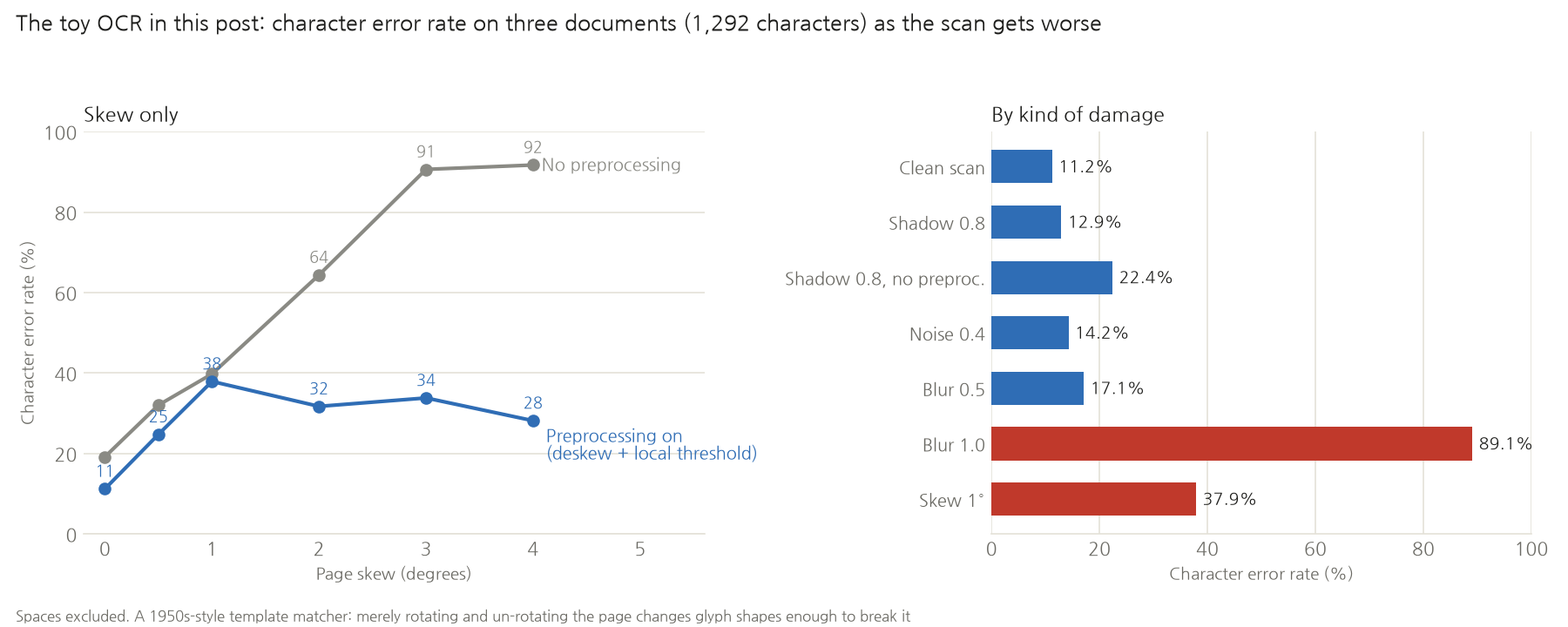
- Preprocessing handles shadow. Even with heavy shadow (0.8), the local threshold keeps it at 12.9%. Turn preprocessing off and use one global threshold and it rises to 22.4%.
- Preprocessing handles only half of skew. With preprocessing off, 3° of skew gets 91% wrong: the lines run diagonally and line splitting collapses first. With it on, the toy holds at around 30%. The lines come back; the letters only partly do (see below).
- Blur is hopeless. 17% at blur 0.5, 89% at 1.0. Once strokes run into each other, the shape to match against a template is simply gone.
The slider defaults (a little shadow, noise and blur, no skew) give 8.7%, slightly better than the clean scan, probably because the light blur thickens strokes and closes small gaps inside letters. Processing takes one to five seconds per page in a laptop browser, most of it in recognition.
Where it went wrong
The mistakes made while building it, in order. The engine was built on the Korean documents, so the examples are Korean.
- One character in five was wrong even on a clean scan. The first run on the Korean receipt had an error rate of 19.5%. The document was binarised with Sauvola, which caught strokes thick, while the templates were made with a much stricter threshold and came out thin. It was comparing the same letters at different stroke weights. Matching the template threshold to the document's brought it down to 7.7%.
- Commas and colons disappeared. The noise-removal step deleted every small dot, and "5,200" became "5200". Removal was narrowed to isolated dots with no other ink within 7 pixels. Commas still went missing: a comma hangs below the line, so it was judged not to overlap the line's height, became a line of its own, and was thrown away. Small blobs near the line's height are now attached to it.
- 사 was read as 시. In 사용, the tip of the short horizontal stroke of ㅏ touched the ㅇ of the next character. The two characters had fused into a single ink blob, which could not be split at blob level. Wide blobs now get candidate cuts at every pixel column.
- A bar chart became a "line" covering half the page. A local threshold treats a dot as ink only if it is darker than its surroundings. Inside a wide, even gray bar, everything around is dark too, so the inside was judged to be paper and only the bar outlines survived. Those outline fragments were chained together like letters into one giant line. Very dark dots are now always ink, and a line may not grow more than 1.6 times taller as blobs are added.
- 0 was read as 9. To speed things up, candidates were pre-filtered so that only the top few got a careful comparison. Three copies of the "9" template (drawn at slightly shifted positions) took all the slots, and the real answer, "0", dropped out. The clean Korean receipt jumped from 4.4% to 14.5%. Each character now gets at most two slots.
- The digit constraint wiped out words. Re-reading lines that were mostly digits with digit templates turned the label of "진료 기간: 2026-10-12" (visit date) into digits too: "0075102026-10-12". It now applies per word, not per line.
- The angle was right but the letters were wrong. This took the longest. On a document skewed 2.5°, it found 2.50° exactly and the lines came back straight. Yet the error rate rose from 3.9% to around 20% (around 30% for the English documents). Rotating an image and rotating it back resamples every pixel and softens the strokes slightly, and template matching cannot tolerate that small difference. I tried making the templates by rotating them the same way and back, and picking the threshold again for each line. Each helped a little; neither brought it back to clean-scan levels.
That last item is this toy's limit, and the reason OCR moved to learning. A template is one person-made answer to "this is what the letter looks like". Turn the paper slightly or let the ink bleed and the letter drifts away from the template, and nobody can write a rule for every drift. A learned recogniser sees millions of skewed, blurred, smudged examples and learns for itself that "this much drift is still the same letter".
A consistency check cannot tell a wrong document from a wrong reading. At the default scan settings, the dissector reads the receipt's not-covered total "25,000" as "25,900" and raises a warning: "items sum to 25,000 ≠ total 25,900". In the NHIS column it also read a 0 somewhere as a 9 and the sum came out 9 off. The document is fine. The same mechanism that caught the real error on the delivery statement raised a false alarm here. Still, a warning is better than a wrong number flowing quietly into the conclusion.
Where the latest models go wrong
VLM document parsers make mistakes too, just different ones.
- They invent text. Template matching, when unsure, produces a wrong letter; a language model, when unsure, produces a plausible one. The FaithC4 study from summer 2026 planted wrong characters in English, Chinese and Korean documents and checked whether models copied them faithfully. General-purpose VLMs "corrected" the wrong characters into real words, worsening word error rate by up to 6.9 percentage points, and rewrote up to 10% of short words of four to six letters. Traditional OCR stayed under 0.8 points. For archives that must be transcribed exactly as written, that is fatal.
- Old scans are still hard. In the Allen Institute's olmOCR-Bench, even the best models score around 50 on the "old scans" category.
- They write something even on a blank page. olmOCR said its August 2025 release fixed a problem where blank documents produced invented text.
- Compression has a price. DeepSeek-OCR gets only 60% right at 20× compression.
So the newest systems bolt on something like step 7 of this toy: add up the table totals again, check date formats, hand low-confidence fields to a person. The technology of reading has changed over 112 years, but doubting what was read still has to be done separately.
Why one line was enough
Once again the ingredients were all public. Otsu's threshold (1979), Sauvola's threshold (2000), finding skew from the projection profile, grouping connected components, the XY cut (1984), over-segmentation followed by dynamic programming. All textbook methods, and the AI assembled them into one file.
That is where one line stopped being enough. The seven mistakes above were invisible until the documents were actually damaged and compared letter by letter with the ground truth. The first version also looked convincing on screen. Only after adding a line that counted the error rate did it become clear that one letter in five was wrong.
If you want to try it
- Start with documents whose answers you know. Here the documents were drawn by the program, so the correct text and position of every letter were known, and each change could be measured as a change in error rate. Start from someone else's scan and you cannot even tell whether it is wrong.
- Break one thing at a time. Adding skew, shadow, noise and blur separately is what shows which step is weak. Here, skew and blur were the weak spots.
- For real work, plug in an MCP server. Once the toy has shown the principle, real documents belong with the PaddleOCR or MinerU MCP servers in the table above. A 0.9B–1.2B model reads far better than this toy.
- Always add a consistency check. Whatever OCR you use, a few lines that re-add the totals catch wrong numbers. A person still has to decide whether the document or the reading is wrong, but at least it tells you where to look.
What it can't do
- It knows the font in advance. The templates were made in the same font, which is close to cheating. Other fonts, handwriting and photographed documents are out of reach.
- It reads only characters it knows. Only the characters that appear in the three documents have templates. Anything else is read as the closest-looking known character.
- It tells documents apart by their titles. Words such as "Receipt", "Electricity" or "Statement" have to appear in the title, and the insight rules were written for these three documents.
- Tables need all their rules drawn. A table aligned only by spacing, without lines, cannot be split into cells.
- It is weak against skew and blur. Even 1° of skew pushes the error rate past one letter in three for the English documents.
- The documents are all fictional. The clinic, people, companies and numbers are made up.
The person using the optophone 112 years ago recognised letters by ear. Today a 1B model reads tables and formulas, and an agent takes that and does the arithmetic. Still, turn the sliders above just a little and you can see how precarious reading remains.
If you enjoyed this, please leave a comment.
Sources
- Optophone: E. E. Fournier d'Albe, On a type-reading optophone, Proc. Royal Society A 90 (1914)
- Tauschek: US 2,026,329 Reading Machine (filed 1929, granted 1935)
- ERMA and MICR: Computer History Museum, ERMA Can Do It
- US Post Office OCR: USPS, The United States Postal Service: An American History
- Kurzweil: Electronic Design interview, Lemelson-MIT
- LeCun: official biography; Backpropagation Applied to Handwritten Zip Code Recognition, Neural Computation 1(4) (1989)
- Tesseract: GitHub README, 4.0.0 release
- CTC Graves et al. 2006, CRNN arXiv 1507.05717, EAST 1704.03155, CRAFT 1904.01941, LayoutLM 1912.13318, Donut 2111.15664, TableFormer 2203.01017, Nougat 2308.13418
- GPT-4V OCR evaluation: arXiv 2310.16809
- olmOCR 2502.18443 and repository, DeepSeek-OCR 2510.18234, PaddleOCR-VL 2510.14528, MinerU 2.5 2509.22186
- OmniDocBench: opendatalab/OmniDocBench README, v1.6 table (updated 11 September 2026); v1.5 table on the v1_5 branch
- FaithC4: arXiv 2607.21617
- Google Books: 15th anniversary post (2019), counting the world's books (2010)
- Otsu's threshold: N. Otsu, A Threshold Selection Method from Gray-Level Histograms, IEEE Trans. SMC (1979). Sauvola's threshold: J. Sauvola and M. Pietikäinen, Adaptive document image binarization, Pattern Recognition 33 (2000). XY cut: G. Nagy and S. Seth, Hierarchical representation of optically scanned documents, ICPR (1984)
- Photos: optophone, Wikimedia Commons (public domain); Kurzweil reader, Wikimedia Commons (Beatrice Murch, CC BY-SA 2.0)
- The dissector screens and error rates were all produced with this article's toy, measured in headless Chrome with the Pretendard font; they may vary slightly by device and font

