I Fed It One Article and Got a Narrated Video Back — Handing Script, Voice, and Footage Search to AI for 1 Minute 17 Seconds
Feed it an article, and AI writes the script, reads it aloud with TTS, finds footage and photos, attaches sources, and stitches it all into a narrated video. Here's what happened when I tested it with the AG1 story, how it compares to similar services at home and abroad, and where YouTube draws the line.
Scroll through YouTube long enough and you'll find no shortage of narrated videos where a human face never once appears. The screen cuts between footage and photos every two or three seconds, captions run along the bottom, and a calm voice carries the story forward. Brand stories, economic news, history explainers — they all come in this shape.
I got curious about this format. The text already exists. Could I build a tool that takes that text, writes a script from it, adds a voice, finds the footage to put on screen — sources attached — and bundles it all into a single video? So I built one.
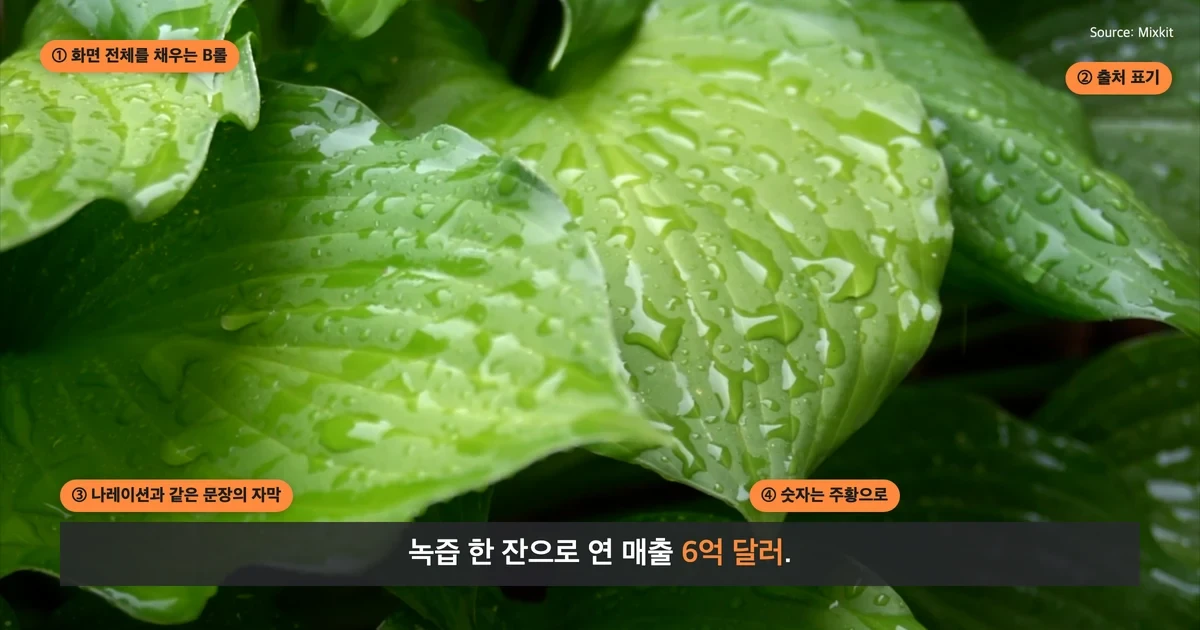
Breaking down a single frame
These videos are usually built from four elements.
- Full-screen B-roll. Real footage or photos that match the story.
- Source citation. A small "Source: XX" in the upper right.
- Captions. The same text as the narration, laid along the bottom of the screen — because plenty of people watch with the sound off.
- Emphasis. Numbers or key terms get a color to catch the eye first.
Making one by hand means writing the script, recording the voice, finding the footage, cutting it, and adding captions — all of it. The part that takes longest is finding the footage, since you need the right image for every single sentence.
Splitting it into five stages
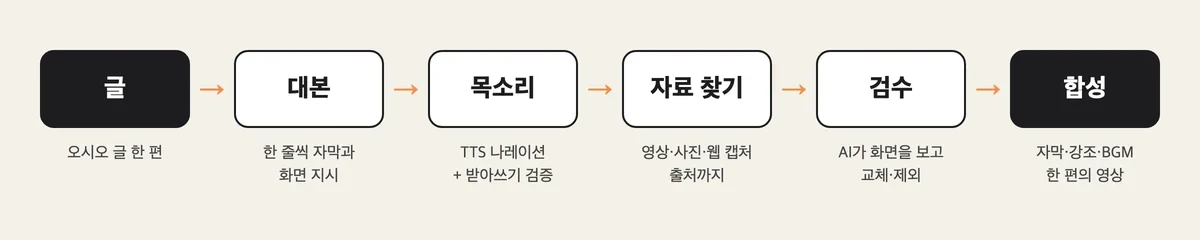
- Script. The AI reads the article and breaks it into caption-length lines to write the narration script. Each line also carries an instruction for what should be on screen — whether it calls for stock footage, a product photo, or a screenshot of the source article.
- Voice. The script gets read aloud by TTS. How numbers and English words should be read in Korean had to be worked out as a separate set of rules — left alone, it would mangle something like "600 million" or "AG1." After the read-through, a transcription model listens back and flags any passage that doesn't match the script.
- Finding footage. Candidates get gathered for every line — free stock video, matching clips from YouTube, image search results, even screenshots of article web pages. An image model scores the candidates for how well each matches the sentence and picks the best one, filtering out anything with a visible watermark. The source of every chosen clip gets logged.
- Review. The AI looks back over each chosen frame one by one and swaps out anything irrelevant, any ads, or any mislabeled map.
- Composite. The cuts get stitched together, captions and sources are laid on top, and narration and background music are added.
Building the voice first turned out to be the trick. Once the voice exists, you know how many seconds of screen time each line needs — and only then do you go looking for the exact clips you'll actually use.
Testing it with the AG1 story
The first test article was a short brand story: how AG1, a green nutrition powder that cleared $600 million a year in revenue, wasn't really selling nutrients but the feeling of being "someone who takes care of their body."
The result was a 1-minute-17-second video. The script ran 29 lines across 30 cuts — 16 video clips, 12 photos, and 2 webpage screenshots. Nine cuts came from free stock footage, seven from actual ads and interview clips pulled from YouTube. The founder's story brought up interview footage, the product story brought up pouch photos, and the podcast-ad story brought up an ad-spend data page. A 30-line source list for the video description was also generated automatically, each entry timestamped to when it appeared.
For a first attempt, it looked convincing. But looking again, the gaps showed.
- Numbers got buried. Figures like "$600 million" and "75 ingredients" were rendered in the same white as everything else. In this format, numbers are supposed to be the first thing the eye catches. So I added a step to automatically find numbers and units and color them orange.
- The highlighter landed in the wrong place. I had it highlight the sentence in an article screenshot that backed up a claim, but instead of "75 ingredients" it highlighted "Minerals" in the corner of a table. Matching text visible on screen is a different task from knowing whether that text actually supports the sentence.
- Citing a source isn't the same as being cleared to use it. The citations themselves were attached correctly, but photos pulled from Pinterest or image aggregator sites had murky original authorship. Disclosing a source and verifying the material is actually usable are two separate checks.

after this test, a few more steps got added: one that cross-checks whether the script invented any figures not in the original text, one where the AI reviews the frames itself, and one that rereads the finished video at one-second intervals and blocks export if even a single forbidden label turns up.
Who's already doing this
Once I'd built it and went looking, this turned out to be a crowded lane already.
| Service | What it does |
|---|---|
| Lumen5 | Feed it a blog post URL and it picks sentences and images to draft a video. Something like the original text-to-video tool |
| Pictory | Turns a script or article into an edited video with stock clips, AI voice, and captions |
| Fliki | Turns text into video with over 80 languages and more than 2,000 AI voices |
| CapCut Script to Video | Drafts a video for free, from script through stock sources, narration, and captions |
| Google Vids | Built for work. Gemini writes a scene-by-scene script and an AI voiceover. Korean voiceovers have been available since February this year |
| Synthesia·HeyGen | An AI avatar reads the script instead of B-roll. Synthesia was valued at $4 billion this past January |
Korea is moving fast too. Voyager X's Vrew has a "Text to Video" feature that generates script, images, and voice all at once, and editing the captions edits the matching video cuts too. Neosapience's Typecast, an AI voice-acting service, has passed 2.6 million cumulative sign-ups. ElevenLabs formally launched in Korea in Seoul last November. On the commerce side, Vcat mass-produces ad videos from nothing but a product URL.
Broadcasters got there even earlier. MBN rolled out its AI anchor Kim Joo-ha in 2020, trained on 10 hours of footage of the real anchor, claiming it could turn a 1,000-character script into video in under a minute. YTN unveiled two AI anchors of its own in 2023.
Caption emphasis has become its own genre too. The so-called 'Hormozi-style captions' — words lighting up one at a time with key terms changing color — have become standard short-form grammar, and tools that automate just that one effect have turned into businesses. Even the slow push-and-pull effect on photos carries a documentary director's name: Apple called it the Ken Burns effect when it added it to iMovie in 2003.
Easier also means more of it
When something gets this easy, there's a cost. The video-editing service Kapwing's AI Slop Report, published last November, found that of the first 500 Shorts shown on a new account, 21% were low-quality AI video. And the country with the most views on these channels was Korea — 11 channels had cleared 8.4 billion views combined.
YouTube has started drawing a line too. In July 2025, it renamed its "repetitive content" policy to "inauthentic content" and cut videos stamped out from near-identical templates off from monetization. Synthetic content that looks real now has to be disclosed as AI-made at upload — synthetic voice narration is listed as one example. Using AI isn't the problem by itself. What draws scrutiny is mass production stripped of human commentary and editorial judgment.
So I don't plan to run this tool as a video factory. A person writes the text; AI's job is just to carry that text onto the screen. Sources get disclosed, the script gets checked against the original for anything invented, and at the end, a person watches it play through once.
The feel of one click
It was striking that one click produced a 1-minute-17-second video. But what actually stuck with me was everything after that: coloring in a single number, catching a highlighter stroke that landed on the wrong word, filtering out a photo with a murky source. Making the video turned out to take less effort than making the video trustworthy.
Anyone can make a video now. The difference comes down to what you filter out.