How Does a Robot Barista's Arm Decide Its Pose? — Solving the 56 Seconds a Collaborative Robot Takes to Make a Latte with a Pose Solver
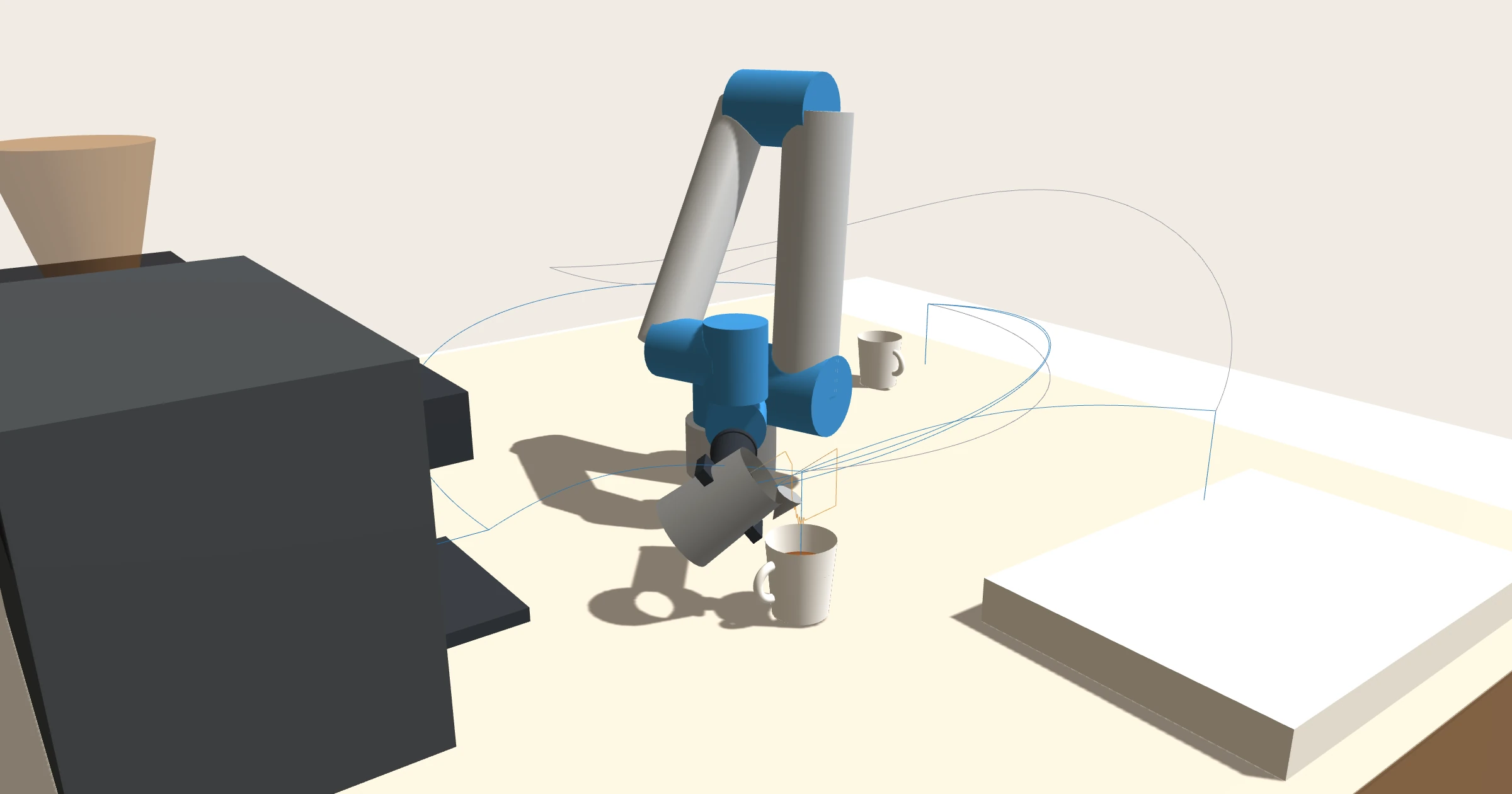
Most robot arms making coffee in cafés are collaborative robots, industrial robots built to work beside people without a fence. I look at what cobots are and how they spread, and how far robot baristas have come in Korea and abroad. Then I built a pose solver that makes one latte with the most common form, a 6-axis arm (UR5e published dimensions). Give it a tool position and it computes eight candidate arm shapes, then picks one that hits nothing and gets there fast. It plans paths that keep the cup from spilling and slows down when a customer comes close. For the same tool point, choosing the wrong arm shape flipped the cup 180 degrees on the way. Solving 2,000 random poses numerically found answers for only 77%, and just 32% matched the chosen solution. Using the standard separation formula as is, the robot stopped as soon as a customer stood at the pickup shelf.
These days you sometimes see a robot arm making coffee in a café or at a highway rest stop. It picks up a cup, slides it under the machine, pours milk when the shot is done, and sets the cup on the pickup shelf. To the people watching it is a novelty. From the arm's side, though, there is one problem to solve at every moment. To put the tool at that spot, facing that way, how far should each of the six joints turn? And how does it get there from where it is now without hitting anything or spilling the cup?
This time I built a program that solves that problem: a pose solver that works out, from start to finish, how a robot barista makes one latte.
What I set out to do
- Explain what a collaborative robot is, how it differs from an ordinary industrial robot, and what standards and market it sits on.
- Collect robot barista cases in Korea and abroad, including the ones that closed.
- Assume the most common form on factory floors, a 6-axis collaborative robot, using the dimensions Universal Robots publishes for the UR5e.
- Build an inverse kinematics solver that turns a tool position and direction into joint angles, plus a rule for choosing one answer when there are several.
- Plan every motion of one latte, from picking the cup through extraction and pouring milk to setting it on the pickup shelf, and show it in 3D. Check collisions, cup tilt and the gap to customers along the way.
- Compare several methods under the same conditions and record the numbers.
Research on cases and standards went to an AI agent. I told it to prefer company announcements, standards texts and papers, and to mark any number it could not confirm as unconfirmed. The solver, the 3D view and the experiments were also built and run by an AI agent.
A cobot is an industrial robot that stepped outside the fence
Industrial robots in factories normally live behind wire mesh. They are fast and strong, and anyone who steps into their reach gets hurt. So they are fenced off and stop when the gate opens. Korea's occupational safety rules also make a fence at least 1.8 m high the default.
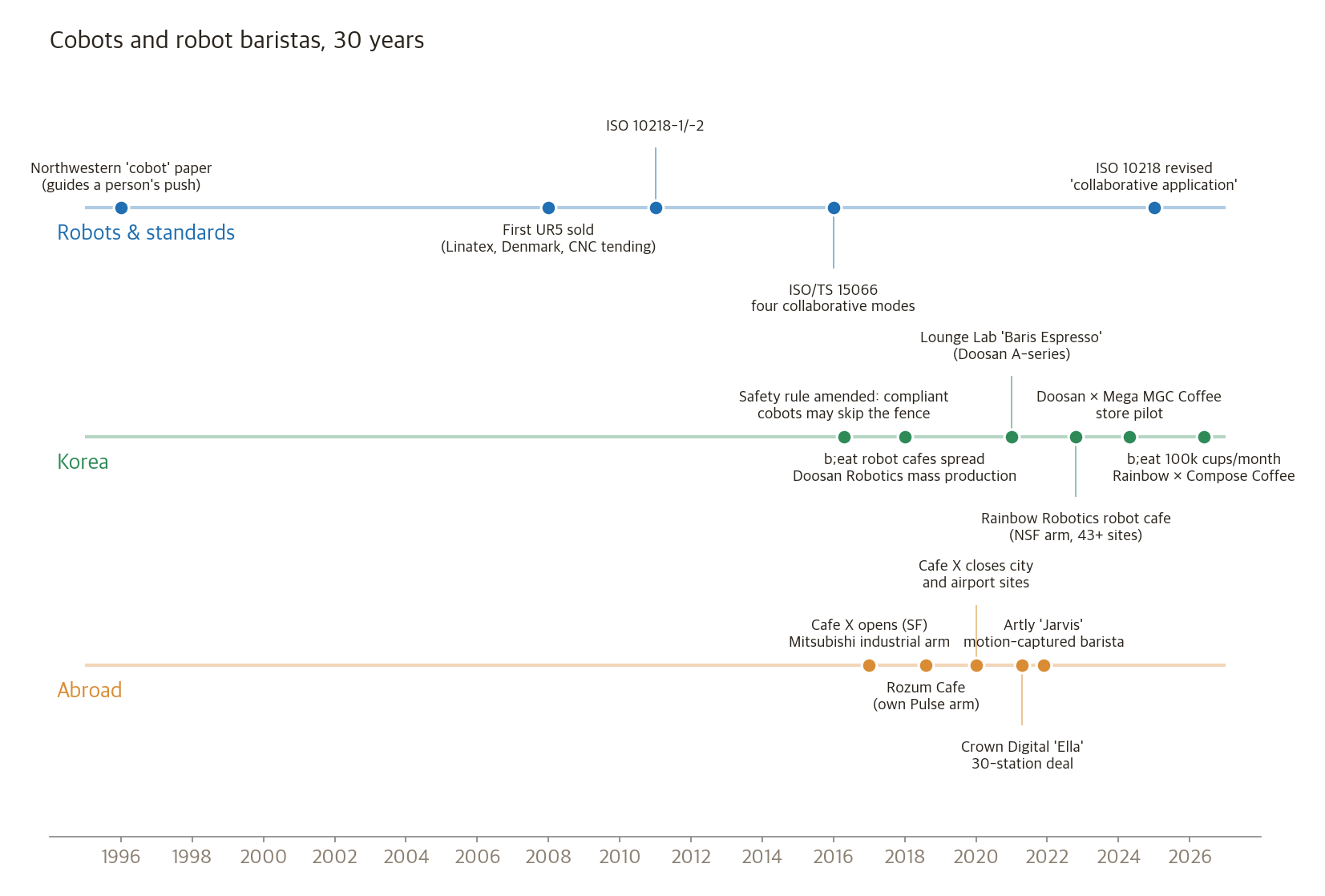
A collaborative robot (cobot) is a robot built so that fence can come down. The word comes from a 1996 paper by J. Edward Colgate and Michael Peshkin at Northwestern University. Their cobot, unlike today's arms, took the push of a person and only steered its direction. It helped car assembly workers move heavy parts.
The form we see today began at Denmark's Universal Robots (UR). In December 2008 a Danish company, Linatex, bought a UR5 to load and unload a CNC machine. UR calls this "the first commercially viable collaborative robot." There is a reason it does not say "the world's first": the 1996 cobot came earlier.
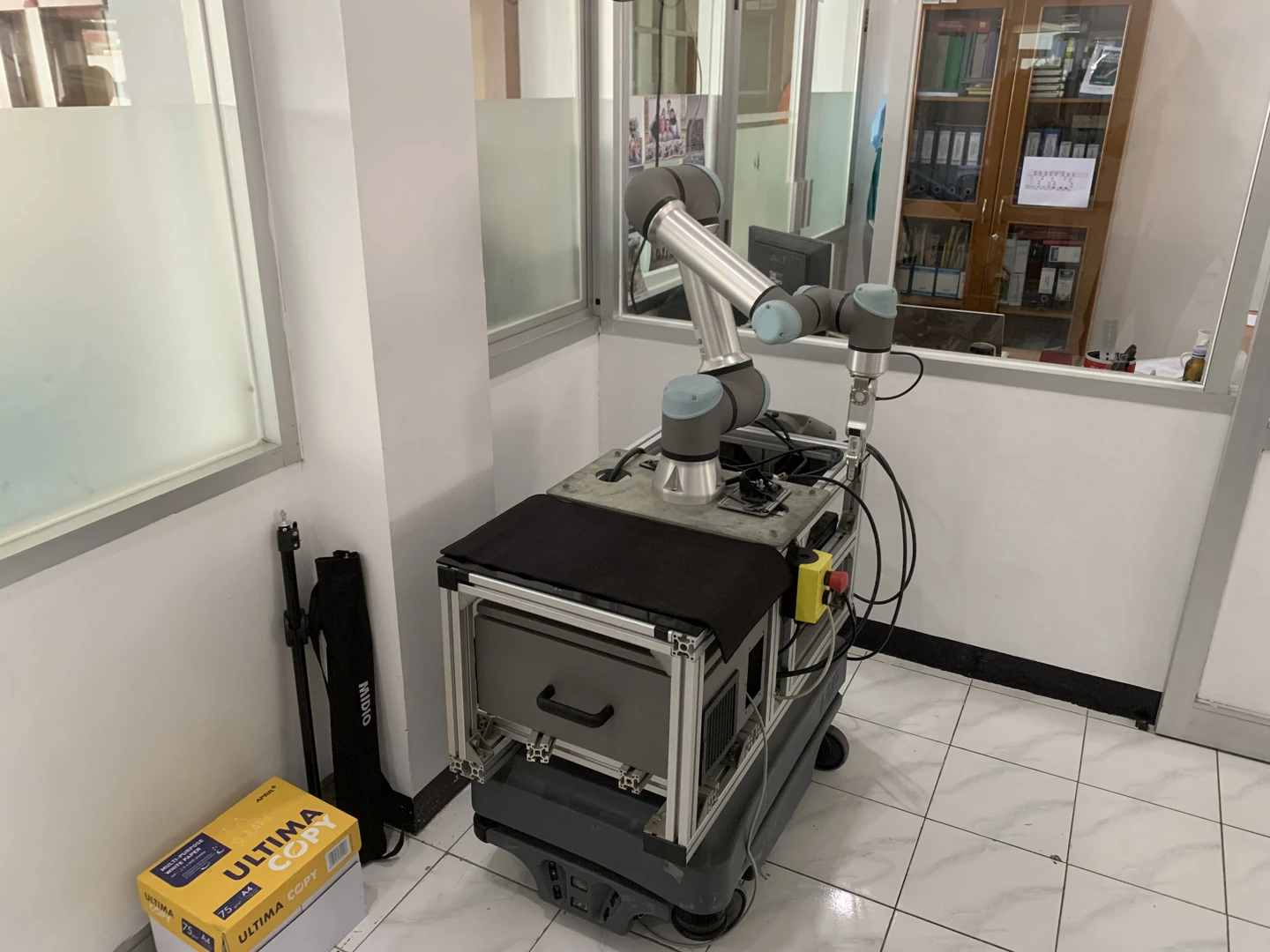
A UR5e, the model whose dimensions this solver borrows. Photo: Dzikra muhammad Imtiyaz, CC BY-SA 4.0, Wikimedia Commons
Four ways to work without a fence
The case for working beside people rests on standards. The basic robot safety standard is ISO 10218 (2011), and the details of collaborative operation were set by ISO/TS 15066 in 2016. Working with people falls into four modes.
| Mode | What it does |
|---|---|
| Safety-rated monitored stop | The robot stops and waits when a person enters the workspace |
| Hand guiding | A person grabs the arm and moves it directly |
| Speed and separation monitoring (SSM) | The robot measures the distance to people, slows as they get closer and stops if they get too close |
| Power and force limiting (PFL) | Force and speed are capped from the start so a collision does not injure |
The last mode comes with limits for each body region. According to sources quoting the standard's annex, the force a body can bear when pressed is 140 N for the hand and fingers, 140 N for the chest and 65 N for the face. This is why most cobots measure torque at every joint: they notice contact through force and stop.
In 2025 ISO 10218 changed substantially for the first time in 14 years. Most of TS 15066 moved into the main standard, and the term "collaborative robot" itself was dropped. The position is that collaboration is a property of how a robot is used, not of the robot. Hand the same arm a knife and it is no longer collaborative. In Korea, an April 2016 rule change lets collaborative robots that meet KS or international standards skip the fence.
The market is still a tenth of industrial robots
According to the International Federation of Robotics (IFR) World Robotics 2026, 603,000 new industrial robots were installed worldwide in 2025, crossing 600,000 for the first time. Cobots made up 11%. They grew 7%, slower than the overall market (11%) for the first time since IFR started counting. Korea installed 30,000 robots in 2025, fourth in the world. Korean cobot makers include Doosan Robotics, Rainbow Robotics, Neuromeka and Hanwha Robotics.
The most common form: six axes, three of them parallel
Most cobots are vertical articulated arms with six joints. Three numbers for position (x, y, z) plus three for orientation make six things to match, so six joints is the minimum. Arms with seven joints, like KUKA's LBR iiwa, exist but are rare.
The UR5e assumed here is a typical example. It carries 5 kg, reaches 850 mm and returns to the same spot within ±0.03 mm. Every joint turns ±360°, at up to 180° per second. UR publishes the lengths and twists between joints as a table (DH parameters). With that table you can compute the arm's geometry exactly.
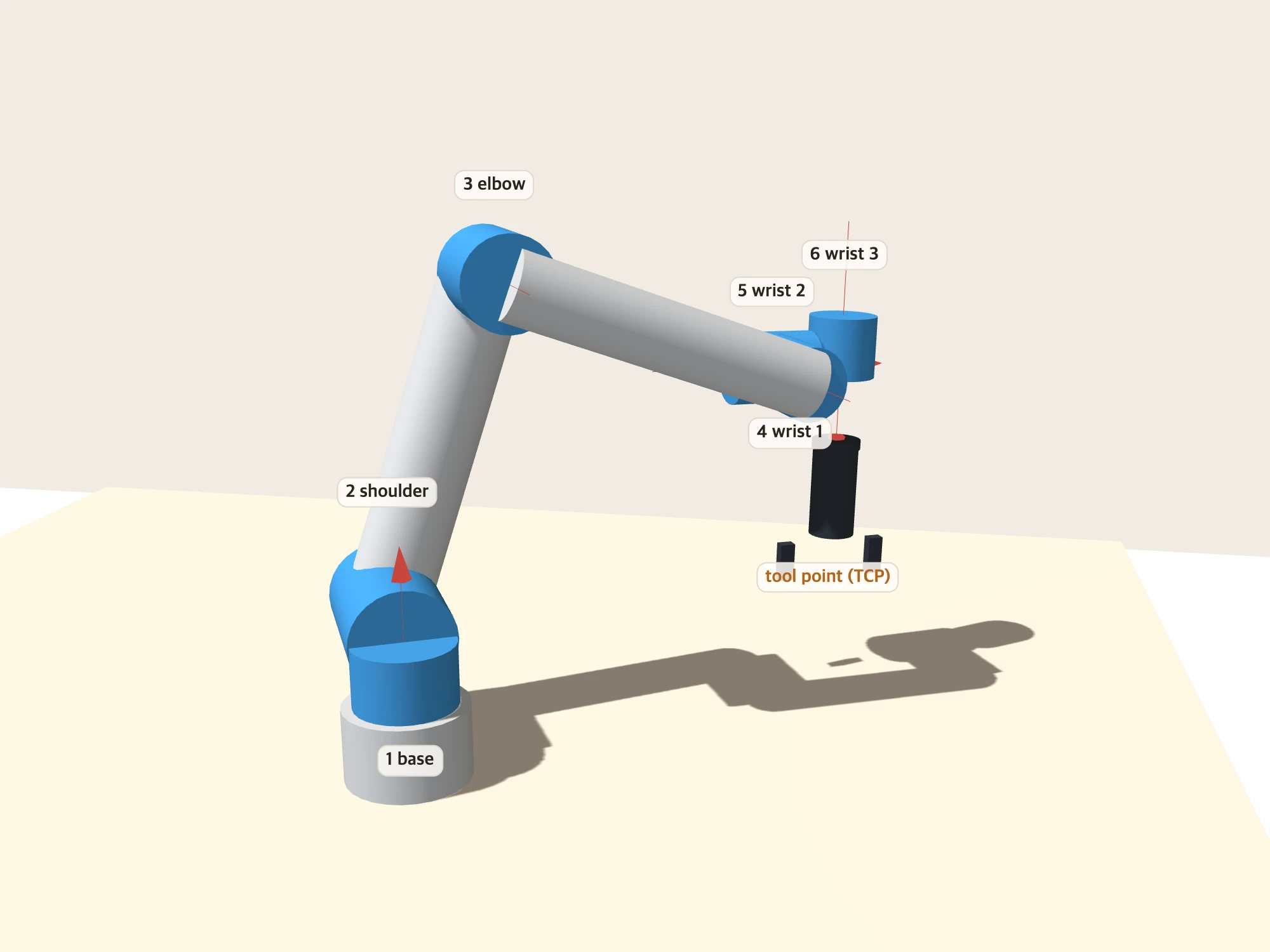
UR-type arms have one notable feature. Axes 2 (shoulder), 3 (elbow) and 4 (wrist 1) are parallel. The upper arm, forearm and wrist 1 fold and unfold in one plane. It is not the textbook design where the three wrist axes meet at one point, but those three parallel axes let you solve the joint angles in closed form. This property returns later when we carry the cup.
How far robot baristas have come
Korea
- b;eat robot café. It began at Dal.komm Coffee and is now run by Beat Corporation, part of the Danal group. It spread from 2018, and its store count has stalled around 270. In 2024 it posted 7.4 billion won in revenue and a 4.5 billion won operating loss, its fifth straight year in the red. In June 2026 it passed 100,000 orders in a month for the first time. The robot works inside a glass booth, closer to separated automation than to collaboration beside people. I could not confirm the arm model from public sources.
- Lounge Lab. "Baris Espresso" puts a Doosan Robotics A-series cobot on a rotating rail. It is the company's third barista robot, after one for hand drip and one for canned drinks.
- Doosan Robotics × Mega MGC Coffee. In 2024 a barista cobot was piloted at the Konkuk Univ. Star branch in Seoul. It links a grinder and a semi-automatic machine and prepares the next cup while one is extracting. Doosan launched its E-series, certified for food hygiene (NSF), for food and beverage in 2023.
- Rainbow Robotics. It unveiled a robot café platform in 2022 and runs it at more than 43 sites, including highway rest stops and universities, with NSF-certified cobots. In June 2026 it announced a robot barista partnership with Compose Coffee.
Abroad
- Café X (San Francisco). Opened in January 2017. Its robot was not a cobot but a Mitsubishi 6-axis industrial robot, enclosed in a glass kiosk. In 2020 it closed its three downtown stores and moved to airports, then closed those too when the pandemic hit that year.
- Crown Digital "Ella" (Singapore). A Techman cobot arm in a kiosk of about 5 m². Up to 200 cups an hour; in 2021 it signed a deal for 30 Singapore metro stations.
- Artly Coffee (Seattle). It fitted a barista champion's arm with motion capture gear and transferred the latte art pouring motion to a robot. A camera on the arm photographs the result for evaluation.
- Rozum Café. It sells a package of its own 6-axis "Pulse" arm and a commercial espresso machine. A cup takes under three minutes, and it has expanded into the Middle East.
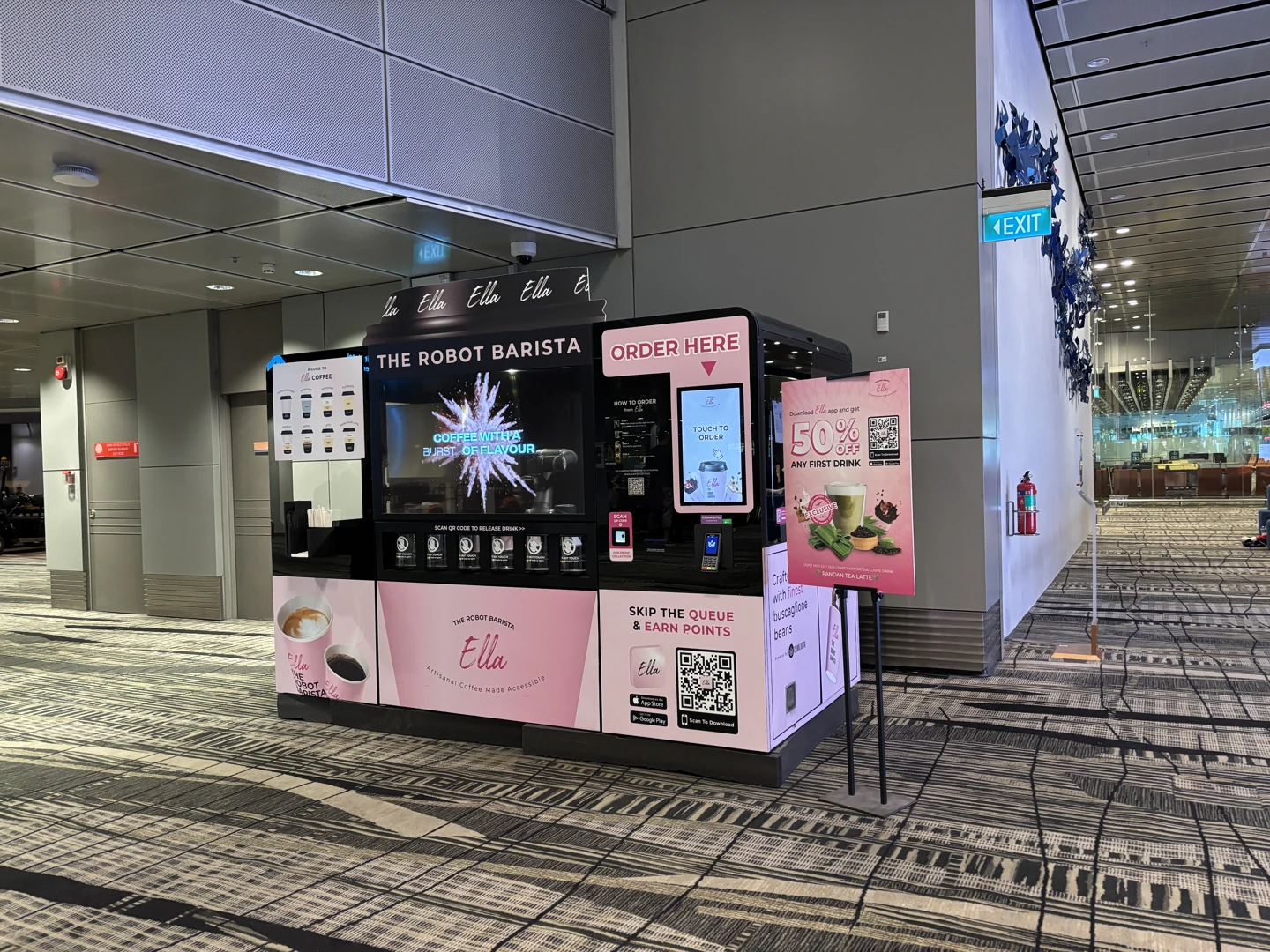
A robot barista kiosk at Changi Airport Terminal 3 (October 2024). Photo: Nick-D, CC BY-SA 4.0, Wikimedia Commons
The upsides that come up again and again in coverage are 24-hour unstaffed operation, consistent taste, a small footprint and spectacle. The downsides repeat too. High upfront cost, a broken machine means a closed store, menus are hard to expand, and once the novelty wears off people stop coming back. It also stands out that most robot cafés separate people and robots with glass. The experiments later put a number on why.
The problem: one tool point, eight arm shapes
Think of the moment a robot barista picks up a cup. The cup sits at a fixed spot on the counter, and the gripper has to grab its side horizontally. The tool's position and direction are fixed. Turning that into six joint angles is called inverse kinematics. The opposite, forward kinematics, finds the tool position from joint angles by multiplying six matrices. The reverse is not that simple.
On a UR-type arm, one tool point has up to eight solutions. Shoulder turned left or right, elbow bent up or down, wrist raised or lowered: 2 × 2 × 2 = 8. In all of them the tool is at the same spot facing the same way. Only the arm shape differs.
This solver computes the eight directly by formula, following a 2013 Georgia Tech technical report (Hawkins). I built tool points from 2,000 random sets of joint angles and solved them back; every solution returned to the original spot, with errors around 10⁻¹² m. Solving one point took 0.012 ms.
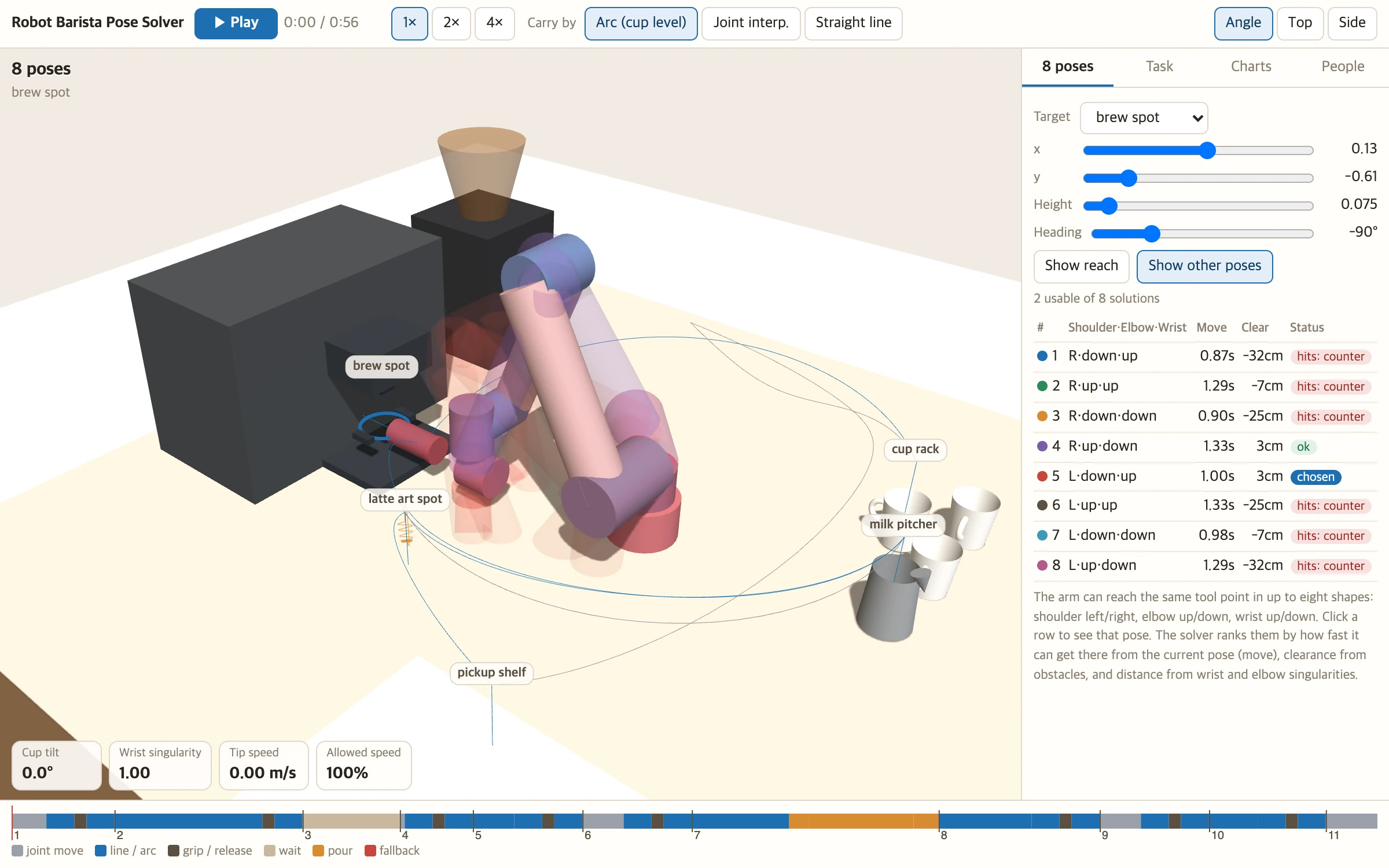
Not all eight are usable. Solve for placing the cup under the brew spot, and in six of them some part of the arm goes below the counter. With the wrist lowered, the wrist block pierces the counter; in some elbow-down shapes the upper arm dips under it. The solver picks one of the remaining two.
How it chooses
The solver scores each remaining solution.
- Move time. The time the slowest joint needs to get from the current pose to that pose. Shorter is better.
- Clearance. The closest distance between the arm and any obstacle. Wider is better.
- Distance from singularities. A singularity is a pose where the arm can no longer move in some direction. Typical ones are the arm fully stretched (elbow singularity), the wrist directly above the base (shoulder singularity), and wrist 2 at 0° so that the wrist 1 and wrist 3 axes line up (wrist singularity). UR lists these three in its own documentation. Near a singularity, moving the tool a little can require joints to turn a lot.
- Joint limits. Because UR5e joints turn ±360°, the same solution exists wound once more or once less. The solver uses the one closest to the current pose.
Solutions that collide or sit too close to a singularity (|sin θ| below 0.08) are dropped, and the best score among the rest wins.
Why it matters which of the eight you pick
I tested this by carrying the cup from in front of the brew spot to above the latte art spot. For each of the eight arm shapes at the destination, I interpolated the joint angles in a straight line (all joints start and finish together).
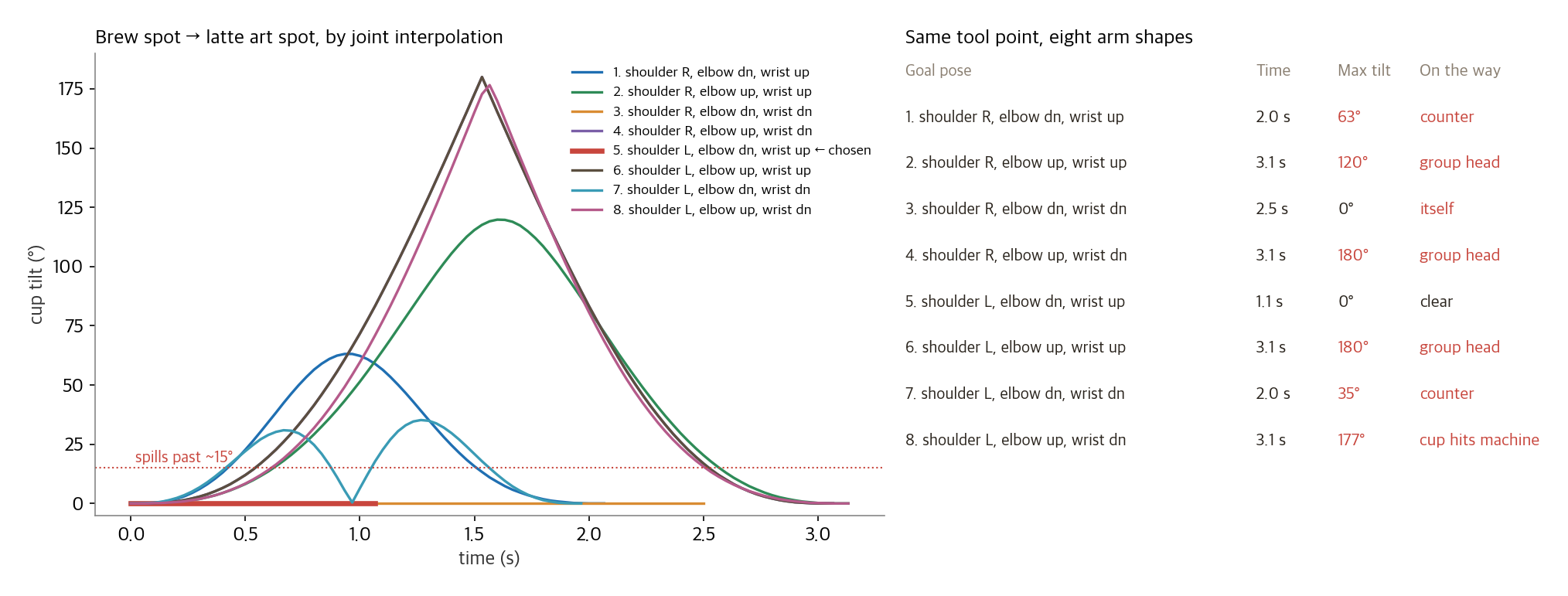
Looking only at the destination, four were fine. Looking at the whole way there, only one remained. Go to another solution and the arm flips over, tilting the cup 120° to 180° and knocking the cup it holds into the machine's group head. Same tool point, one different arm shape, and the coffee is on the floor.
The solver picked the solution with the shortest move time, and this time that one also had a clean path. There is no guarantee it always will. So for segments with a cup in hand, the solver checks the whole path, not just the goal. More on that below.
Solving by formula vs creeping closer
The other way to solve inverse kinematics is numerical. Start from some pose, see how far the tool is from the target, and adjust the joints a little at a time. It works even for arms without a formula (seven joints, unusual structures), so general-purpose libraries usually take this route. I implemented a method called damped least squares (DLS) and had it solve the same 2,000 random poses starting from the rest pose.
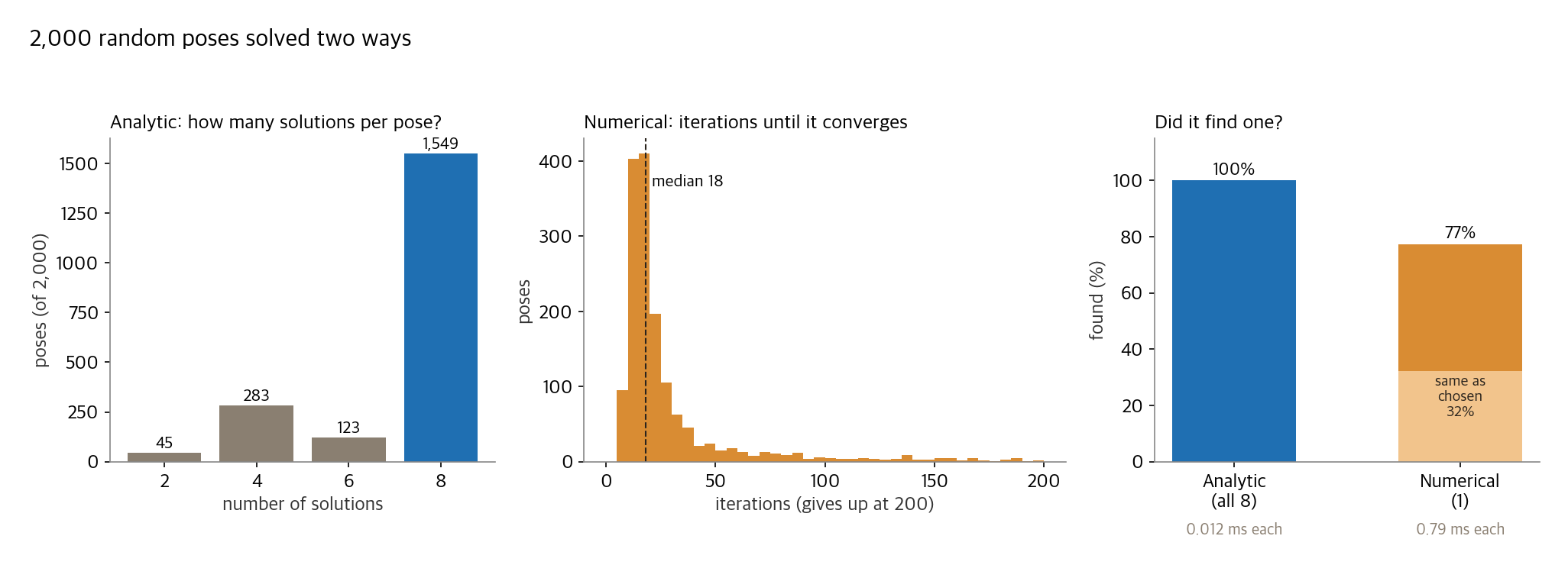
The numerical method found an answer for 1,547 of the 2,000 (77%). The median was 18 iterations, but 453 still had no answer after 200. The bigger problem is that you cannot choose which arm shape you get. It simply rolls into whichever solution is near the start. Its answer matched the one the solver chose by score in 644 cases, 32% of the total. The rest could be arm shapes that flip the cup, as in the previous experiment. The analytic solution was also about 60 times faster.
Robot software used in industry mixes the two. OpenRAVE's IKFast (2010) generates analytic solver code from an arm description, and TRAC-IK (2015) lowered the failure rate of numerical solving.
Where the cup can be gripped
I solved for gripping an upright cup from the side at every 2.5 cm cell on the counter. For the gripping direction I tried 24 headings, 15° apart, and kept the best.
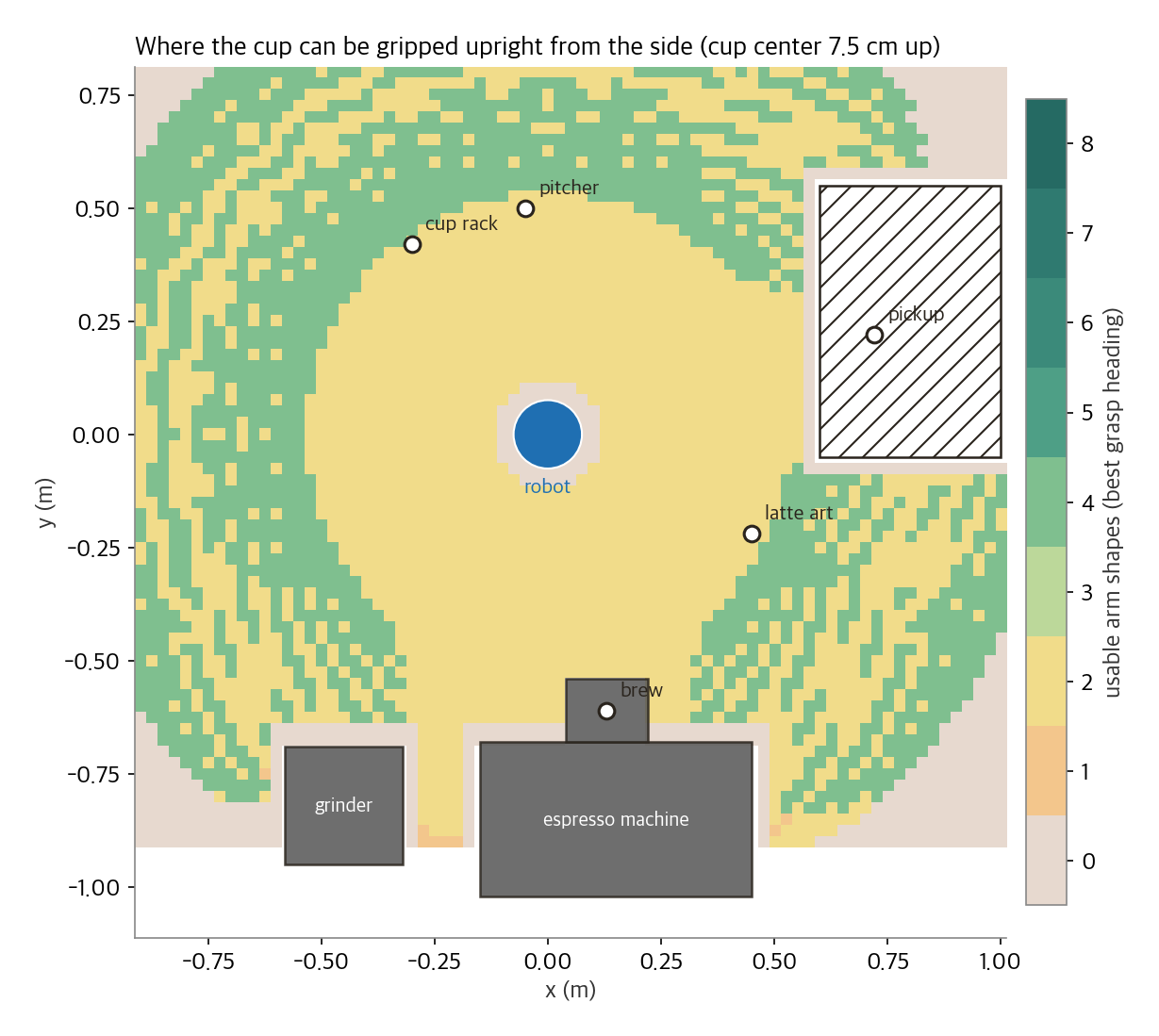
Within 10 cm of the robot's base and beyond 1.05 m, nothing could be gripped. The inner zone is where the wrist would have to sit right above the base, the shoulder singularity; the outer zone is out of reach even with the arm fully stretched. In between, the number of usable arm shapes was either 2 or 4. Not a single cell had all eight usable. As long as the cup is gripped low, a lowered wrist always catches the counter.
Carrying the cup
Choosing a pose does not make coffee by itself. There has to be a path from the current pose to the next. A barista robot adds three conditions: hit nothing, keep the cup from tilting while holding it, and do not move so fast the coffee sloshes.
I compared three methods on the same latte.
- Joint interpolation. Set only the start and goal joint angles and connect them smoothly. The simplest and fastest. But you only find out which way the tool goes by computing it.
- Straight line. Move the tool in a straight line from start to goal. Re-solve inverse kinematics every 4 mm and chain the solution closest to the previous pose.
- Arc. Interpolate radius, angle and height around the robot's base separately, moving the tool in a curve. The cup stays level the whole time, and tool speed while holding the cup is capped at 0.3 m/s. This is the solver's default.
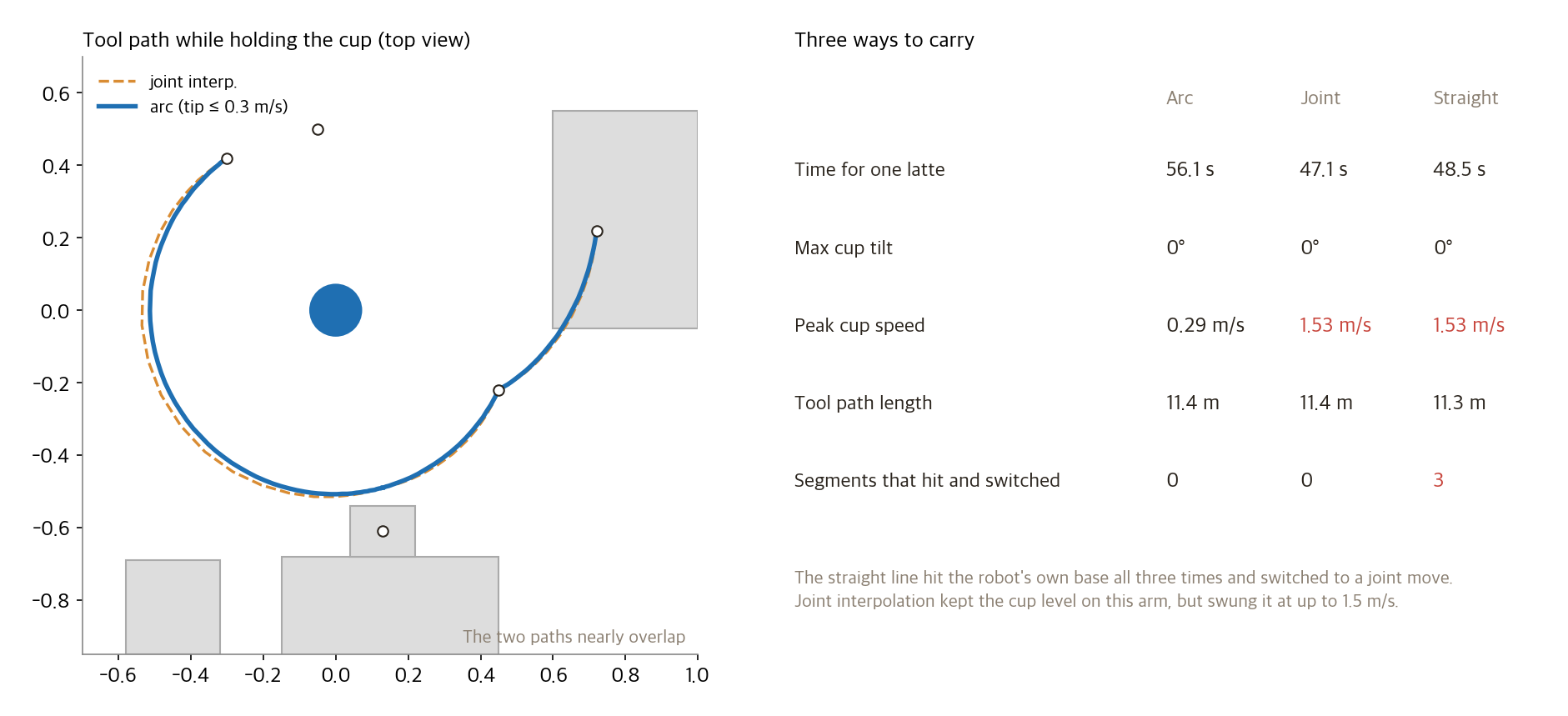
The results were not what I expected.
The straight line failed all three times. Moving the cup from the rack to the brew spot, bringing the pitcher over the cup and returning the pitcher, the straight path went right through the robot's own base. For a person, it would be like trying to move your hand to the other side through your own torso. The failed segments were switched to joint moves.
Joint interpolation did not spill the cup. At first I assumed joint interpolation would tilt it. When each joint is interpolated on its own, the tool's direction usually twists along the way. On this arm the tilt was 0°, because of the three parallel axes mentioned earlier. With the cup gripped level, the sum of joints 2, 3 and 4 is constant. If the sum is the same at start and goal, it stays the same at every interpolated pose in between. And with the wrist 2 axis standing vertical, turning wrist 2 only spins the cup in place without tilting it. The tool path also nearly overlapped the arc: the base turning while the arm folds and unfolds naturally traces a round path.
The difference was speed. Joint interpolation uses the joints up to their speed limits, so the tool moved at up to 1.53 m/s with the cup in hand. Swing a full cup of coffee at 1.5 m/s and it overflows even without tilting. An IROS 2022 paper (Muchacho et al.) models the liquid in a cup as a pendulum and shows the cup should lean slightly toward the direction of acceleration to avoid sloshing. This solver does not go that far; it only caps tool speed at 0.3 m/s. The price is that one latte goes from 47 to 56 seconds.
When it hits something, it searches for a way around
When a straight line or joint interpolation hits something, the solver searches for a path in joint space using a method called RRT-Connect. It grows random branches from both the start and the goal pose, takes the path once the two trees meet, and finally trims unnecessary bends. In this latte plan the default arc never needed this step. Choose "Straight line" in the viewer and the failure point appears as a red dot, with that segment switched to a joint move.
Latte art: fix the spout first, solve the arm backward
When pouring milk, the pitcher spout matters, not the tool point. The spout must stay over the middle of the cup, and stay put even as the pitcher tilts. At first I tilted the pitcher around the gripper. The spout slid about 2 cm out past the cup while tilting. The pitcher turned around the gripper's center, so the spout, 7.5 cm away, swung through a wide circle.
So I reversed the order. First decide the path the spout tip takes over the cup: tilt for one second while approaching the surface, pour for about three seconds while wiggling side to side six times by 1.4 cm, then pull across the cup while bringing the pitcher upright. Then, at each moment, compute the gripper pose backward from the spout position and tilt, and solve that pose with inverse kinematics. 600 poses were chained together. The spout never strayed more than 4.2 cm from the cup's center.
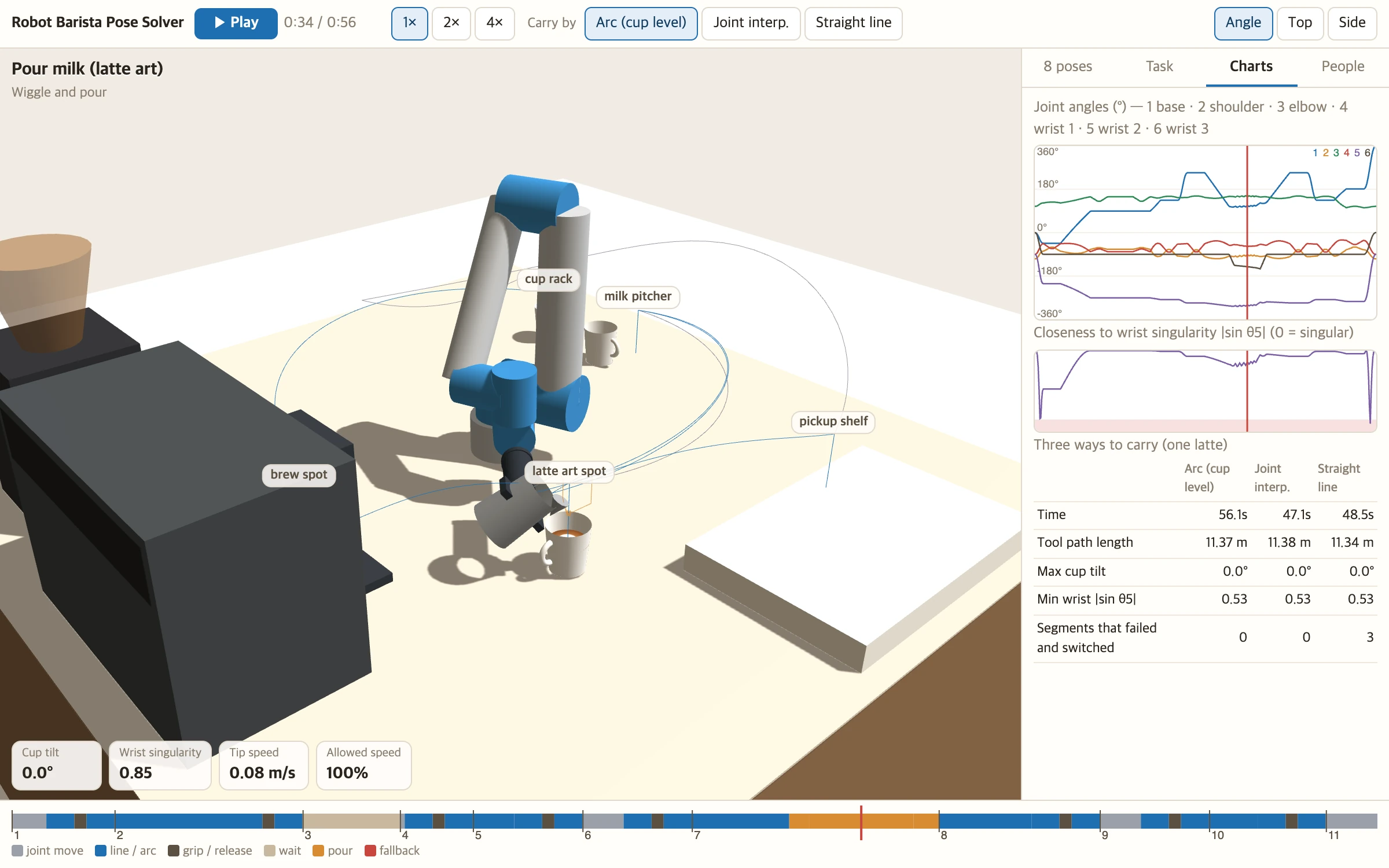
The fluid is not simulated. The cup surface in the viewer only shows where the spout passed. A white circle grows by however much was poured while wiggling, and the final pull leaves a line across it. Whether it becomes a heart is up to the milk foam and a human hand.
One latte, 56 seconds
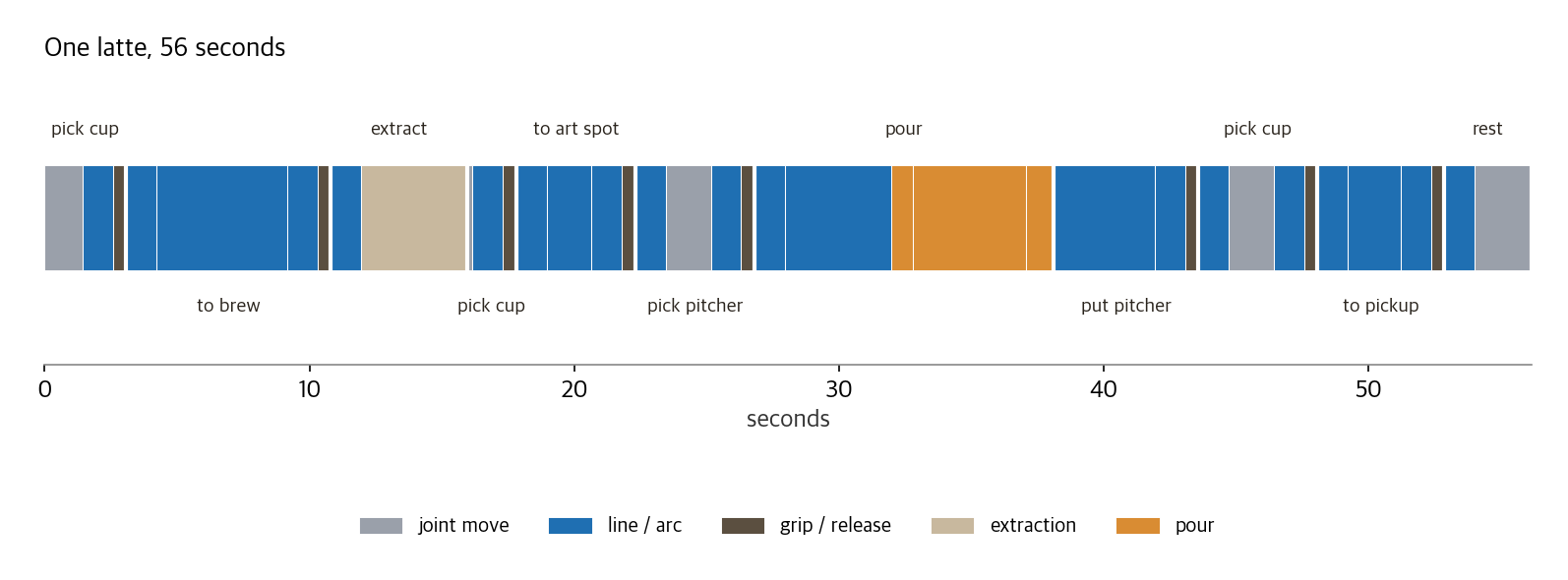
Extraction is set to 4 seconds, shorter than reality. An espresso shot usually takes around 25 seconds. With that included, one cup takes about 1 minute 20 seconds. That is why real robot cafés prepare the next cup during extraction.
When a customer comes close
If the robot sets a cup on the pickup shelf without a fence, the customer stands right there waiting for it. I added the speed and separation monitoring (SSM) described above, a simplified form of the ISO/TS 15066 formula. The protective distance is the speed at which a person approaches (1.6 m/s) times the time the robot needs to notice and stop (0.1 s + 0.3 s), plus the distance the robot travels in that time, its stopping distance and a 0.2 m margin. The robot slows to the fastest speed that still satisfies this at the current gap. The person is modeled as a cylinder of 18 cm radius, with an outstretched arm of 45 cm.
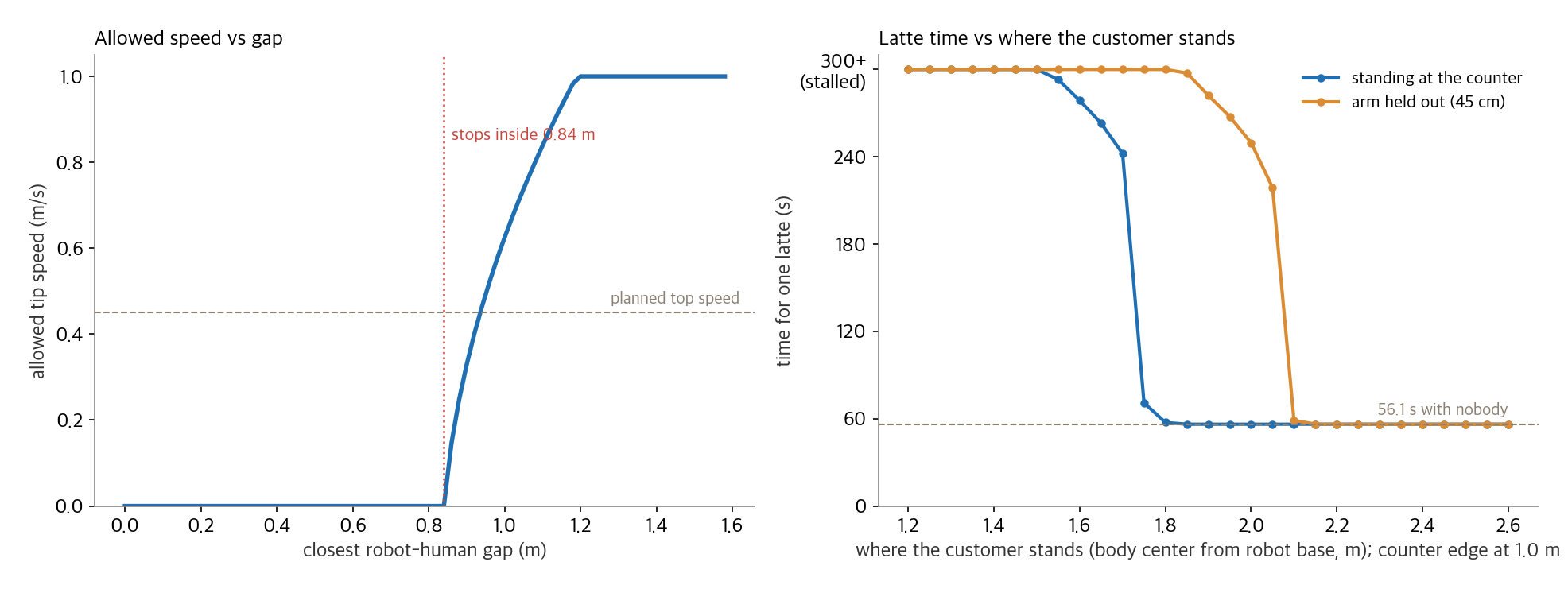
Assume people approach at 1.6 m/s and the robot must keep 0.84 m away even while completely still, because a person could cover 64 cm in those 0.4 seconds. On this counter, the edge of the pickup shelf is 1.0 m from the robot's base. When a customer stands right against the shelf, the gap drops inside 0.84 m every time the robot goes to set down a cup, and the robot stops. The latte came out in 56 seconds only when the customer's body center was at 1.8 m, about 60 cm back from the counter. With a hand held out, they had to stand back to 2.1 m.
This is why real robot cafés use glass booths. With separation monitoring alone, the robot cannot work while customers wait where they would naturally stand. The other route is power and force limiting: moving slowly and gently enough that a bump does not hurt. But an arm holding hot coffee is not something it is "fine to bump into." For a café robot to work beside people, it has to combine the two.
Try it
On a narrow screen, open it in a new window. Drag the stage to rotate and use the wheel to zoom. Click the bar at the bottom to jump to that time.
In the "8 poses" panel, set the target to "set by hand" and you can move x, y, height and heading yourself. Every move re-solves the eight solutions at that spot and moves the arm to the best usable one. The faded arms are the other solutions; the ones glowing red hit something. "Show reach" lays the map above onto the counter.
In the "People" panel, place a customer and drag the distance slider to see at once how many seconds the same latte now takes. Switch "Carry by" to "Straight line" and a red segment shows the message that a straight line would hit the robot itself.
Where it went wrong
- The cup was gripped too low. At first the gripper took the cup at its middle (4.5 cm above the counter). Then all eight solutions at the brew spot came back "hits counter." With the gripper held out horizontally, the wrist block (radius about 4.5 cm) comes down to the gripper's height. I moved the grip to the upper part of the cup (7.5 cm). There is a reason real robot café grippers hold the top of the cup or its handle.
- The brew spot was too close to the robot. In the first layout the brew spot was 43 cm from the robot's base. To put the tool there, the wrist center had to come within 17 cm of the base. Solutions existed, but in all of them the wrist hit the base or the upper arm. I pushed the machine back 18 cm. A cobot cannot reach too far, and it cannot reach too close either.
- The held cup was checked like a ball. When checking whether the cup's bottom touched the counter, I subtracted the cup radius from the bottom point. Every time the cup was set down, it registered "hits counter." An upright cup is a cylinder; its bottom does not stick out downward by its radius. I changed it to check the bottom by height only and the sides by radius.
- The grip direction was chosen carelessly. Where the direction is not fixed, like the cup rack, choosing by score alone produced a direction with the gripper facing toward the robot. Carried to a spot farther out from there, the wrist passes right next to its singularity (|sin θ5| = 0.003). I limited the grip direction to within ±60° of facing outward from the base. But when I built 31 paths, changing the grip direction 10° at a time, joint speeds did not spike even on paths passing right next to the singularity (at most 46° per second, versus 35° when gripping outward). On this path, it seems the arm never needed to move in the direction lost at the singularity. The textbook "joint speeds blow up near a singularity" did not reproduce here. I kept the limit anyway.
- I thought joint interpolation would spill the cup. As described above, it does not on this arm. The real danger was choosing a different arm shape.
- Returning to rest wound an extra turn. For the last step I converted the rest pose into a tool point and solved it again, which picked another solution at the same tool point (base joint at 360°, wrist 3 at -180°). The tool was in the same place, but the base was wound one extra turn. I changed the rest move to go to the joint angles directly.
- The pitcher spout went outside the cup. As described in the latte art section, tilting around the gripper pushed the spout out 2 cm. I switched to fixing the spout path first and solving the gripper pose backward.
- The standard separation formula stopped the robot. The latte never came out while a customer simply stood at the pickup shelf. The calculation was not wrong; the formula is that conservative. The viewer shows that result as is.
Why this works in one click
Deciding a robot arm's pose is geometry. The arm's dimensions are published, and UR-type arms solve in closed form. Whether it collided, whether the cup tilted, how many centimeters it is from a person: a program judges these without fail. Because they can be judged, you can generate many candidates and choose. Computing and comparing eight solutions, 24 grip directions and three ways to carry takes less than a second.
The places where it does not work are just as clear. This solver does not know how much the coffee sloshes or whether the latte art becomes a heart, because it does not simulate the fluid. It does not know when a customer will reach out. The 0.3 m/s tool speed, the ±60° grip direction and the 0.2 m margin in the separation formula were all set by a person. In a real store, you would spill a few cups and set them again.
Much recent research has AI decide "what to do" for robots: Google's SayCan and Code as Policies (2022), Stanford's VoxPoser (2023), Physical Intelligence's π0 (2024) and Google DeepMind's Gemini Robotics (2025). Still, turning those plans into joint angles, finding paths that hit nothing and slowing down for people is mostly left to classic solvers like this one. What I built here is that lower layer.
If you want to try this
- Start with the arm's DH table. Most makers, including UR, Doosan and Rainbow, publish the lengths and twists between joints. Write forward kinematics, generate tool points from random joint angles and first check that inverse kinematics returns to the same spot.
- Find all solutions, then choose. If you use a single numerical answer, you cannot tell which arm shape you will get. If the arm has a formula, compute every analytic solution and choose by move time and clearance.
- Don't check only the goal pose. The goal can be fine while the cup flips on the way. For segments with a cup in hand, check the whole path densely.
- Check objects by their real shape. A held cup is a cylinder, and the pitcher spout sits away from the gripper. Checking only a point at the gripper tip gets it wrong.
- Put numbers into the separation formula. The standard formula demands a wider gap than you would expect. Before deciding where the pickup shelf goes, work out how many seconds the robot slows down by when a customer stands where they will stand.
What it can't do
- It has not run on a real robot. It uses the UR5e's published dimensions but was not verified on hardware. The joint limit (elbow ±180°), acceleration limits and gripper length are values chosen for this model.
- The collision model is coarse. The arm is simplified to a few capsules and the equipment to boxes. The real arm's edges and cables are not there.
- There are no dynamics. Motor torque, the arm's weight and liquid sloshing are not computed. It only respects speed and acceleration limits.
- The latte art is just a drawing. It only draws where the milk lands. No heart or rosetta is guaranteed.
- People detection assumes the position is known. In reality a camera or range sensor has to find the person, and its delay and error add to the gap.
- One robot, one cup. There is no plan for making several cups at once or for two arms working together.
When you see a café robot arm carry a cup in a wide, slow circle, the reason is now visible. Go straight and it catches on its own body, turn fast and the coffee spills, and if a customer gets too close it has to stop. In between, it chooses one of eight arm shapes every time.
If you enjoyed this, please leave a comment.
Sources
- The start of cobots: Northwestern Peshkin lab cobot page, UR's first customer Universal Robots blog, A3 news
- Standards: ISO/TS 15066 collaborative modes and limits arXiv 2311.13814, UR on collaboration modes, ISO 10218 2025 revision The Robot Report, arXiv 2602.17822, Korean rule change KIDD. The standards are paywalled and I could not read them directly; the numbers follow papers and vendors quoting them
- Market: IFR World Robotics 2026 press release, presentation
- Robot dimensions: UR5e datasheet, UR DH parameters, UR on singularities, analytic inverse kinematics Hawkins 2013, Georgia Tech, IKFast (Diankov 2010)
- Korean cases: b;eat Sidae Economy 2025-05-22, Insight, Lounge Lab Venture Square 2021-04-30, Doosan × Mega MGC Metro Seoul 2024-04-08, Doosan E-series Food Industry Executive, Rainbow Robotics Herald Economy 2026-06-26
- Cases abroad: Café X TechCrunch 2017-01-30, The Spoon, Crown Digital Ella CNBC 2021-12-09, Artly Freethink, Rozum company page
- Carrying cups and sloshing: Muchacho et al., IROS 2022 (arXiv 2210.12614), separation monitoring implementation arXiv 1904.07379
- AI and robots: Gemini Robotics (Google DeepMind, March 2025), π0 Maginative
- 3D: three.js. The solver, 3D viewer, the 2,000-pose comparison, the 8-goal-pose experiment, the reach map, the carry comparison, the separation experiment and the charts were all made by the experiments in this post
Image credits
- UR5e photo: Wikimedia Commons, File:Robot Lengan Industri UR5e.jpg, Dzikra muhammad Imtiyaz, CC BY-SA 4.0
- Changi Airport robot barista photo: Wikimedia Commons, File:Robot barista at Changi Airport Terminal 3 October 2024.jpg, Nick-D, CC BY-SA 4.0
- All other figures and screens were made by the experiments in this post

